
Last month I made the Table library. I inspired by javascript console.table.
What is the Table?
The Table is a helper function to print the tabulation data bypassing the Any data! [e.g., 1d array, 2d array, and dictionary]. I’m sure if you practice coding interviews, it helps you a lot. You don’t need to struggle for checking results using a build-in print function!
Examples
The Table can print the tabulation data. It also supports the iPad playground.
print(
    table: ["Good", "Very Good", "Happy", "Cool!"],
    header: ["Wed", "Thu", "Fri", "Sat"]
)

//Result
+----+---------+-----+-----+
|Wed |Thu      |Fri  |Sat  |
+----+---------+-----+-----+
|Good|Very Good|Happy|Cool!|
+----+---------+-----+-----+
print(
    table: [
        "1": 1,
        2: "Hellow?",
        1.2: 0,
        "I'm Table": [1, 2, 3, 2, 1]],
    header: [
        "key", "value"
    ]
)

//Result
+---------+---------------+
|key      |value          |
+---------+---------------+
|2        |Hellow?        |
+---------+---------------+
|I'm Table|[1, 2, 3, 2, 1]|
+---------+---------------+
|1.2      |0              |
+---------+---------------+
|1        |1              |
+---------+---------------+
print(table: [
    [1, 2, 3],
    [4, 5, 6],
    [7, 8, 9, 10]
])

//Result
+-+-+-+--+
|1|2|3|  |
+-+-+-+--+
|4|5|6|  |
+-+-+-+--+
|7|8|9|10|
+-+-+-+--+
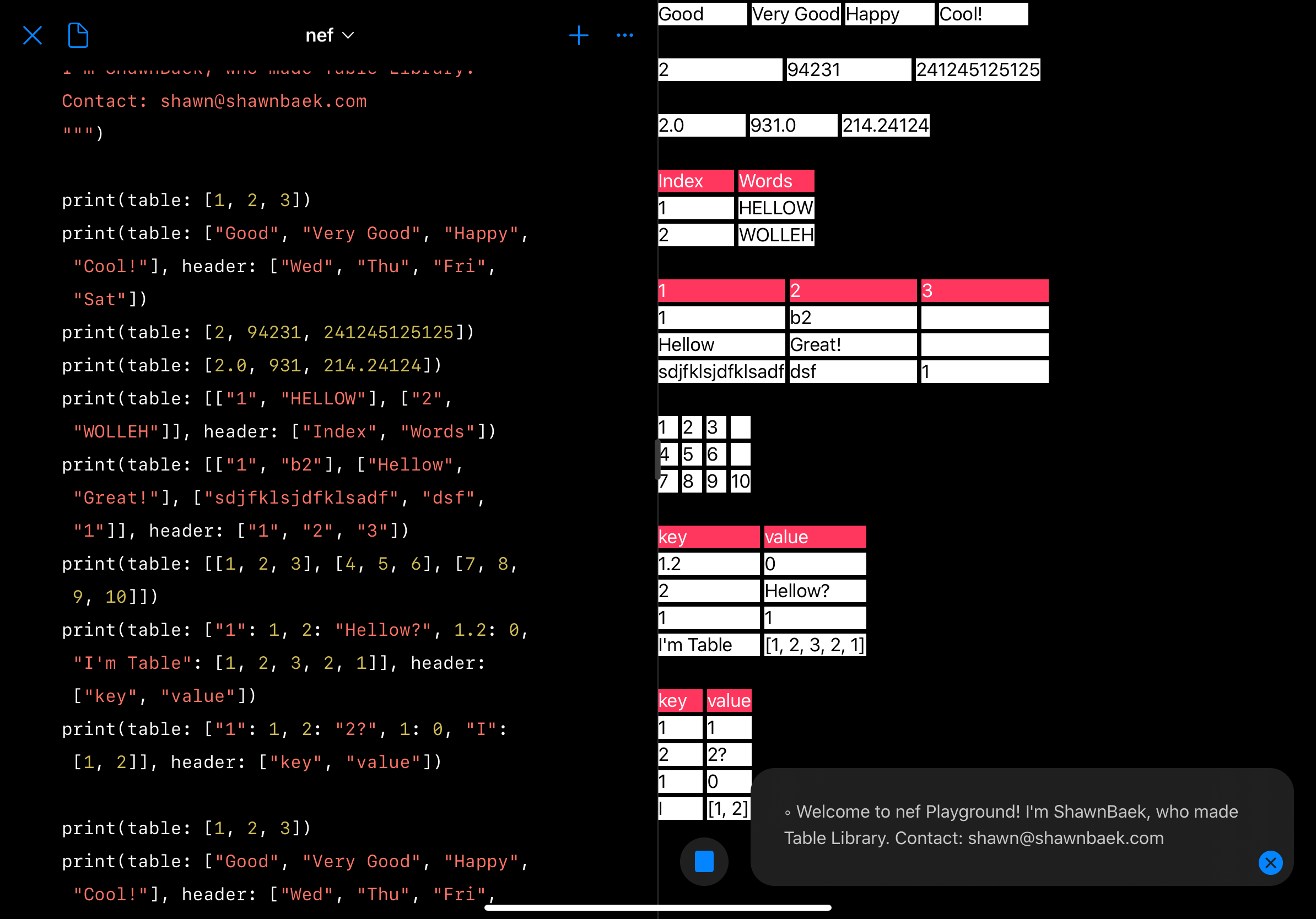
Inside the Table Library
The declaration of function is similar to standard Swift print function.
//Standard print
func print(
    _ items: Any...,
    separator: String = " ",
    terminator: String = "\n"
)

//Table print
@discardableResult func print(
    table data: Any,
    header: [String]? = nil,
    distribution: TableSpacing = .fillProportionally,
    terminator: String = ""
) -> String
The difference is that it is not a variadic function. It take the one data type and then print the tabulation of given data.
How to check the given data type?
It use the Mirror to check the given data type. It is useful to check the type of any data.
“A representation of the substructure and display style of an instance of any type. ”
let mirrorObj = Mirror(reflecting: data)

//Check one dimensional array
if mirrorObj == [Any].self {
}
//Check two dimensional array
else if mirrorObj == [[Any]].self {
}
//Check Dictionary
else if mirrorObj == [AnyHashable: Any].self {
}
Check the Item Width
To display the tabulation of data, It needed item width in data elements. The table cell’s width is set by the longest item width.
private func tableInfo<Item: LosslessStringConvertible>(
data: [Item]) -> (
    numberOfItem: Int,
    maxWidth: Int,
    widthInfo: [Int: Int]
    ) {
    let stringData = data.map { String($0) }
    let maxWidth = stringData.sorted {
        $0.count > $1.count
    }.first!.count
    var maxWidthDict: [Int: Int] = [:]
    for (index, item) in stringData.enumerated() {
        maxWidthDict[index] = item.count
    }
    return (
        numberOfItem: stringData.count,
        maxWidth: maxWidth,
        widthInfo: maxWidthDict
    )
}
The tableInfo function return the informations of data. I use the LosslessStringConvertible protocols to get the item width by checking the characters of string.
“For example, the integer value 1050 can be represented in its entirety as the string “1050”.”
This function didn’t considering the Unicode block so far. If you set the CJK(Chinese, Japanese, and Korean) characters then table layout will be broken. I’m going to solve it by using Unocode-Box-Drawing next time.
Unit Test
Apple tests the print function using TextOutputStream.
//Declaration of print function by Apple
func print<Target>(
    _ items: Any...,
    separator: String = " ",
    terminator: String = "\n",
    to output: inout Target
) where Target : TextOutputStream
The TextOutputStream is a protocol. The String type already conforms to TextOutputStream. So If you pass the reference of String at to in print function, The output of print will be written into String.
//https://github.com/apple/swift/blob/master/test/stdlib/Print.swift
PrintTests.test("StdoutUTF8") {
  expectPrinted("µ", "\u{00B5}")
}

PrintTests.test("Varargs") {
  var s0 = ""
  print("", 1, 2, 3, 4, "", separator: "|", to: &s0)
  expectEqual("|1|2|3|4|\n", s0)

  var s1 = ""
  print(1, 2, 3, separator: "\n", terminator: "===", to: &s1)
  expectEqual("1\n2\n3===", s1)

  var s2 = ""
  print(4, 5, 6, separator: "\n", to: &s2)
  expectEqual("4\n5\n6\n", s2)

  var s3 = ""
  print("", 1, 2, 3, 4, "", separator: "|", to: &s3)
  expectEqual("|1|2|3|4|\n", s3)
}
I wrote the unit tests code by checking the result of function.
func test_1DArray_Of_String_with_header() {
  let output = print(
  table: ["Good", "Very Good", "Happy", "Cool!"],
  header: ["Wed", "Thu", "Fri", "Sat"]
  )
  let expected = """
  +----+---------+-----+-----+
  |Wed |Thu      |Fri  |Sat  |
  +----+---------+-----+-----+
  |Good|Very Good|Happy|Cool!|
  +----+---------+-----+-----+

  """
  XCTAssertEqual(output, expected)
}

func test_2DArray_Of_Int_With_Different_Columns() {
    let output = print(
      table: [
        [1, 2, 3],
        [4, 5, 6],
        [7, 8, 9, 10]
      ]
    )
  let expected = """
  +-+-+-+--+
  |1|2|3|  |
  +-+-+-+--+
  |4|5|6|  |
  +-+-+-+--+
  |7|8|9|10|
  +-+-+-+--+

  """
  XCTAssertEqual(output, expected)
}
Swift Over Coffee S2E4: Erica vs the World

Paul Hudson(HackingWithSwift.com) introduces the Table library on the Swift Over Coffee PodCast Episode S2E4.
In this episode: WWDC goes WFH, Swift gets some inspiration from JavaScript, and we review your awesome Breathe app submissions.
- WWDC is online: https://developer.apple.com/news/?id=03132020a
- Swift Argument Parser: https://github.com/apple/swift-argument-parser
- SE-0279 Multiple Trailing Closures: https://github.com/apple/swift-evolution/blob/master/proposals/0279-multiple-trailing-closures.md
- Push notifications may now be user for advertising (with consent)
- Paul’s pick: Table, by Shawn Baek – https://github.com/ShawnBaek/Table
- Erica’s pick: Slideas – https://www.slideas.app/
- Challenge: Recreate the Breathe app animation from watchOS – https://github.com/twostraws/SwiftOverCoffee
What’s the next step?
I’m going to support more types!
-
tuple
-
decodable / encodable
-
custom data type
-
emoji / unicode
 Shawn
Shawn 