Category: iOS Development

English Posting for iOS development

  • MacOS Native App Review series #1 – Git GUI Tool – Fork

    MacOS Native App Review series #1 – Git GUI Tool – Fork

    I’ve used fork app for more than 5 years now.

    This app is light, built by native. It’s fast and easy to manage git branches and commits.

    https://git-fork.com

    It also supports the command line tools. I only use fork in terminal to open the current folder in fork app. It’s quite useful when you are working on terminal with claude code.

  • Tip for preventing crash issues when you migrate CoreData

    CoreData supports 3 type of migration

    • LightWeight Migrations
    • Staged Migrations
    • Manual Migrations
    screenshot 2026 01 01 at 8.20.42 pm

    Case 1. Manual Migration

    When you faced this issue, You need to check next version of the xcdatamodel.

    Case 2. LightWeight Migration

    Most common crash issues are caused by mismatching options in a properties. For example you have a Binary Data type field with external storage. And when your next xcdatamodel doesn’t matching with external storage options, it causes crash issues

    Lastly I recommend adding Arguments to investigate issues

    • -com.apple.CoreData.SQLDebug
    • -com.apple.CoreData.ConcurrencyDebug
    • -com.apple.CoreData.MigrationDebug
    screenshot 2026 01 01 at 8.49.46 pm

  • Swift Vapor: How to run a scheduled job

    Step 1. Install Redis on your Mac

    Follow the official guide

    https://redis.io/docs/latest/operate/oss_and_stack/install/archive/install-redis/install-redis-on-mac-os/

    brew install redis
    
    brew services start redis
    
    brew services info redis
    
    redis-cli
    screenshot 2025 12 28 at 11.38.31 am

    Step 2. Setup Redis Configuration in Vapor App

    Add Redis Swift Package

    .package(url: "https://github.com/vapor/queues-redis-driver.git", from: "1.0.0")

    // swift-tools-version:6.0
    import PackageDescription
    
    let package = Package(
        name: "TestServer",
        platforms: [
            .macOS(.v13)
        ],
        dependencies: [
            // 💧 A server-side Swift web framework.
            .package(url: "https://github.com/vapor/vapor.git", from: "4.111.0"),
            .package(url: "https://github.com/vapor/fluent", from: "4.12.0"),
            .package(url: "https://github.com/vapor/fluent-sqlite-driver", from: "4.8.0"),
            .package(url: "https://github.com/vapor/sql-kit", from: "3.33.2"),
            .package(url: "https://github.com/lukaskubanek/LoremSwiftum", from: "2.2.3"),
            .package(url: "https://github.com/vapor/fluent-postgres-driver", from:"2.10.0"),
            .package(url: "https://github.com/vapor/jwt", from: "5.1.2"),
            .package(url: "https://github.com/vapor/queues-redis-driver.git", from: "1.0.0"),
        ],
        targets: [
            .target(
                name: "App",
                dependencies: [
                    .product(name: "Vapor", package: "vapor"),
                    .product(name: "Fluent", package: "fluent"),
                    .product(name: "FluentSQLiteDriver", package: "fluent-sqlite-driver"),
                    .product(name: "SQLKit", package: "sql-kit"),
                    .product(name: "LoremSwiftum", package: "LoremSwiftum"),
                    .product(name: "JWT", package: "jwt"),
                    .product(name: "FluentPostgresDriver", package: "fluent-postgres-driver"),
                    .product(name: "QueuesRedisDriver", package: "queues-redis-driver")
                ],
                swiftSettings: [
                    // Enable better optimizations when building in Release configuration. Despite the use of
                    // the `.unsafeFlags` construct required by SwiftPM, this flag is recommended for Release
                    // builds. See <https://github.com/swift-server/guides#building-for-production> for details.
                    .unsafeFlags(["-cross-module-optimization"], .when(configuration: .release))
                ]
            ),
            .executableTarget(name: "Run", dependencies: [
                    .target(name: "App")
                ]
            ),
            .testTarget(name: "AppTests", dependencies: [
                .target(name: "App"),
                .product(name: "XCTVapor", package: "vapor")
            ])
        ]
    )
    

    Create an AsyncScheduledJob

    import Foundation
    import Vapor
    import Queues
    
    struct ScheduledJobs: AsyncScheduledJob {
        // Add extra services here via dependency injection, if you need them.
        func run(context: QueueContext) async throws {
            context.logger.info("Starting ScheduledJobs")
            print("✅ It is called")
            //Call other services using context.application.client
    //        context.application.client
            context.logger.info("ScheduledJobs completed")
        }
    }
    

    Register Scheduled Job in Vapor App

    https://docs.vapor.codes/advanced/queues/#available-builder-methods

    import Vapor
    import QueuesRedisDriver
    
    public func configure(_ app: Application) throws {
        let redisConfig = try RedisConfiguration(
            hostname: "127.0.0.1",
            port: 6379,
            pool: .init(
                maximumConnectionCount: .maximumActiveConnections(50),
                minimumConnectionCount: 10
            )
        )
        app.redis.configuration = redisConfig
        //Use Redis
        app.queues.use(.redis(redisConfig))
        
        //Register ScheduledJob - It runs every 30 seconds
        app.queues.schedule(ScheduledJobs())
            .minutely()
            .at(30)
        
        try app.queues.startScheduledJobs()
    
    ....
    }
    screenshot 2025 12 28 at 11.51.30 am

    Conclusion

    Hope my articles helps you who want to run scheduled job using Redis. Please like my post or leave a comment it helps me continue share my knowledge for free.

  • Server-Side Swift – AWS Lambda with OpenAPI Generator Part 1

    screenshot 2025 10 26 at 10.37.10 pm

    This post is for whom want to use AWS Lambda with OpenAPI Generator. Official guide is useful but I felt there are some missing information. So I wrote this post. You can successfully run AWS Lambda function on your local machine and debug your code.

    Let’s start from very simple example. You only need 4 files. I’ll explain details. (Ignore Tests folder, no need it in this tutorial)

    • Package.swift
    • NativeMobileServer.swift
    • openapi.yaml
    • openapi-generator-config.yaml
    screenshot 2025 10 26 at 10.49.32 pm

    Step 1. Define OpenAPI Spec

    This OpenAPI spec is for tutorial.

    Please check folder and file structure. Create an openapi.yaml

    openapi: 3.1.0
    info:
      title: MobileJobService
      version: 1.0.0
    
    paths:
      /jobs/fetch:
        post:
          summary: Fetch job data from external source
          description: >
            This endpoint is called by a scheduled Lambda or backend service.
            It fetches job data from the given URL and processes it using the provided prompt.
          operationId: fetchJobs
          tags:
            - jobs
          requestBody:
            required: true
            content:
              application/json:
                schema:
                  $ref: '#/components/schemas/FetchJobsRequest'
          responses:
            '200':
              description: Successfully fetched and processed job data
              content:
                application/json:
                  schema:
                    $ref: '#/components/schemas/JobListResponse'
            '400':
              description: Invalid input parameters
            '500':
              description: Internal error during job fetch or processing
    
    components:
      schemas:
        FetchJobsRequest:
          type: object
          required:
            - url
            - prompt
          properties:
            url:
              type: string
              format: uri
              description: Target URL to scrape or fetch job data from
            prompt:
              type: string
              description: Instruction / extraction prompt used to parse the fetched page
    
        JobListResponse:
          type: array
          items:
            $ref: '#/components/schemas/Job'
    
        Job:
          type: object
          required:
            - id
            - title
          properties:
            id:
              type: string
              description: Unique identifier for the job
            title:
              type: string
              description: Job title
            country:
              type: string
              description: Country code (e.g. SG, US, TW)
            city:
              type: string
              description: City name (e.g. Singapore)
            postedAt:
              type: string
              format: date-time
              description: When this job was posted, if known
            company:
              type: string
              description: Company name
            team:
              type: string
              description: Team / department (e.g. Mobile, Backend, Growth)
            jobDescriptionLink:
              type: string
              format: uri
              description: Public link to full job description
            jobApplyLink:
              type: string
              format: uri
              description: Public link to apply
            salary:
              $ref: '#/components/schemas/Salary'
            description:
              type: string
              description: Cleaned / extracted full-text description for the role
    
        Salary:
          type: object
          properties:
            min:
              type: number
              description: Minimum compensation
            max:
              type: number
              description: Maximum compensation
            basis:
              type: string
              enum: [year, month]
              description: Salary period basis (yearly or monthly)
    

    And then create openapi-generator-config.yaml

    generate:
      - types
      - server
    

    Step 2. Create Swift Package Manger

    Package.swift

    // swift-tools-version: 6.2
    // The swift-tools-version declares the minimum version of Swift required to build this package.
    
    import PackageDescription
    
    let package = Package(
        name: "NativeMobileServer",
        platforms: [
            .macOS(.v15)
        ],
        products: [
            .executable(name: "NativeMobileServer", targets: ["NativeMobileServer"])
        ],
        dependencies: [
            .package(url: "https://github.com/apple/swift-openapi-generator.git", from: "1.10.3"),
            .package(url: "https://github.com/apple/swift-openapi-runtime.git", from: "1.8.2"),
    
            .package(url: "https://github.com/awslabs/swift-aws-lambda-runtime.git", from: "2.0.0"),
            .package(url: "https://github.com/awslabs/swift-aws-lambda-events.git", from: "1.2.0"),
            .package(url: "https://github.com/awslabs/swift-openapi-lambda.git", from: "2.0.0"),
    
            .package(url: "https://github.com/swift-server/swift-service-lifecycle.git", from: "2.0.0"),
        ],
        targets: [
            .executableTarget(
                name: "NativeMobileServer",
                dependencies: [
                    .product(name: "OpenAPIRuntime", package: "swift-openapi-runtime"),
    
                    .product(name: "AWSLambdaRuntime", package: "swift-aws-lambda-runtime"),
                    .product(name: "AWSLambdaEvents", package: "swift-aws-lambda-events"),
    
                    .product(name: "OpenAPILambda", package: "swift-openapi-lambda"),
                    .product(name: "ServiceLifecycle", package: "swift-service-lifecycle"),
                ],
                path: "Sources/NativeMobileServer",
                resources: [
                    .copy("openapi.yaml"),
                    .copy("openapi-generator-config.yaml")
                ],
                plugins: [
                    .plugin(name: "OpenAPIGenerator", package: "swift-openapi-generator")
                ]
            ),
            .testTarget(
                name: "NativeMobileServerTests",
                dependencies: ["NativeMobileServer"]
            ),
        ]
    )
    

    You can remove .testTarget if you don’t need to write test cases.

    Step 3. Write a main function

    //
    //  NativeMobileServer.swift
    //  NativeMobileServer
    //
    //  Created by Shawn Sungwook Baek on 10/26/25.
    //
    
    import Foundation
    import Logging
    import OpenAPILambda
    import OpenAPIRuntime
    
    @main
    struct JobServiceImpl: APIProtocol, OpenAPILambdaHttpApi {
        func fetchJobs(_ input: Operations.fetchJobs.Input) async throws -> Operations.fetchJobs.Output
        {
            logger.info("fetchJobs invoked")
            let requestBody = input
           
            if case let .json(request) = requestBody.body {
                logger.info("Fetching jobs from \(request.url) with prompt: \(request.prompt)")
            }
    
            let mockJobs: [Components.Schemas.Job] = [
                .init(
                    id: "job-001",
                    title: "iOS Developer",
                    country: "SG",
                    postedAt: Date(),
                    company: "Apple",
                    team: "Mobile",
                    jobDescriptionLink: "https://example.com/job/1",
                    jobApplyLink: "https://example.com/apply/1",
                    salary: .init(min: 6000, max: 9000, basis: .month),
                    description: "Develop and maintain the iOS application."
                ),
                .init(
                    id: "job-002",
                    title: "Backend Engineer",
                    country: "TW",
                    postedAt: Date(),
                    company: "Uber",
                    team: "Server",
                    jobDescriptionLink: "https://example.com/job/2",
                    jobApplyLink: "https://example.com/apply/2",
                    salary: .init(min: 7000, max: 10000, basis: .month),
                    description: "Build API services and integrations."
                ),
            ]
            return .ok(.init(body: .json(mockJobs)))
        }
    
        let logger: Logger
    
        func register(transport: OpenAPILambdaTransport) throws {
            try transport.router.get("/health") { _, _ in
                "OK"
            }
            logger.trace("Available Routes\n\(transport.router)")
            // to log all requests and their responses, add a logging middleware
            let loggingMiddleware = LoggingMiddleware(logger: logger)
    
            // MANDATORY (middlewares are optional)
            try self.registerHandlers(on: transport, middlewares: [loggingMiddleware])
        }
    
        static func main() async throws {
            let openAPIService = JobServiceImpl(loggerLabel: "JobService")
            try await openAPIService.run()
    
        }
    
        init(loggerLabel: String) {
            var logger = Logger(label: loggerLabel)
            logger.logLevel = .trace
            self.logger = logger
        }
    }
    

    Step 4. Check Scheme in Xcode

    screenshot 2025 10 26 at 10.52.56 pm

    Check Executable Target.

    screenshot 2025 10 26 at 10.54.39 pm

    Important!

    You need to set Environment Variables

    • LOCAL_LAMBDA_SERVER_ENABLED
    • LOCAL_LAMBDA_PORT <- Optional! Default port is 7000

    Try build and run and check which pid is using 7000 port.

    lsof -i :7000

    If other program uses that port, you can change default port by setting LOCAL_LAMBDA_PORT

    screenshot 2025 10 26 at 10.57.10 pm

    When you run it, you will see the message. (In my case, I changed the default port 8000)

    Step 5. Invoke Lambda function

    This part you may confusing because you can’t call lambda like

    curl -v -X POST http://127.0.0.1:8000/jobs/fetch \
      -H "Content-Type: application/json" \
      -d '{
        "url": "https://example.com/jobs",
        "prompt": "Extract latest mobile job listings"
      }'
    screenshot 2025 10 26 at 11.01.22 pm

    If you want to see more detail information, check this out

    To invoke and debug our code, we should invoke function like this.

    If you want to learn more about this payload structure v2.0 in API Gateway check here

    curl -X "POST" "http://127.0.0.1:8000/invoke" \
         -H 'Content-Type: application/json; charset=utf-8' \
         -d $'{
      "requestContext": {
        "accountId": "",
        "time": "",
        "http": {
          "path": "/jobs/fetch",
          "userAgent": "",
          "method": "POST",
          "protocol": "HTTP/1.1",
          "sourceIp": "127.0.0.1"
        },
        "domainName": "",
        "timeEpoch": 0,
        "domainPrefix": "",
        "apiId": "",
        "requestId": "",
        "stage": "$default"
      },
      "rawPath": "/jobs/fetch",
      "rawQueryString": "",
      "version": "2.0",
      "routeKey": "$default",
      "isBase64Encoded": true,
      "body": "{\\"url\\":\\"https://jobs.apple.com/en-sg/search\\", \\"prompt\\":\\"Extract latest mobile job listings\\"}"
    }'

    I’ve set breakpoint at here.

    screenshot 2025 10 26 at 11.07.43 pm

    Let’s invoke function.

    screenshot 2025 10 26 at 11.09.43 pm

    Ok, breakpoint is working.

    screenshot 2025 10 26 at 11.09.04 pm

    And I can see the results from AWS Lambda function

    Conclusion

    Swift is very powerful for developing server-side applications. There a lot of great open source projects. In Part 2, I’ll explain how to deploy AWS Lambda Swift function to the AWS using SAM CLI.

  • Apply Swift Format

    Apply Swift Format

    Swift Format is made by Apple. If your Xcode Version is latest version (after Xcode 16), you don’t need to install it. Toolchain contains swift format.

    xcrun --find swift-format
    
    ///Applications/Xcode.app/Contents/Developer/Toolchains/XcodeDefault.xctoolchain/usr/bin/swift-format

    https://github.com/swiftlang/swift-format?tab=readme-ov-file#configuring-the-command-line-tool

    Step 1. Create swift-format.json

    swift-format dump-configuration > swift-format.json
    
    //It will show default settings for formatting and listing

    Copied default settings and create a file like swift-format.json in your project root directory.

    SampleProject/
    ├── 📱 SampleProject.xcworkspace
    ├── 🔧 SampleProject.xcodeproj
    │
    ├── swift-format.json               # Swift Format
    ├── 📦 Main App & Server
    │   ├── SampleProject/              # iOS 
    │   ├── SampleProjectTests/
    │   └── SampleProjectServer/        # Server
    │
    ├── 🧩 Modules (Core Libraries)
    │
    ├── 📦 Dependencies
    │   └── Packages/                  # SPM packages
    │
    └── 📄 Config Files
        ├── SampleProject.xcconfig
        └── GoogleService-Info.plist

    Step 2. Add Build Script

    screenshot 2025 10 04 at 11.07.55 pm
    echo "🐥 Formatting"
    swift-format format --configuration swift-format.json --ignore-unparsable-files -i -p -r ${PROJECT_DIR}
        
    echo "🐥 Linting"
    swift-format lint --configuration swift-format.json --ignore-unparsable-files -p -r ${PROJECT_DIR}

    Step 3. Build Project

    screenshot 2025 10 04 at 11.24.04 pm

    Okay It works

  • Setup C/C++ on the iPad using iSH Shell

    Setup C/C++ on the iPad using iSH Shell

    Do you want to use a terminal on your iPad?

    I recommend iSH Shell.

    You can install packages on your iPad and it works on the offline.

    img 0581

    Step 1. Download iSH shell

    https://apps.apple.com/kr/app/ish-shell/id1436902243?l=en-GB

    Step 2. Install APK packages

    apk update
    
    apk add gcc g++ make musl-dev
    
    apk add git
    
    apk add vim

    Step 3. Install zsh

    apk add zsh curl git
    
    sh -c “$(curl -fsSL https://raw.github.com/ohmyzsh/ohmyzsh/master/tools/install.sh)”
    img 0577

    And set zsh as default

    ask add shadow
    
    passwd
    
    chsh -s /bin/zsh

    To run chsh, you have to set your password. But on the iSH shell, you haven’t set any password. So please set a new password by running passwd.

    And then run chsh -s /bin/zsh

    Step 4. Write C++ Code

    vim hello.cpp
    #include <iostream>;
    using namespace std;
    
    int main() {
        cout &lt;&lt; “Hellow from iPad” &lt;&lt; endl;
        return 0;
    }
    g++ hello.cpp -o hello
    
    ./hello
    img 0580

    Isn’t it cool? 😎 Happy c++ coding on your iPad on the offline!

  • How to Validate an OpenAPI Spec Using IBM OpenAPI Validator

    How to Validate an OpenAPI Spec Using IBM OpenAPI Validator

    This post is the second part of our OpenAPI series. Let’s set up GitHub Actions for validating an OpenAPI spec before merging into the main branch.

    Check more details

    Step 1. Install IBM OpenAPI Validator

    npm i -g ibm-openapi-validator
    npm i @ibm-cloud/openapi-ruleset

    Step 2. Setup OpenAPI Rullset

    extends: '@ibm-cloud/openapi-ruleset'
    rules:
      ibm-accept-and-return-models: info
      ibm-integer-attributes: false
      ibm-required-array-properties-in-response: false
      ibm-property-casing-convention: false
    

    Create an file – validator-rules.yaml

    You can check details

    ibm rules (inherent from spectral:as rules)

    spectral:oas rules

    Step 3. Setup Configurations

    Create an file – validator-config.yml

    errorsOnly: true
    colorizeOutput: true
    limits:
      warnings: 25
    outputFormat: 'text'
    summaryOnly: false
    files:
      - api.yml
    ignoreFiles:
      - validator-config.yml
    logLevels:
      root: error
      ibm-schema-description-exists: debug
    ruleset: ./validator-rules.yaml
    produceImpactScore: false
    markdownReport: true
    

    Check document

    Step 4. Check Project Folders and Files

    screenshot 2025 08 31 at 12.57.16 pm

    Step 5. Run Validator on your Local Machine

    lint-openapi -c ./validator-config.yml ./api.yml --errors-only --no-colors
    

    After run the command, It will generate reporting file (md)

    • api-validator-report.md

    Step 6. Add .gitignore file

    node_modules/
    package-lock.json
    package.json
    api-validator-report.md

    Step 7. Setup Github Action

    name: Validate OpenAPI Documentation
    on:
      pull_request:
        branches: [main]
      push:
        branches: [main]
    
    jobs:
      validate:
        name: Validate OpenAPI Documentation
        runs-on: ubuntu-latest
        permissions:
          contents: read
          pull-requests: write
    
        steps:
          - name: Checkout code
            uses: actions/checkout@v4
    
          - name: Setup Node.js
            uses: actions/setup-node@v4
            with:
              node-version: '20'
    
          - name: Install IBM OpenAPI Validator
            run: |
              npm i -g ibm-openapi-validator
              npm i @ibm-cloud/openapi-ruleset
    
          - name: Validate api.yml
            id: validation
            run: |
              if lint-openapi -c ./validator-config.yml ./api.yml --errors-only --no-colors > validation_result.txt 2>&1; then
                echo "validation_status=success" >> $GITHUB_OUTPUT
              else
                echo "validation_status=failed" >> $GITHUB_OUTPUT
              fi
            continue-on-error: true
    
          - name: Comment PR with validation output
            if: github.event_name == 'pull_request'
            uses: actions/github-script@v7
            with:
              script: |
                const fs = require('fs');
                const validationStatus = '${{ steps.validation.outputs.validation_status }}';
                const validationOutput = fs.readFileSync('api-validator-report.md', 'utf8');
                  
                let body = '';
                
                if (validationStatus === 'success') {
                  body = `## ✅ OpenAPI Validation Passed
                  
                  **File**: \`./api.yml\`
                  **Commit**: \`${{ github.sha }}\`
                  
                  ${validationOutput}
                  
                  `;
                } else {
                  body = `## ❌ OpenAPI Validation Failed
                                
                  **File**: \`./api.yml\`
                  **Commit**: \`${{ github.sha }}\`
                  
                  ${validationOutput}
                  
                  `;
                }
                
                // Truncate if too long for GitHub comment limit
                if (body.length > 65000) {
                  body = body.slice(0, 65000) + '\n\n... (truncated due to GitHub comment length limit)';
                }
                
                // Find existing comment and update or create new one
                const { data: comments } = await github.rest.issues.listComments({
                  owner: context.repo.owner,
                  repo: context.repo.repo,
                  issue_number: context.issue.number,
                });
                
                const marker = 'OpenAPI Validation';
                const existing = comments.find(c => c.body && c.body.includes(marker));
                
                if (existing) {
                  await github.rest.issues.updateComment({
                    owner: context.repo.owner,
                    repo: context.repo.repo,
                    comment_id: existing.id,
                    body
                  });
                } else {
                  await github.rest.issues.createComment({
                    owner: context.repo.owner,
                    repo: context.repo.repo,
                    issue_number: context.issue.number,
                    body
                  });
                }
    
    
          - name: Fail job if validation failed
            if: steps.validation.outputs.validation_status == 'failed'
            run: exit 1
    

    Create Github Action yml file

    • .github/workflows/validator.yml

    ⚠️ Check md file name – api-validator-report.md

    const validationOutput = fs.readFileSync('api-validator-report.md', 'utf8');

    Step 8. Check Github Action’s results

    This is the last step, let’s check the results.

    screenshot 2025 08 31 at 1.03.54 pm

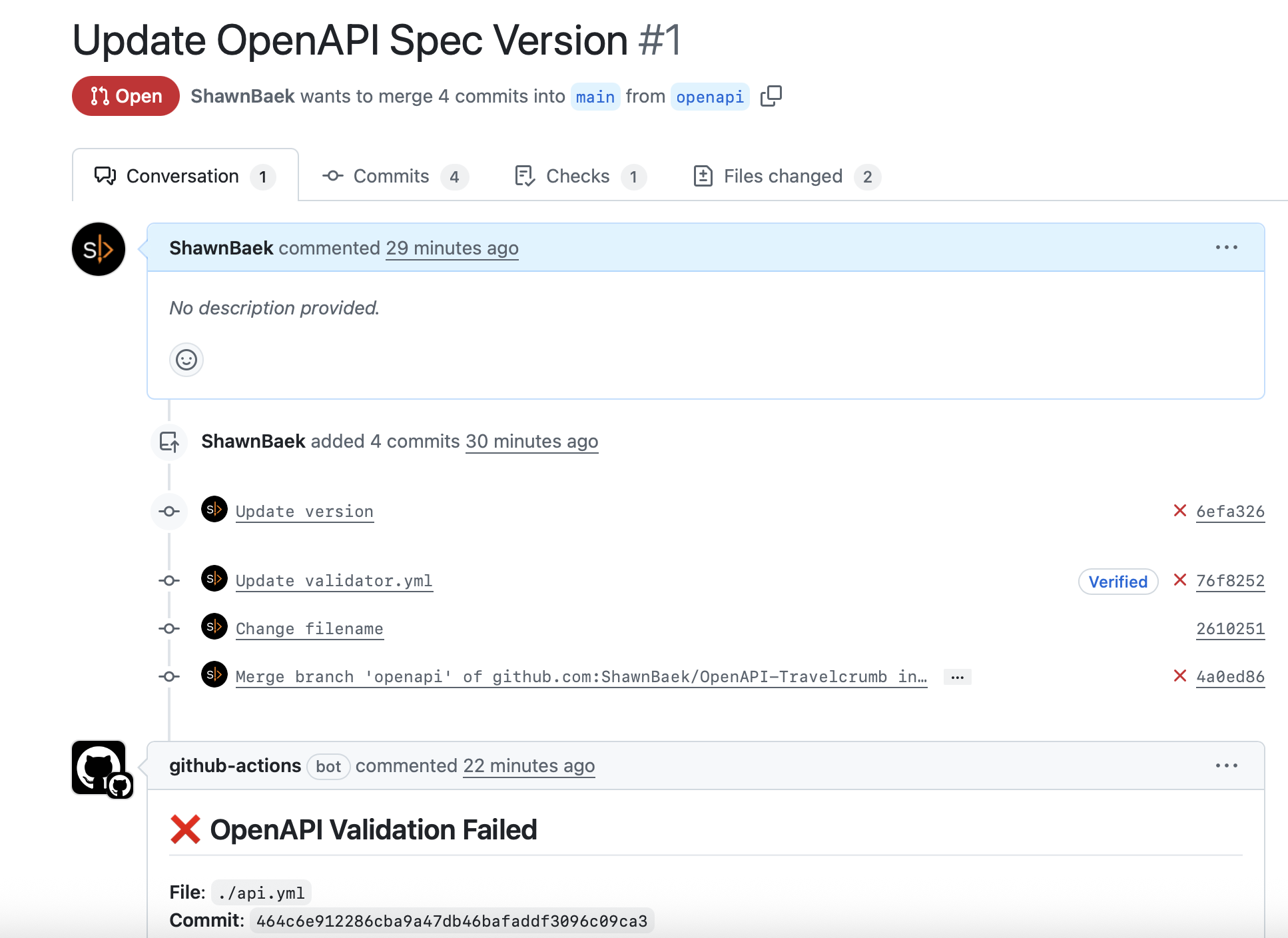
    When you create a PR that targets main branch, our GitHub action will run and comment results on your Opened PR.

    screenshot 2025 08 31 at 1.04.19 pm
    screenshot 2025 08 31 at 1.04.27 pm
    screenshot 2025 08 31 at 1.04.34 pm

    IBM OpenAPI Validator provides very detailed information. To fix issues, You can update your OpenAPI Spec file or You can change the rulesets if you don’t want to change your OpenAPI Spec files.

    BTW This validator is really helpful it prevent wrong OpenAPI spec merged into main branch.

    Related Posts

  • From OpenAPI Spec to Live Documentation: AWS Amplify Deploy Guide

    From OpenAPI Spec to Live Documentation: AWS Amplify Deploy Guide

    I choose the AWS Amplify for deploying OpenAPI Static Website.

    It is very simple.

    Step 1. Create a Repo

    screenshot 2025 08 31 at 11.27.45 am

    I have only 2 files in my repo.

    • index.html
    • api.yml

    You can follow the official guide.

    <!DOCTYPE html>
    <html lang="en">
    <head>
      <meta charset="utf-8" />
      <meta name="viewport" content="width=device-width, initial-scale=1" />
      <meta name="description" content="SwaggerUI" />
      <title>SwaggerUI</title>
      <link rel="stylesheet" href="https://unpkg.com/swagger-ui-dist@5.11.0/swagger-ui.css" />
    </head>
    <body>
    <div id="swagger-ui"></div>
    https://unpkg.com/swagger-ui-dist@5.11.0/swagger-ui-bundle.js
    <script>
      window.onload = () => {
        window.ui = SwaggerUIBundle({
          url: './api.yml',
          dom_id: '#swagger-ui',
        });
      };
    </script>
    </body>
    </html>

    This is my index.html file.

    Step 2. Create Amplify Projects

    screenshot 2025 08 31 at 10.31.56 am
    amplify setup step 1

    Login AWS, Search Amplify and Create a new App.

    • Don’t select template (e.g, Next.js, Due, Angular and Vite. We don’t need it)

    And Select your GitHub Repository and Branch. (You don’t need to make your Repo as Public, Private Repo also is working fine)

    screenshot 2025 08 31 at 10.48.33 am

    Protect your site if you want

    • Set an Username and Password
    screenshot 2025 08 31 at 10.49.57 am

    Ok, that’s all. Click Save and deploy!

    screenshot 2025 08 31 at 11.09.32 am

    Click Monitoring and check your Domain. Open this url.

    screenshot 2025 08 31 at 11.08.52 am

    If you set Username and Password, You must Sign In to access your Website

    screenshot 2025 08 31 at 11.43.41 am

    All done, Your OpenAPI Document Site is Live now!

    Step 3. Setup Domain

    If you want to set your custom domain for your website, follow this guidelines

    screenshot 2025 08 31 at 11.17.46 am

    I recommend Route53. If your domain already registered in Route53, setup custom domain is very easy.

    screenshot 2025 08 31 at 11.18.01 am

    Enter your subdomains. And Click Add domain button.

    screenshot 2025 08 31 at 11.18.18 am

    It takes 2-3 minutes. Just wait a bit. You will access your static website using your subdomain.

    Conclusion

    Using Amplify is super simple to deploy the static website. You don’t need to extra setup. When your branch has updated, amplify will automatically detect that changes and deploy it.

    Next topic, I’ll share how to verify OpenAPI spec file using IBM OpenAPI Validator. https://github.com/IBM/openapi-validator

    Related Post

  • iOS App Launch Time – React Native Sample Project

    Testing App Launch Time for React Native Sample App – Expo

    Create Sample App using Expo

    screenshot 2025 03 26 at 12.20.52e280afam
    screenshot 2025 03 26 at 12.18.32e280afam

    When you create an app using Expo, there are no iOS and Android folder.

    Create iOS and Android folder in Expo Sample Project

    npx expo prebuild

    Setup iOS App Launch Tests

    screenshot 2025 04 05 at 5.04.05e280afpm

    Add UI Testing Bundle and write a test cases

    @MainActor
        func testExample() throws {
            // UI tests must launch the application that they test.
            let app = XCUIApplication()
            app.launch()
    
            // Use XCTAssert and related functions to verify your tests produce the correct results.
        }
    
        @MainActor
        func testLaunchPerformance() throws {
            if #available(macOS 10.15, iOS 13.0, tvOS 13.0, watchOS 7.0, *) {
                // This measures how long it takes to launch your application.
                let measureOptions = XCTMeasureOptions()
                measureOptions.iterationCount = 10
              measure(metrics: [XCTApplicationLaunchMetric()], options: measureOptions) {
                    XCUIApplication().launch()
                }
            }
        }

    Results

    screenshot 2025 04 05 at 5.28.56e280afpm

    I ran 10 times and it’s average launch time is 0.157s (157ms).

  • Useful Github Actions

    Useful Github Actions

    Setting GitHub actions is a headache, and it takes time to run correctly. I’ll share what actions I daily use.

    How to add github actions?

    Add github actions on your branch

    • .github/workflows/xxxx.yml
    github action

    Trigger github action by leaving a comment on PR

    Scenario 1: share new build to someone

    You can define commands to run action

    For example, If you want to share something to test, use this action.

    • share is command
    • test is userId

    And you can leave a comment using github.issues.createComment

    This action is very useful. You can integrate third-party services like Slack, WhatsApp, or Linear. Listening share command and trigger action whatever you want to share it.

    screenshot 2025 01 11 at 6.49.36e280afpm
    name: Comment Action
    on:
      issue_comment:
        types: [created]
    jobs:
      comment_job:
        runs-on: ubuntu-latest
        steps:
          - name: Check Comment Type
            id: check_comment
            uses: actions/github-script@v4
            with:
              github-token: ${{ secrets.GITHUB_TOKEN }}
              script: |
                const comment = context.payload.comment.body.trim();
                console.log(`Received comment: ${comment}`);
    
                const issueOrPrNumber = context.payload.issue?.number || context.payload.pull_request?.number;
                if (!issueOrPrNumber) {
                  throw new Error("Could not determine issue or PR number.");
                }
    
                let action = '';
                if (comment.startsWith('share')) {
                  action = 'share';
                }
    
                core.setOutput('action', action);
                core.setOutput('comment', comment);
                core.setOutput('issue_or_pr_number', issueOrPrNumber);
          
          - name: Handle Share Command
            if: steps.check_comment.outputs.action == 'share'
            uses: actions/github-script@v4
            with:
              github-token: ${{ secrets.GITHUB_TOKEN }}
              script: |
                const comment = '${{ steps.check_comment.outputs.comment }}';
                const issueOrPrNumber = '${{ steps.check_comment.outputs.issue_or_pr_number }}';
    
                if (!issueOrPrNumber) {
                  throw new Error("Could not determine the issue or PR number.");
                }
    
                const splitComment = comment.split(' ');
                if (splitComment.length < 2) {
                  throw new Error("Invalid 'share' command format. Expected: 'share <id>'");
                }
    
                const recipientId = splitComment[1]; // Extract ID after "share"
                const commentBody = `Sharing this with: ${recipientId}`;
    
                console.log(`Adding a share comment for ID: ${recipientId}`);
                await github.issues.createComment({
                  owner: context.repo.owner,
                  repo: context.repo.repo,
                  issue_number: issueOrPrNumber,
                  body: commentBody
                });

    scenario 2: rebuild when the build failed

    There are 2 yml files in workflows

    When you get a build failed message, you can rebuild it by leaving a comment.

    github action
    screenshot 2025 01 11 at 9.56.42e280afpm

    comment_action.yml

    • Get PR Number using github.pulls.get
    • Pass issue_or_pr_number as Inputs to build.yml
    name: Comment Action
    on:
      issue_comment:
        types: [created]
    
    jobs:
      comment_job:
        runs-on: ubuntu-latest
        steps:
          - uses: actions/checkout@v4
          - name: GitHub CLI Login
            run: |
              gh auth login --with-token <<< "${{ secrets.GITHUB_TOKEN }}"
          - name: Check Comment Type
            id: check_comment
            uses: actions/github-script@v4
            with:
              github-token: ${{ secrets.GITHUB_TOKEN }}
              script: |
                const comment = context.payload.comment.body.trim();
                console.log(`Received comment: ${comment}`);
            
                const issueOrPrNumber = context.payload.issue?.number || context.payload.pull_request?.number;
                const isPR = Boolean(context.payload.issue.pull_request);
    
                if (!isPR) {
                  throw new Error("This comment is not associated with a pull request.");
                }
    
                const { data: pullRequest } = await github.pulls.get({
                  owner: context.repo.owner,
                  repo: context.repo.repo,
                  pull_number: issueOrPrNumber,
                });
    
                const sourceBranch = pullRequest.head.ref;
                const targetBranch = pullRequest.base.ref;
    
                console.log(`Source branch: ${sourceBranch}`);
                console.log(`Target branch: ${targetBranch}`);
                if (!issueOrPrNumber) {
                  throw new Error("Could not determine issue or PR number.");
                }
    
                let action = '';
                if (comment === 'rebuild') {
                  action = 'rebuild';
                }
    
                core.setOutput('action', action);
                core.setOutput('comment', comment);
                core.setOutput('issue_or_pr_number', issueOrPrNumber);
                core.setOutput('source_branch', sourceBranch);
                core.setOutput('target_branch', targetBranch);
    
          - name: Rebuild
            run: |
              echo "🟢 Issue or PR Number: ${{ steps.check_comment.outputs.issue_or_pr_number }}"
              gh workflow run rebuild.yml --ref ${{ steps.check_comment.outputs.target_branch }} -f issue_or_pr_number=${{ steps.check_comment.outputs.issue_or_pr_number }}
            env:
              GITHUB_TOKEN: ${{ secrets.GITHUB_TOKEN }}

    build.yml

    • define workflow_dispatch and inputs
    name: build
    
    on:
      workflow_dispatch:
        inputs:
          issue_or_pr_number:
            description: "The issue or PR number to comment on"
            required: true
    
    jobs:
      reusable_job:
        runs-on: ubuntu-latest
        steps:
          - name: Build
            run: echo "Running workflow"
          - name: Rebuild triggered
            uses: actions/github-script@v4
            with:
              github-token: ${{ secrets.GITHUB_TOKEN }}
              script: |
                const issueOrPrNumber = ${{ github.event.inputs.issue_or_pr_number }};
                console.log(`🟢 Input issue_or_pr_number: ${issueOrPrNumber}`);
                if (!issueOrPrNumber) {
                  throw new Error("Could not determine the issue or PR number.");
                }
                const commentBody = `Rebuild triggered`;
                await github.issues.createComment({
                  owner: context.repo.owner,
                  repo: context.repo.repo,
                  issue_number: issueOrPrNumber,
                  body: commentBody
                });

    scenario 3: read latest build success message and share it to someone

    screenshot 2025 01 12 at 12.06.04e280afam

    build.yml

    • Just leave a comment on PR
    name: Build
    
    on:
      pull_request:
        branches:
          - master
        types:
          - opened
          - synchronize
          - reopened
          - edited
    jobs:
      run_on_pr:
        runs-on: ubuntu-latest
        steps:
          - name: Checkout Code
            uses: actions/checkout@v4
          - name: Comment on PR
            uses: actions/github-script@v4
            with:
              github-token: ${{ secrets.GITHUB_TOKEN }}
              script: |
                const issueOrPrNumber = context.payload.pull_request.number;
                console.log(issueOrPrNumber);
    
                await github.issues.createComment({
                  owner: context.repo.owner,
                  repo: context.repo.repo,
                  issue_number: issueOrPrNumber,
                  body: "iOS v12.0(1022)"
                });
    
                await github.issues.createComment({
                  owner: context.repo.owner,
                  repo: context.repo.repo,
                  issue_number: issueOrPrNumber,
                  body: "Android 15.0(1022)"
                });
    screenshot 2025 01 11 at 11.32.18e280afpm

    comment_action.yml

    • await github.issues.listComments
      • default page_num is 30. If your PR have many comments, I suggest you set page_num 100
    name: Comment Action
    on:
      issue_comment:
        types: [created]
    
    jobs:
      comment_job:
        runs-on: ubuntu-latest
        steps:
          - uses: actions/checkout@v4
          - name: GitHub CLI Login
            run: |
              gh auth login --with-token <<< "${{ secrets.GITHUB_TOKEN }}"
          - name: Check Comment Type
            id: check_comment
            uses: actions/github-script@v4
            with:
              github-token: ${{ secrets.GITHUB_TOKEN }}
              script: |
                const comment = context.payload.comment.body.trim();
                console.log(`Received comment: ${comment}`);
            
                const issueOrPrNumber = context.payload.issue?.number || context.payload.pull_request?.number;
                const isPR = Boolean(context.payload.issue.pull_request);
    
                if (!isPR) {
                  throw new Error("This comment is not associated with a pull request.");
                }
    
                const { data: pullRequest } = await github.pulls.get({
                  owner: context.repo.owner,
                  repo: context.repo.repo,
                  pull_number: issueOrPrNumber
                });
    
                const sourceBranch = pullRequest.head.ref;
                const targetBranch = pullRequest.base.ref;
    
                console.log(`Source branch: ${sourceBranch}`);
                console.log(`Target branch: ${targetBranch}`);
    
                core.setOutput('source_branch', sourceBranch);
                core.setOutput('target_branch', targetBranch);
                if (!issueOrPrNumber) {
                  throw new Error("Could not determine issue or PR number.");
                }
    
                let action = '';
                if (comment.startsWith('share')) {
                  action = 'share';
                }
    
                core.setOutput('action', action);
                core.setOutput('comment', comment);
                core.setOutput('issue_or_pr_number', issueOrPrNumber);
    
          - name: Get Latest Build Comments
            if: steps.check_comment.outputs.action == 'share'
            uses: actions/github-script@v4
            with:
              github-token: ${{ secrets.GITHUB_TOKEN }}
              script: |
                const issueNumber = ${{ steps.check_comment.outputs.issue_or_pr_number }};
                const comment = '${{ steps.check_comment.outputs.comment }}';
    
                if (!issueNumber) {
                  throw new Error("Could not determine the issue or PR number.");
                }
    
                const splitComment = comment.split(' ');
                if (splitComment.length < 2) {
                  throw new Error("Invalid 'share' command format. Expected: 'share <id>'");
                }
    
                const recipientId = splitComment[1]; // Extract ID after "share"
                
                // Fetch all comments on the PR
                const comments = await github.issues.listComments({
                  owner: context.repo.owner,
                  repo: context.repo.repo,
                  issue_number: issueNumber,
                  per_page: 100,
                });
    
                console.log("✅ All Comments")
                comments.data.forEach(comment => console.log(`- ${comment.body}`));
    
    
                // Filter and find the most recent iOS-related comment
                const latestIOS = comments.data
                  .filter(comment => comment.body.startsWith('iOS'))
                  .sort((a, b) => new Date(b.updated_at) - new Date(a.updated_at))[0];
    
                // Filter and find the most recent Android-related comment
                const latestAndroid = comments.data
                  .filter(comment => comment.body.startsWith('Android'))
                  .sort((a, b) => new Date(b.updated_at) - new Date(a.updated_at))[0];
    
                if (latestIOS) {
                  console.log(`Latest iOS Comment: ${latestIOS.body}`);
                  core.setOutput('latest_ios_comment', latestIOS.body);
                } else {
                  console.log('No iOS-related comments found.');
                }
    
                if (latestAndroid) {
                  console.log(`Latest Android Comment: ${latestAndroid.body}`);
                  core.setOutput('latest_android_comment', latestAndroid.body);
                } else {
                  console.log('No Android-related comments found.');
                }
                const commentBody = `Sharing this with: ${recipientId}\nReady for Testing\n${latestIOS.body}\n${latestAndroid.body}`;
                await github.issues.createComment({
                  owner: context.repo.owner,
                  repo: context.repo.repo,
                  issue_number: issueNumber,
                  body: commentBody
                });
    screenshot 2025 01 11 at 11.56.50e280afpm