
This post might be helpful if you are considering using the typeText function for validating user input using regular expressions, such as for validating passwords or usernames.
Although XCTest enables you to write unit tests for validating the results of regular expressions, it is not suitable for writing test cases that involve inputting characters one by one.
Let me show the example.
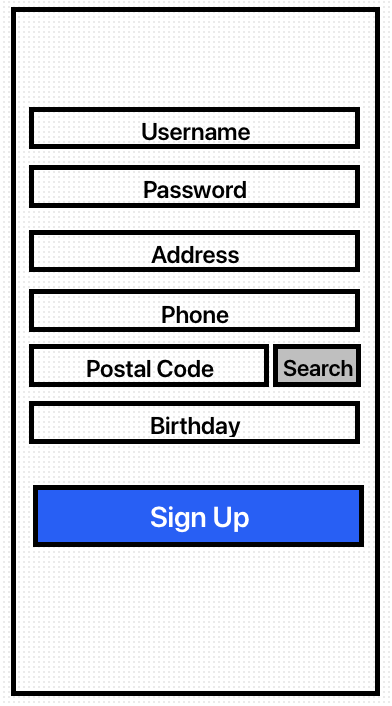
Business requirements
-
Username allows alphabet + numbers only
-
Password allows alphabet + numbers + special characters
-
Address allows alphabet + numbers only
-
Phone number format is 4 digits – 4 digits
-
Postal Code is 5 numbers
-
Birthday format is yyyyMMDD
-
Username, Password, Phone, Address are required fields
-
Error message will be displayed when entering text into the TextField
-
Search button will be enabled once the postal code is validated.
Let’s write a test cases
ProfileInputValidatorTests: XCTestCase
It has a sut for checking unitTests and typeText function (like a XCUIElement’s typeText) to put the characters into the active UITextField.
class ProfileInputValidatorTests: XCTestCase {
    var sut: MockClass!

    override func setUp() {
        super.setUp()
        sut = MockClass()
    }

    override func tearDown() {
        super.tearDown()
        sut.activeTextField = nil
        sut.inputCheckType = nil
        sut.errorMessage = nil
    }

    //UnitTests
}

private extension ProfileInputValidatorTests {
    func typeText(_ input: String) {
        guard let activeTextField = sut.activeTextField else {
            return
        }
        for (location, character) in input.enumerated() {
            let canInputText = activeTextField.delegate?.textField?(
                activeTextField,
                shouldChangeCharactersIn: NSRange(location: location, length: 0),
                replacementString: String(character)
            )
            if canInputText ?? false {
                let lastPosition = activeTextField.endOfDocument
                activeTextField.selectedTextRange = activeTextField
                    .textRange(from: lastPosition, to: lastPosition)
                activeTextField.insertText(String(character))
            }
        }
    }
}
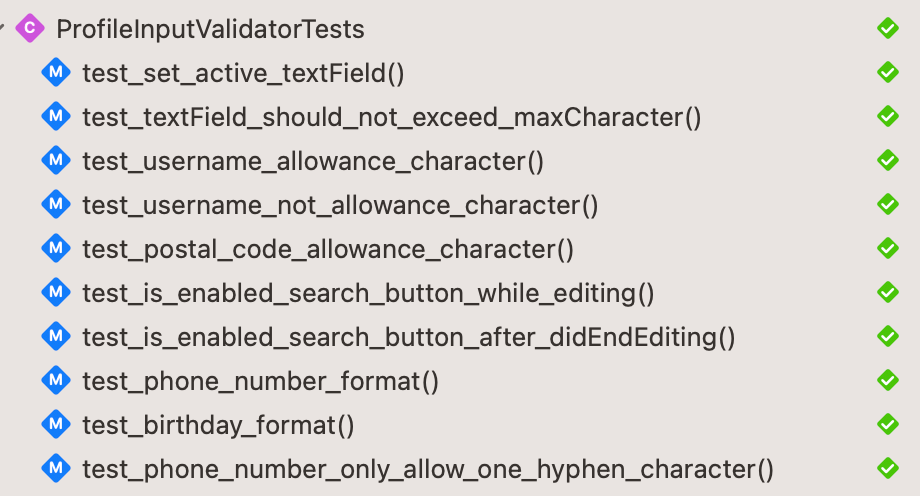
Here is the example of unit tests
func test_textField_should_not_exceed_maxCharacter() {
    ProfileInputType.allCases.forEach {
        sut.setActiveTextField($0)
        let dummyText = """
        Lorem Ipsum is simply dummy text of the printing and typesetting industry.
        """
        typeText(dummyText)
        XCTAssertTrue(
            sut.activeTextField?.text?.count == sut.inputValidator.activeTextFieldType?.maxCharacter,
            "TextField tag: \($0.rawValue) should not exceed maxCharacter"
        )
    }
}

func test_username_allowance_character() {
    let username = "skboard"
    sut.setActiveTextField(.username)
    typeText(username)
    sut.activeTextField?.delegate?.textFieldDidEndEditing?(sut.activeTextField!)

    XCTAssertNil(sut.errorMessage)
    XCTAssertEqual(sut.inputCheckType, ProfileInputType.username)
}

func test_username_not_allowance_character() {
    let username = "マーン224s한글djfタklsdf"
    sut.setActiveTextField(.username)
    typeText(username)
    sut.activeTextField?.delegate?.textFieldDidEndEditing?(sut.activeTextField!)

    XCTAssertEqual(ProfileInputType.username.errorMessage, sut.errorMessage)
    XCTAssertEqual(sut.inputCheckType, ProfileInputType.username)
}

func test_postal_code_allowance_character() {
    let postalCode = "13456"
    sut.setActiveTextField(.postalCode)
    typeText(postalCode)
    sut.activeTextField?.delegate?.textFieldDidEndEditing?(sut.activeTextField!)

    XCTAssertNil(sut.errorMessage)
    XCTAssertEqual(sut.inputCheckType, ProfileInputType.postalCode)
}

func test_is_enabled_search_button_while_editing() {
    sut.setActiveTextField(.postalCode)
    let postalCode = "89761"
    typeText(postalCode)
    XCTAssertEqual(sut.activeTextField?.text, "89761")
    XCTAssertTrue(sut.searchButton.isEnabled, "searchButton should enabled")
}

func test_is_enabled_search_button_after_didEndEditing() {
    sut.setActiveTextField(.postalCode)
    let postalCode = "24028"
    typeText(postalCode)

    XCTAssertEqual(sut.activeTextField?.text, "24028")
    sut.activeTextField?.delegate?.textFieldDidEndEditing?(sut.activeTextField!)
    XCTAssertTrue(sut.searchButton.isEnabled, "searchButton should enabled")
}

func test_phone_number_format() {
    sut.setActiveTextField(.phone)
    let phoneNumber = "78761241"
    typeText(phoneNumber)
    XCTAssertEqual(sut.activeTextField?.text, "7876-1241")
}

func test_birthday_format() {
    let birthday = "19980115"
    sut.setActiveTextField(.birthday)
    typeText(birthday)
    sut.activeTextField?.delegate?.textFieldDidEndEditing?(sut.activeTextField!)

    XCTAssertNil(sut.errorMessage)
    XCTAssertEqual(sut.inputCheckType, ProfileInputType.birthday)
}

func test_phone_number_only_allow_one_hyphen_character() {
    sut.setActiveTextField(.phone)
    let phoneNumber = "1467834527891471247"
    typeText(phoneNumber)
    let hyphenCount = numberOfHyphen(in: sut.activeTextField?.text ?? "")
    XCTAssertTrue(
        hyphenCount == 1,
        "phone number only allow one hyphen character"
    )
}
InputValidator
InputValidator checks the inputTypes and validates strings.
protocol ProfileInputValidatorDelegate: AnyObject {
    var activeTextField: UITextField? { get set }
    func setActiveTextField(_ inputType: ProfileInputType)
    func updateAddressSearchButtonState(isEnabled: Bool)
    func showValidateResult(_ inputType: ProfileInputType?, error message: String?)
}

final class ProfileInputValidator: NSObject {
    var activeTextFieldType: ProfileInputType?
    var dateFormatter: DateFormatter?
    weak var delegate: ProfileInputValidatorDelegate?

    func validate(
        text: String,
        type: ProfileInputType,
        needToSetType: Bool = false,
        placeholder: String? = nil
    ) {
        guard isNotEmpty(text: text) else {
            showEmptyMessage(type: type, needToSetType: needToSetType, placeholder: placeholder)
            return
        }
        let errorMessage: String?
        switch type {
        case .username:
            errorMessage = isValidUsername(text) ? nil : type.errorMessage
        case .password:
            errorMessage = isValidPassword(text) ? nil : type.errorMessage
        case .phone:
            errorMessage = isValidPhoneNumber(text) ? nil : type.errorMessage
        case .address:
            errorMessage = isValidAddress(text) ? nil : type.errorMessage
        case .postalCode:
            errorMessage = isValidPostalCode(text) ? nil : type.errorMessage
        case .birthday:
            errorMessage = isValidBirthday(text) ? nil : type.errorMessage
        }
        delegate?.showValidateResult(needToSetType ? type : activeTextFieldType, error: errorMessage)
    }

    private var isRequiredField: Bool {
        if activeTextFieldType == .some(.username) ||
            activeTextFieldType == .some(.password) ||
            activeTextFieldType == .some(.address) ||
            activeTextFieldType == .some(.phone) {
            return true
        }
        else {
            return false
        }
    }

    private func showEmptyMessage(type: ProfileInputType, needToSetType: Bool, placeholder: String?) {
        let textFieldTitle = activeTextFieldType?.title ?? ""
        var emptyErrorMessage: String?
        if isRequiredField {
            emptyErrorMessage =
                "\(placeholder ?? textFieldTitle) is required"
        }
        delegate?.showValidateResult(
            needToSetType ? type : activeTextFieldType,
            error: emptyErrorMessage
        )
    }

    private func isNotEmpty(text: String?) -> Bool {
        guard let inputText = text else {
            return false
        }
        let textWithOutWhiteSpace = inputText.trimmingCharacters(in: .whitespacesAndNewlines)
        return !textWithOutWhiteSpace.isEmpty
    }

    private func isValidDateFormat(text: String) -> Bool {
        guard convertBirthdayFormat(text)?.count == ProfileInputType.birthday.maxCharacter else {
            return false
        }
        return true
    }
}
This class conforms to UITextFieldDelegate to check strings
//MARK: UITextFieldDelegate
extension ProfileInputValidator: UITextFieldDelegate {
    func textFieldDidBeginEditing(_ textField: UITextField) {
        guard let fieldType = ProfileInputType(textField.tag) else {
            return
        }
        delegate?.activeTextField = textField
        activeTextFieldType = fieldType
    }

    func textFieldDidEndEditing(_ textField: UITextField) {
        guard let inputText = textField.text, let inputType = activeTextFieldType else {
            return
        }
        validate(text: inputText, type: inputType)
    }

    func textField(
        _ textField: UITextField,
        shouldChangeCharactersIn range: NSRange,
        replacementString string: String
    ) -> Bool {
        let text = textField.text ?? ""
        guard let stringRange = Range(range, in: text),
              let activeTextFieldMaxCount = activeTextFieldType?.maxCharacter
        else {
            return false
        }
        if activeTextFieldType == .phone, let phoneNumber = formattingPhoneNumber(text: text, to: string, range: range) {
            textField.text = phoneNumber
            return false
        }
        let updatedText = text.replacingCharacters(in: stringRange, with: string)
        if activeTextFieldType == .postalCode {
            delegate?.updateAddressSearchButtonState(isEnabled: updatedText.count == activeTextFieldMaxCount)
        }
        return updatedText.count <= activeTextFieldMaxCount
    }

    func textFieldShouldReturn(_ textField: UITextField) -> Bool {
        guard let activeType = activeTextFieldType else {
            return false
        }
        textField.endEditing(false)
        // Focus on the next field
        switch activeType {
        case .username:
            delegate?.setActiveTextField(.password)
        case .password:
            delegate?.setActiveTextField(.phone)
        case .phone:
            delegate?.setActiveTextField(.address)
        case .address:
            delegate?.setActiveTextField(.postalCode)
        case .postalCode:
            delegate?.setActiveTextField(.birthday)
        default:
            break
        }
        return false
    }
}
MockClass
This class has a InputValidator and conforms to ProfileInputValidatorDelegate. It is use for XCTestCase.
class MockClass {
    var activeTextField: UITextField?
    var searchButton = UIButton()
    var inputCheckType: ProfileInputType?
    var errorMessage: String?

    fileprivate let inputValidator = ProfileInputValidator()

    var usernameTextField: UITextField!
    var passwordTextField: UITextField!
    var addressTextField: UITextField!
    var phoneTextField: UITextField!
    var postalCodeTextField: UITextField!
    var birthdayTextField: UITextField!

    lazy var dateFormatter: DateFormatter = {
        let formatter = DateFormatter()
        formatter.dateFormat = "yyyy.MM.dd"
        formatter.calendar = Calendar(identifier: .gregorian)
        return formatter
    }()

    init() {
        inputValidator.delegate = self
        inputValidator.dateFormatter = dateFormatter

        setupTextFields()
        searchButton.isEnabled = false
    }

    private func setupTextFields() {
        usernameTextField = UITextField()
        passwordTextField = UITextField()
        addressTextField = UITextField()
        phoneTextField = UITextField()
        postalCodeTextField = UITextField()
        birthdayTextField = UITextField()

        let textFields = [
            usernameTextField,
            passwordTextField,

            addressTextField,
            phoneTextField,

            postalCodeTextField,
            birthdayTextField
        ]

        for (index, textField) in textFields.enumerated() {
            textField?.delegate = inputValidator
            textField?.tag = index
        }
    }
}

extension MockClass: ProfileInputValidatorDelegate {
    func setActiveTextField(_ inputType: ProfileInputType) {
        switch inputType {
        case .username:
            usernameTextField.delegate?.textFieldDidBeginEditing?(usernameTextField)
        case .password:
            passwordTextField.delegate?.textFieldDidBeginEditing?(passwordTextField)
        case .address:
            addressTextField.delegate?.textFieldDidBeginEditing?(addressTextField)
        case .phone:
            phoneTextField.delegate?.textFieldDidBeginEditing?(phoneTextField)
        case .postalCode:
            postalCodeTextField.delegate?.textFieldDidBeginEditing?(postalCodeTextField)
        case .birthday:
            birthdayTextField.delegate?.textFieldDidBeginEditing?(birthdayTextField)
        }
    }

    func updateAddressSearchButtonState(isEnabled: Bool) {
        searchButton.isEnabled = isEnabled
    }

    func showValidateResult(_ inputType: ProfileInputType?, error message: String?) {
        errorMessage = message
        inputCheckType = inputType
    }
}
Conclusion
XCTest is a powerful framework for testing unit tests, but it can be challenging to test UI-related logic. In mobile development, UI logic is closely intertwined with the user interface itself. The conventional approach for testing UI logic is to use XCUITest. However, XCUITest tends to be slower compared to XCTest. If we have multiple views designed for registering or updating information using input fields, we would need to write multiple UI testing code with XCUITest.
An alternative approach is to use XCTest and create a function that simulates user actions, such as typing text. This allows us to write a unit test for common input validator logic while considering user actions as well. This way, we can test the UI-related logic using XCTest in a more efficient manner compared to relying solely on XCUITest.
 Shawn
Shawn 