맥북에서 스크린 캡쳐를 하다보면 지저분하게 바탕화면에 저장된다.
기본 캡쳐 폴더 변경 방법
Shift + Command + 5 를 누르자.
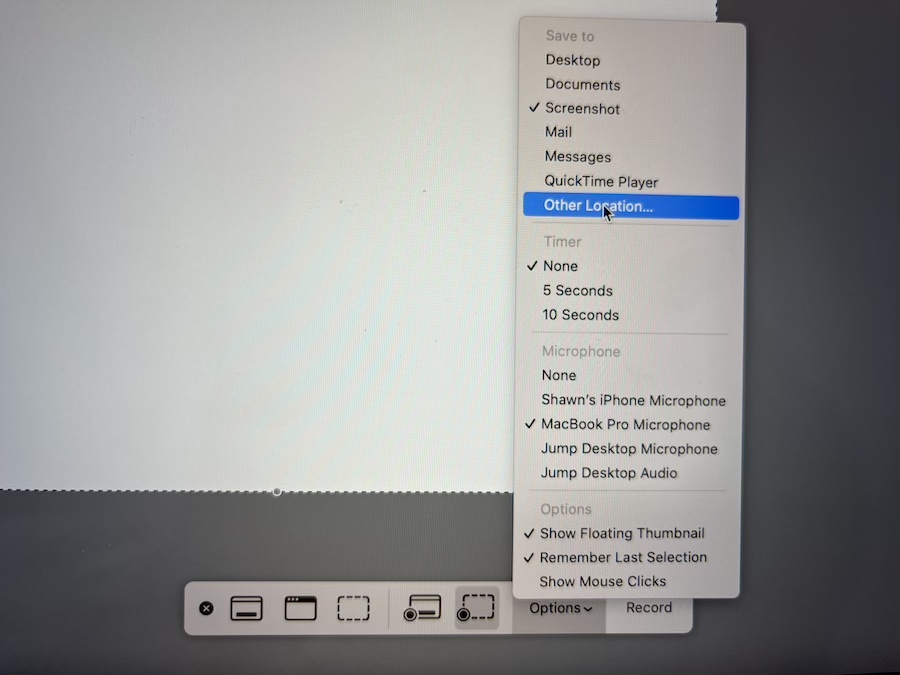
Option -> Other Location을 선택하자.
위와 같이 하면 다음부터는 스크린 캡쳐시 위에서 지정한 폴더에 저장될 것이다.
맥북에서 스크린 캡쳐를 하다보면 지저분하게 바탕화면에 저장된다.
Shift + Command + 5 를 누르자.
Option -> Other Location을 선택하자.
위와 같이 하면 다음부터는 스크린 캡쳐시 위에서 지정한 폴더에 저장될 것이다.
"People ask me what I do in the winter when there's no baseball. I'll tell you what I do. I stare out the window and wait for spring."
~ Rogers Hornsby
 Shawn
Shawn 
Leave a comment