1. Download firebase macOS tool
https://firebase.google.com/docs/cli#mac-linux-standalone-binary
2. Copy firebase-tools-macos.zip into ci_scripts folder
3. Create Service Account
I suggest use Service Account instead of using token. Because firebase no longer support token. (firebase login:ci)

Don’t forget to check Project before creating Service Accounts.
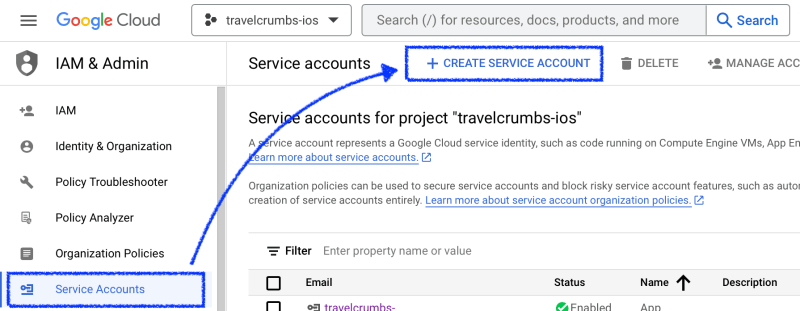
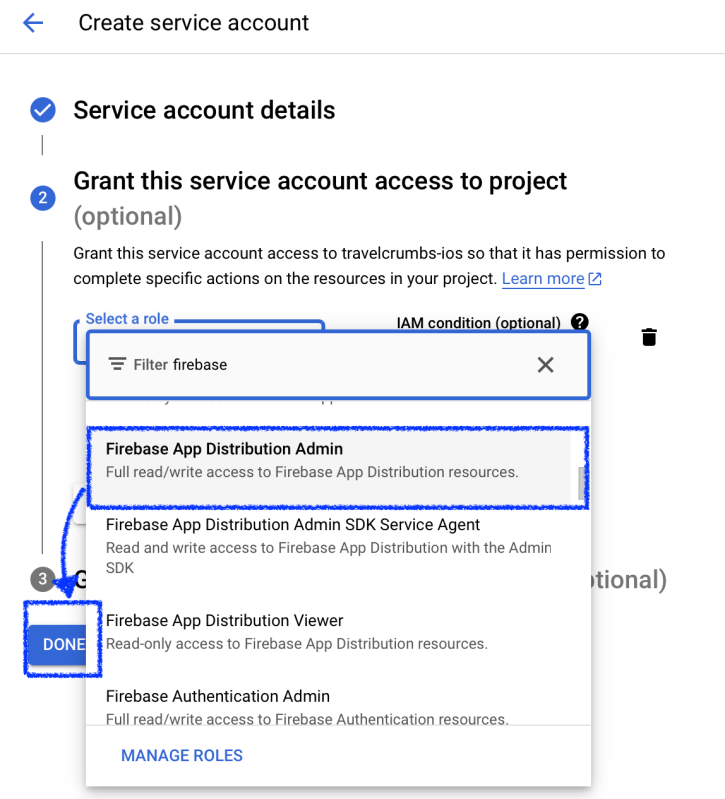
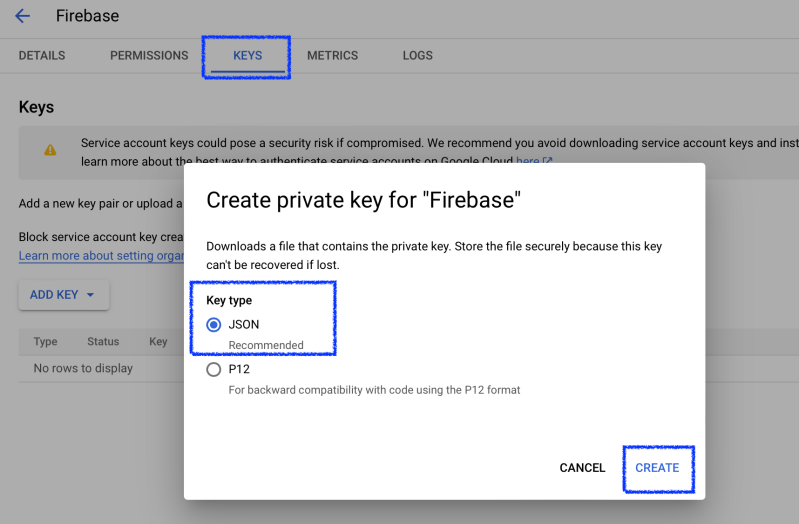
Once create an account, create private key at KEYS.
Put json file you download into ci_scripits folder and rename it as credentials.json
4. Add Environment Variables at Xcode Cloud
Add FIREBASE_APP_ID


[Option] ADD GOOGLE_SERVICE_ACCOUNT_KEY
You can skip this if you want to add json file into git repo. In this post, I’ll skip this step.
Open JSON (Step 3, Downloaded JSON Key), Copy all the text in JSON and Paste it.
# If you added GOOGLE_SERVICE_ACCOUNT_KEY into Xcode Cloud's Environment Variable then use this
echo "$GOOGLE_SERVICE_ACCOUNT_KEY" | jq -r '.' > credentials.json

export GOOGLE_APPLICATION_CREDENTIALS=./credentials.json
5. Edit ci_post_clone.sh in ci_scripts folder
Install any packages you want to use it later.
#!/bin/sh
brew install jq
6. Edit ci_post_xcodebuild.sh in ci_scripts folder
#!/bin/zsh
upload_ipa_to_firebase() {
    unzip firebase-tools-macos.zip
    chmod +x ./firebase-tools-macos
    local file_path="$1/$CI_PRODUCT.ipa"
    echo "🚀 Upload $file_path to Firebase App ID $FIREBASE_APP_ID"
    # https://firebase.google.com/docs/app-distribution/authenticate-service-account?platform=ios
    export GOOGLE_APPLICATION_CREDENTIALS=./credentials.json
    ./firebase-tools-macos appdistribution:distribute "$file_path" --app "$FIREBASE_APP_ID"
    echo "🚀 End uploading dSYMs"
}

if [[ -n "$CI_ARCHIVE_PATH" && "$CI_XCODEBUILD_EXIT_CODE" == 0 ]]; then
    if [ -d "$CI_APP_STORE_SIGNED_APP_PATH" ]; then
        upload_ipa_to_firebase "$CI_APP_STORE_SIGNED_APP_PATH"
    elif [ -d "$CI_AD_HOC_SIGNED_APP_PATH" ]; then
        upload_ipa_to_firebase "$CI_AD_HOC_SIGNED_APP_PATH"
    fi
else
    echo "Archive path isn't available. Unable to run dSYMs uploading script."
fi
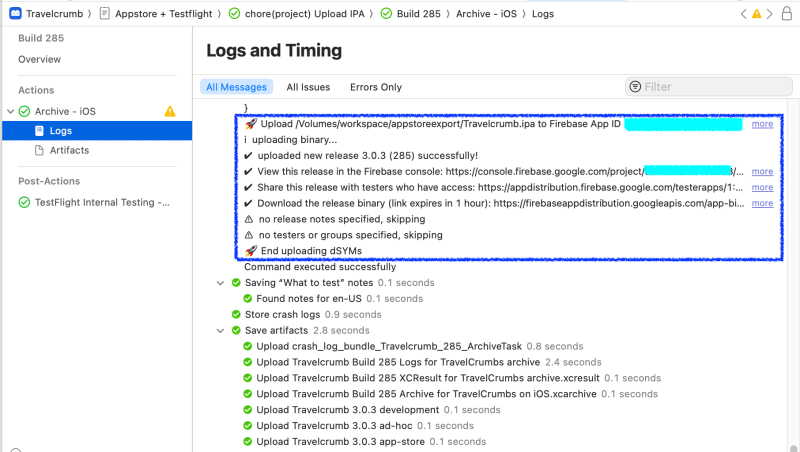
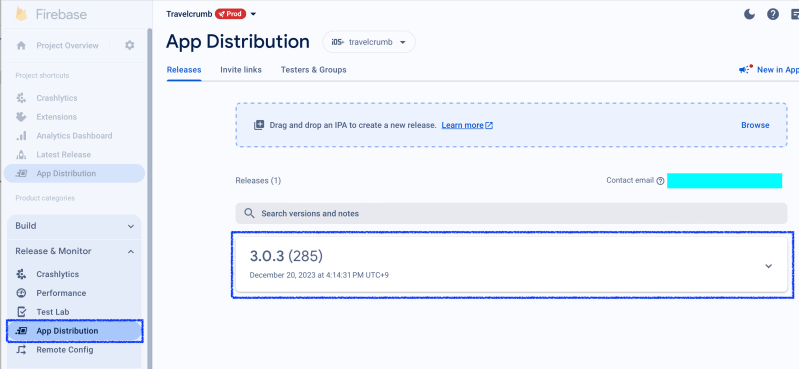
7. Check ipa file
Check Xcode Cloud Logs
Check Firebase
Conclusion
I faced a lot of issues to upload ipa file into firebase. Because firebase-tools-macos has updated and token login was deprecated.
Also Xcode Cloud doesn’t support git-lfs. That’s why I upload firebase-tools-macos.zip file and unzip it at ci_post_xcodebuild.sh. (without zip file I need to set git-lfs because this tool’s size is around 150mb)
The other option is download firebase-tool at ci_post_xcodebuild.sh.
curl -sL https://firebase.tools | bash
All options are up to you. I hope my post helps you. Thanks!
 Shawn
Shawn 
Leave a comment