
✍️ Note
All the codes and contents are sourced from Apple’s official documentation. This post is for personal notes where I summarize the original contents to grasp the key concepts
DispatchQueue

QoS (Quality of Service)
- UserInteractive
- Animations, event handling, or updates to your app’s user interface.
- User-interactive tasks have the highest priority on the system. Use this class for tasks or queues that interact with the user or actively update your app’s user interface. For example, use this class for animations or for tracking events interactively.
- UserInitiated
- Prevent the user from actively using your app
- User-initiated tasks are second only to user-interactive tasks in their priority on the system. Assign this class to tasks that provide immediate results for something the user is doing, or that would prevent the user from using your app. For example, you might use this quality-of-service class to load the content of an email that you want to display to the user.
- Default
- Default tasks have a lower priority than user-initiated and user-interactive tasks, but a higher priority than utility and background tasks. Assign this class to tasks or queues that your app initiates or uses to perform active work on the user’s behalf.
- Utility
- Utility tasks have a lower priority than default, user-initiated, and user-interactive tasks, but a higher priority than background tasks. Assign this quality-of-service class to tasks that do not prevent the user from continuing to use your app. For example, you might assign this class to long-running tasks whose progress the user does not follow actively.
- Background
- Background tasks have the lowest priority of all tasks. Assign this class to tasks or dispatch queues that you use to perform work while your app is running in the background.
let concurrentQueue = DispatchQueue(label: "concurrent", qos: .userInitiated, attributes:
.concurrent)
let serialQueue = DispatchQueue(label: "serial", qos: . userInitiated)
Example 1. Perform async tasks on serialQueue
for i in 0...3 {
  serialQueue.async {
    print("serial task(\(i)) start")
    sleep(1)
    print("serial task(\(i)) end")
  }
}

//prints
serial task(0) start
serial task(0) end

serial task(1) start
serial task(1) end

serial task(2) start
serial task(2) end

serial task(3) start
serial task(3) end
It’s make sense because serialQueue can run a one task at a time.
Example 2. Perform sync tasks on serialQueue
for i in 0...3 {
  serialQueue.sync {
    print("serial task(\(i)) start")
    sleep(1)
    print("serial task(\(i)) end")
  }
}

//prints
serial task(0) start
serial task(0) end

serial task(1) start
serial task(1) end

serial task(2) start
serial task(2) end

serial task(3) start
serial task(3) end
Results are the same as example 1
Submits a work item for execution on the current queue and returns after that block finishes executing.
https://developer.apple.com/documentation/dispatch/dispatchqueue/2016083-sync
Example 3. Perform a sync task on the concurrentQueue
for i in 0...3 {
  concurrentQueue.sync {
    print("concurrent task(\(i)) start")
    sleep(1)
    print("concurrent task(\(i)) end")
  }
}

//Prints
concurrent task(0) start
concurrent task(0) end

concurrent task(1) start
concurrent task(1) end

concurrent task(2) start
concurrent task(2) end

concurrent task(3) start
concurrent task(3) end
Example 4. Perform a async task on the concurrentQueue
for i in 0...3 {
  concurrentQueue.async {
    print("concurrent task(\(i)) start")
    sleep(1)
    print("concurrent task(\(i)) end")
  }
}

//Prints
concurrent task(0) start
concurrent task(3) start
concurrent task(1) start
concurrent task(2) start

concurrent task(0) end
concurrent task(1) end
concurrent task(3) end
concurrent task(2) end
Schedules a work item for immediate execution, and returns immediately.
https://developer.apple.com/documentation/dispatch/dispatchqueue/2016103-async
It immediate execution and returns immediately.
Example 5. Perform async task on the concurrentQueue and sync task on the serialQueue
for i in 0...3 {
  concurrentQueue.async {
    print("concurrent task(\(i)) start")
    sleep(1)
    print("concurrent task(\(i)) end")
  }

  serialQueue.sync {
    print("serial task(\(i)) start")
    sleep(1)
    print("serial task(\(i)) end")
  }
}

//Prints
concurrent task(0) start
serial task(0) start
serial task(0) end
serial task(1) start
concurrent task(1) start
concurrent task(0) end
concurrent task(1) end
serial task(1) end
serial task(2) start
concurrent task(2) start
serial task(2) end
serial task(3) start
concurrent task(3) start
concurrent task(2) end
serial task(3) end
concurrent task(3) end
Example 6. Run async tasks on the concurrentQueue and serialQueue
for i in 0...3 {
   concurrentQueue.async {
     print("concurrent task(\(i)) start")
     sleep(1)
     print("concurrent task(\(i)) end")
   }

   serialQueue.async {
     print("serial task(\(i)) start")
     sleep(1)
     print("serial task(\(i)) end")
   }
}

//Prints
concurrent task(0) start
concurrent task(2) start
concurrent task(3) start
serial task(0) start
concurrent task(1) start
concurrent task(3) end
concurrent task(0) end
concurrent task(2) end
serial task(0) end
concurrent task(1) end
serial task(1) start
serial task(1) end
serial task(2) start
serial task(2) end
serial task(3) start
serial task(3) end
As you can see a SerialQueue run a task and returned when task has finished either perform it on sync or async.
What about dispatchQueue.main.async?
for i in 0...3 {
  DispatchQueue.main.async {
    print("main task(\(i)) start")
    sleep(1)
    print("main task(\(i)) end")
  }
}

//Prints
main task(0) start
main task(0) end

main task(1) start
main task(1) end

main task(2) start
main task(2) end

main task(3) start
main task(3) end
The dispatch queue associated with the main thread of the current process.
The system automatically creates the main queue and associates it with your application’s main thread. Your app uses one (and only one) of the following three approaches to execute blocks submitted to the main queue:
- Calling
dispatchMain()- Starting your app with a call to
UIApplicationMain(_:_:_:_:)(iOS) orNSApplicationMain(_:_:)(macOS)- Using a
CFRunLoopon the main threadAs with the global concurrent queues, calls to
https://developer.apple.com/documentation/dispatch/dispatchqueue/1781006-mainsuspend(),resume(),dispatch_set_context(_:_:), and the like have no effect when used on the queue in this property.

As the results, It is not returns immediately like a concurrent queue. Because It’s a serial queue. You can check it on Xcode.
What about dispatchQueue.global().async?
for i in 0...3 {
  DispatchQueue.global().async {
    print("global task(\(i)) start")
    sleep(1)
    print("global task(\(i)) end")
  }
}

//Prints
global task(3) start
global task(2) start
global task(0) start
global task(1) start

global task(1) end
global task(0) end
global task(3) end
global task(2) end
This method returns a queue suitable for executing tasks with the specified quality-of-service level. Calls to the
suspend(),resume(), anddispatch_set_context(_:_:)functions have no effect on the returned queues.Tasks submitted to the returned queue are scheduled concurrently with respect to one another
https://developer.apple.com/documentation/dispatch/dispatchqueue/2300077-global
🤯 When function is returned?
It’s a good example for understanding sync vs async.
Before look at the example, let’s remind
Dispatch queues are FIFO queues to which your application can submit tasks in the form of block objects. Dispatch queues execute tasks either serially or concurrently. Work submitted to dispatch queues executes on a pool of threads managed by the system. Except for the dispatch queue representing your app’s main thread, the system makes no guarantees about which thread it uses to execute a task.
You schedule work items synchronously or asynchronously. When you schedule a work item synchronously, your code waits until that item finishes execution. When you schedule a work item asynchronously, your code continues executing while the work item runs elsewhere.
https://developer.apple.com/documentation/dispatch/dispatchqueue
ConcurrentQueue with sync

runWorkItem function is returned when after finishing the sync task.
ConcurrentQueue with async

runWorkItem function returned and then async task starts
SerialQueue with async
DispatchQueue.main.async
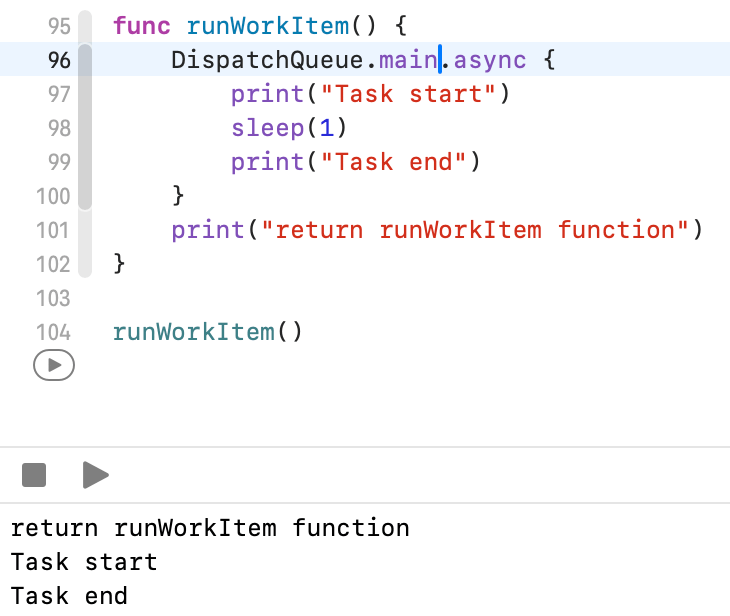
Custom Serial DispatchQueue

SerialQueue with sync but what if a submitted task is delayed?

Keep in mind
Work submitted to dispatch queues executes on a pool of threads managed by the system. Except for the dispatch queue representing your app’s main thread, the system makes no guarantees about which thread it uses to execute a task.
https://developer.apple.com/documentation/dispatch/dispatchqueue
sync -> block will run and returned when task finished
async -> block will immediately returned when task started
| sync | async | when function returned? | |
| SerialQeueue | wait until task finished | wait until task finished | either sync or async it returned when after task finished |
| ConcurrentQueue | wait until task finished | immediately return when task started | sync: it returned after task finished async: it returned before task finished |

 Shawn
Shawn 
Leave a comment