Some codes and contents are sourced from Apple’s official documentation. This post is for personal notes where I summarize the original contents to grasp the key concepts
https://developer.apple.com/documentation/foundation/runloop
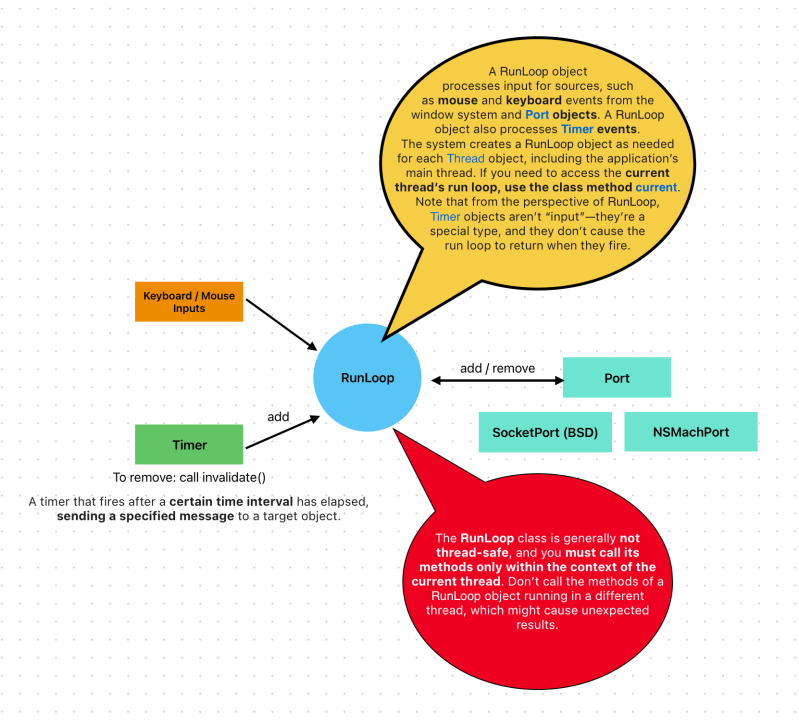

Your code provides the control statements used to implement the actual loop portion of the run loop—in other words, your code provides the
whileorforloop that drives the run loop. Within your loop, you use a run loop object to “run” the event-processing code that receives events and calls the installed handlers.A run loop receives events from two different types of sources. Input sources deliver asynchronous events, usually messages from another thread or from a different application. Timer sources deliver synchronous events, occurring at a scheduled time or repeating interval. Both types of source use an application-specific handler routine to process the event when it arrives.
Figure 3-1 shows the conceptual structure of a run loop and a variety of sources. The input sources deliver asynchronous events to the corresponding handlers and cause the
runUntilDate:method (called on the thread’s associatedNSRunLoopobject) to exit. Timer sources deliver events to their handler routines but do not cause the run loop to exit.In addition to handling sources of input, run loops also generate notifications about the run loop’s behavior. Registered run-loop observers can receive these notifications and use them to do additional processing on the thread. You use Core Foundation to install run-loop observers on your threads.
The following sections provide more information about the components of a run loop and the modes in which they operate. They also describe the notifications that are generated at different times during the handling of events.
https://developer.apple.com/library/archive/documentation/Cocoa/Conceptual/Multithreading/RunLoopManagement/RunLoopManagement.html
RunLoop.mode
common
When you add an object to a run loop using this mode, the runloop monitors the object when running in any of the common modes. For details about adding a runloop mode to the set of common modes,
Apple
default
- for handling input sources
perform a task
RunLoop.current.perform {
    print("Hello RunLoop")
}

RunLoop.main.perform {
    print("Hellow?")
}
current
- Returns the run loop for the current thread.
main
- Returns the run loop of the main thread.
Add Timer to run a code at specific time
class RunLoopTest {
    var timer: Timer!
    init() {
        let date = Date.now.addingTimeInterval(5)

        //After 5 secs from not, timer will fire an event, every 2 seconds It run a function
        timer = Timer(
            fireAt: date,
            interval: 2,
            target: self,
            selector: #selector(run),
            userInfo: ["time": date],
            repeats: true
        )
        RunLoop.main.add(timer, forMode: .common)
    }

    @objc func run() {
        print("Hellow? : \(timer.userInfo)")
    }

    func stop() {
        timer.invalidate()
    }
}

RunLoopTest()

//Prints
Hellow? : Optional({
    time = "2024-03-11 15:25:30 +0000";
})
Hellow? : Optional({
    time = "2024-03-11 15:25:30 +0000";
})
Hellow? : Optional({
    time = "2024-03-11 15:25:30 +0000";
})
Run a timer in a RunLoop while scrolling the table
import UIKit

class ViewController: UIViewController {
    var timer: Timer!
    var firedCount = 0

    lazy var tableView: UITableView = {
       let tableView = UITableView()
        tableView.dataSource = self
        tableView.register(UITableViewCell.self, forCellReuseIdentifier: "cell")
        return tableView
    }()

    lazy var items: [Int] = {
       var items = [Int]()
        for i in 0...1000 {
            items.append(i)
        }
        return items
    }()

    override func viewDidLoad() {
        super.viewDidLoad()
        timer = Timer(
            fireAt: Date.now.addingTimeInterval(5),
            interval: 0.2,
            target: self,
            selector: #selector(run),
            userInfo: nil,
            repeats: true
        )
        RunLoop.main.add(timer, forMode: .default)
        tableView.translatesAutoresizingMaskIntoConstraints = false
        view.addSubview(tableView)
        NSLayoutConstraint.activate([
            tableView.topAnchor.constraint(equalTo: view.topAnchor),
            tableView.leadingAnchor.constraint(equalTo: view.leadingAnchor),
            tableView.trailingAnchor.constraint(equalTo: view.trailingAnchor),
            tableView.bottomAnchor.constraint(equalTo: view.bottomAnchor)
        ])
    }

    @objc func run() {
        print("🔥 timer fired: \(firedCount)")
        firedCount += 1
    }
}

extension ViewController: UITableViewDataSource {
    func tableView(_ tableView: UITableView, numberOfRowsInSection section: Int) -> Int {
        items.count
    }

    func tableView(_ tableView: UITableView, cellForRowAt indexPath: IndexPath) -> UITableViewCell {
        let cell = tableView.dequeueReusableCell(withIdentifier: "cell", for: indexPath)
        cell.textLabel?.text = "\(items[indexPath.row])"
        return cell
    }
}

//Prints
🔥 timer fired: 0

🔥 timer fired: 1

🔥 timer fired: 2

🔥 timer fired: 3
🔥 timer fired: 4
🔥 timer fired: 5
🔥 timer fired: 6
Example 1. RunLoop Mode is defaults
Above the code, timer starts after 5 secs. And I scrolling the table for 20 secs.

Example 2. Changed RunLoop Mode to common

Now I understand what RunLoop mode is…
When you use default mode, timer might not fired if user touching the screens. defaults mode handles Input source.
 Shawn
Shawn 
Leave a comment