
✍️ Note
Some codes and contents are sourced from Apple’s official documentation. This post is for personal notes where I summarize the original contents to grasp the key concepts
Swift Concurrency Model

The possible suspension points in your code marked with
awaitindicate that the current piece of code might pause execution while waiting for the asynchronous function or method to return. This is also called yielding the thread because, behind the scenes, Swift suspends the execution of your code on the current thread and runs some other code on that thread instead. Because code withawaitneeds to be able to suspend execution, only certain places in your program can call asynchronous functions or methods:https://docs.swift.org/swift-book/documentation/the-swift-programming-language/concurrency/
- Code in the body of an asynchronous function, method, or property.
- Code in the static
main()method of a structure, class, or enumeration that’s marked with@main.- Code in an unstructured child task, as shown in Unstructured Concurrency below.
Explicitly insert a suspension point
Call Task.yield() method for long running operation that doesn’t contain any suspension point.
func listPhotos(inGallery name: String) async throws -> [String] {
    // ... some asynchronous networking code ...
    // use Task.sleep for simulating networking logic
    try await Task.sleep(for: .seconds(2))
    let result = ["photo1.jpg", "photo2.jpg", "photo3.jpg"]
    return result
}

func generateSlideshow(forGallery gallery: String) async throws {
    let photos = try await listPhotos(inGallery: gallery)
    for photo in photos {
        // ... render a few seconds of video for this photo ...
        print("photo file: \(photo)")
        // Explicitly insert a suspending point
        // It allows other tasks to execute
        await Task.yield()
    }
}

Task {
    let _ = try? await generateSlideshow(forGallery: "Summer Vacation")
}
Wait, there is no function to resuming it explicitly?
No.
Suspends the current task and allows other tasks to execute.
A task can voluntarily suspend itself in the middle of a long-running operation that doesn’t contain any suspension points, to let other tasks run for a while before execution returns to this task.
If this task is the highest-priority task in the system, the executor immediately resumes execution of the same task. As such, this method isn’t necessarily a way to avoid resource starvation.
Structuring long-running code this way (explicitly insert a suspension point) lets Swift balance between making progress on this task, and letting other tasks in your program make progress on their work.
Task.yield(), Apple
Wrap a throwing function
When you define an asynchronous or throwing function, you mark it with
asyncorthrows, and you mark calls to that function withawaitortry. An asynchronous function can call another asynchronous function, just like a throwing function can call another throwing function.However, there’s a very important difference. You can wrap throwing code in a
Appledo–catchblock to handle errors, or useResultto store the error for code elsewhere to handle it. These approaches let you call throwing functions from nonthrowing code.
func photoList(inGallery: String) throws -> [String] {
    return ["photo1.jpg", "photo2.jpg"]
}

func photoListResult(inGallery name: String) -> Result<[String], Error> {
    return Result {
        try photoList(inGallery: name)
    }
}
Normal function can wrap a throwing function returning Result. But there’s no safe way to wrap asynchronous code so you can call it from synchronous code and wait for the result.
The Swift standard library intentionally omits this unsafe functionality — trying to implement it yourself can lead to problems like subtle races, threading issues, and deadlocks. When adding concurrent code to an existing project, work from the top down. Specifically, start by converting the top-most layer of code to use concurrency, and then start converting the functions and methods that it calls, working through the project’s architecture one layer at a time. There’s no way to take a bottom-up approach, because synchronous code can’t ever call asynchronous code.
Apple

Above the example is working fine. But If you try to wrap a async throws function using Result, It can’t. See below example.

Asynchronous Sequences
let handle = FileHandle.standardInput
for try await line in handle.bytes.lines {
    print(line)
}
In the same way that you can use your own types in a
Applefor–inloop by adding conformance to theSequenceprotocol, you can use your own types in afor–await–inloop by adding conformance to theAsyncSequenceprotocol.
Calling Asynchronous Functions in Parallel
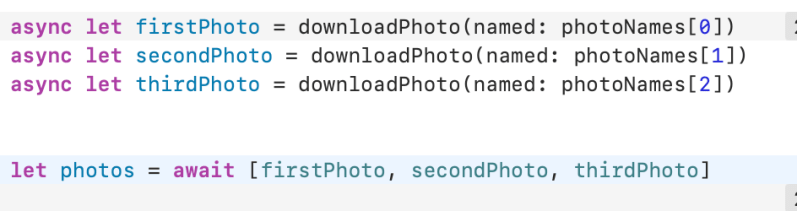
Apple
- Call asynchronous functions with
async–letwhen you don’t need the result until later in your code. This creates work that can be carried out in parallel.- Both
awaitandasync–letallow other code to run while they’re suspended.- In both cases, you mark the possible suspension point with
awaitto indicate that execution will pause, if needed, until an asynchronous function has returned.
🤯 Tasks and Task Groups
func downloadPhoto(from url: String) async throws -> Data {
    //Download image
    try await URLSession.shared.data(from: URL(string: url)!).0
}

Task {
    let photoUrls = [
        "https://picsum.photos/200/300?grayscale",
        "https://picsum.photos/200",
        "https://picsum.photos/300"
    ]
    //async let, It implicitly create a new child task
    async let firstPhoto = downloadPhoto(from: photoUrls[0])
    async let secondPhoto = downloadPhoto(from: photoUrls[1])
    async let thirdPhoto = downloadPhoto(from: photoUrls[2])

    //3 child tasks are created
    let photos = try await [firstPhoto, secondPhoto, thirdPhoto]
}
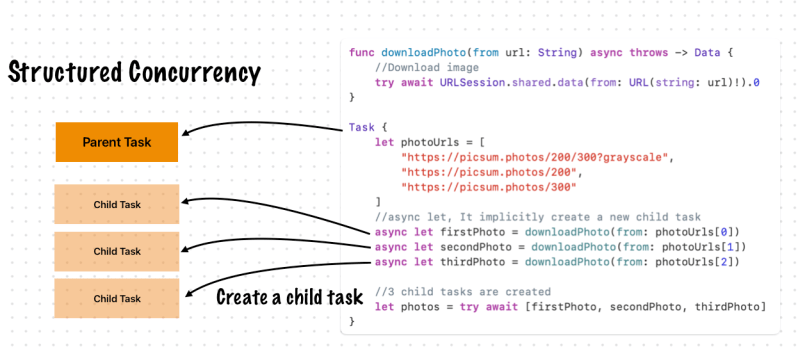
Tasks are arranged in a hierarchy. Each task in a given task group has the same parent task, and each task can have child tasks. Because of the explicit relationship between tasks and task groups, this approach is called structured concurrency. The explicit parent-child relationships between tasks has several advantages:
Apple
- In a parent task, you can’t forget to wait for its child tasks to complete.
- When setting a higher priority on a child task, the parent task’s priority is automatically escalated.
- When a parent task is canceled, each of its child tasks is also automatically canceled.
- Task-local values propagate to child tasks efficiently and automatically.
Task Group
Swift runs as many of these tasks concurrently as conditions allow.
Apple
Task {
    let photos = await withTaskGroup(of: Data.self) { group in
        let photoUrls = [
            "https://picsum.photos/200/300?grayscale",
            "https://picsum.photos/200",
            "https://picsum.photos/300"
        ]

        for photoUrl in photoUrls {
            group.addTask {
                return try await downloadPhoto(from: photoUrl)
            }
        }

        var results: [Data] = []
        for await photo in group {
            results.append(photo)
        }
        return results
    }
}
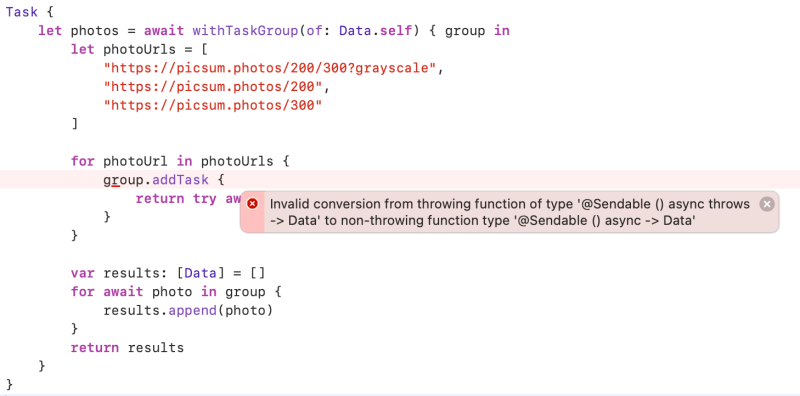
Ops, There is an error. Because withTaskGroup doesn’t support error handling.
withTaskGroup
func withTaskGroup<ChildTaskResult, GroupResult>(
    of childTaskResultType: ChildTaskResult.Type,
    returning returnType: GroupResult.Type = GroupResult.self,
    body: (inout TaskGroup<ChildTaskResult>) async -> GroupResult
) async -> GroupResult where ChildTaskResult : Sendable
withThrowingTaskGroup
Task {
    let photos = try await withThrowingTaskGroup(of: Data.self) { group in
        let photoUrls = [
            "https://picsum.photos/200/300?grayscale",
            "https://picsum.photos/200",
            "https://picsum.photos/300"
        ]

        for photoUrl in photoUrls {
            //creates child tasks
            group.addTask {
                return try await downloadPhoto(from: photoUrl)
            }
        }

        var results: [Data] = []
        for try await photo in group {
            results.append(photo)
        }
        return results
    }
}

Apple
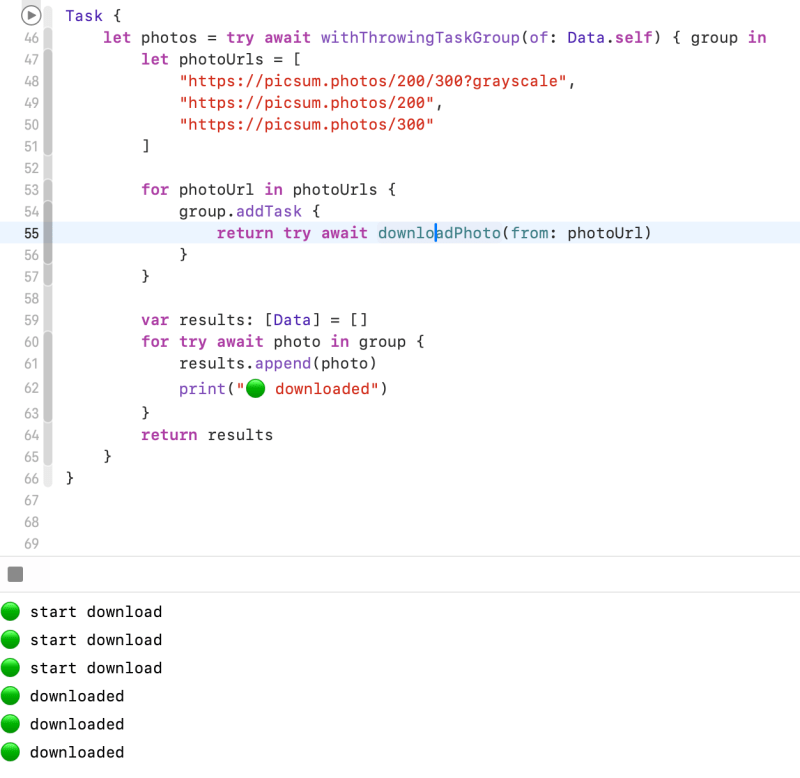
for–await–inloop waits for the next child task to finish, appends the result of that task to the array of results, and then continues waiting until all child tasks have finished. Finally, the task group returns the array of downloaded photos as its overall result.
I fixed it by using withThrowingTaskGroup
Task Cancellation
Swift concurrency uses a cooperative cancellation model. Each task checks whether it has been canceled at the appropriate points in its execution, and responds to cancellation appropriately. Depending on what work the task is doing, responding to cancellation usually means one of the following:
- Throwing an error like
CancellationError- Returning
nilor an empty collection- Returning the partially completed work
Downloading pictures could take a long time if the pictures are large or the network is slow. To let the user stop this work, without waiting for all of the tasks to complete, the tasks need check for cancellation and stop running if they are canceled. There are two ways a task can do this: by calling the
Task.checkCancellation()method, or by reading theTask.isCancelledproperty.Calling
ApplecheckCancellation()throws an error if the task is canceled; a throwing task can propagate the error out of the task, stopping all of the task’s work. This has the advantage of being simple to implement and understand. For more flexibility, use theisCancelledproperty, which lets you perform clean-up work as part of stopping the task, like closing network connections and deleting temporary files.
Task {
    let photos = try await withThrowingTaskGroup(of: Optional<Data>.self) { group in
        let photoUrls = [
            "https://picsum.photos/200/300?grayscale",
            "https://picsum.photos/200",
            "https://picsum.photos/300"
        ]

        for photoUrl in photoUrls {
            group.addTaskUnlessCancelled {
                return try await downloadPhoto(from: photoUrl)
            }
        }

        var results: [Data] = []
        for try await photo in group {
            if let photo {
                results.append(photo)
            }
            print("🟢 downloaded")
        }
        return results
    }
}
- Each task is added using the
TaskGroup.addTaskUnlessCancelled(priority:operation:)method, to avoid starting new work after cancellation.- Each task checks for cancellation before starting to download the photo. If it has been canceled, the task returns
nil. <- 🤔 Need to check…- At the end, the task group skips
nilvalues when collecting the results. Handling cancellation by returningnilmeans the task group can return a partial result — the photos that were already downloaded at the time of cancellation — instead of discarding that completed work.


If parent task has cancelled, all the child tasks are also cancelled.
What if I cancel a child task?

It seems cancelling a child task doesn’t cancel the parent task.
Let’s remind Task cancellation.
There are two ways a task can do this: by calling the
Task.checkCancellation()method, or by reading theTask.isCancelledproperty. CallingcheckCancellation()throws an error if the task is canceled;a throwing task can propagate the error out of the task, stopping all of the task’s work. This has the advantage of being simple to implement and understand. For more flexibility, use the
AppleisCancelledproperty, which lets you perform clean-up work as part of stopping the task, like closing network connections and deleting temporary files.
Unstructured Concurrency
Unlike tasks that are part of a task group, an unstructured task doesn’t have a parent task. You have complete flexibility to manage unstructured tasks in whatever way your program needs, but you’re also completely responsible for their correctness. To create an unstructured task that runs on the current actor, call the
AppleTask.init(priority:operation:)initializer. To create an unstructured task that’s not part of the current actor, known more specifically as a detached task, call theTask.detached(priority:operation:)class method. Both of these operations return a task that you can interact with — for example, to wait for its result or to cancel it.
Apple document’s example
let newPhoto = // ... some photo data ...
let handle = Task {
    return await add(newPhoto, toGalleryNamed: "Spring Adventures")
}
let result = await handle.value
My example
let unstructuredTask = Task { () -> Data in
    return try! await URLSession.shared.data(from: URL(string: "https://picsum.photos/100")!).0
}
let firstPhoto = await unstructuredTask.value
Task Closure life cycle
Tasks are initialized by passing a closure containing the code that will be executed by a given task.
After this code has run to completion, the task has completed, resulting in either a failure or result value, this closure is eagerly released.
Retaining a task object doesn’t indefinitely retain the closure, because any references that a task holds are released after the task completes. Consequently, tasks rarely need to capture weak references to values.
For example, in the following snippet of code it is not necessary to capture the actor as
weak, because as the task completes it’ll let go of the actor reference, breaking the reference cycle between the Task and the actor holding it.Note that there is nothing, other than the Task’s use of
Appleselfretaining the actor, And that the start method immediately returns, without waiting for the unstructuredTaskto finish. So once the task completes and its the closure is destroyed, the strong reference to the “self” of the actor is also released allowing the actor to deinitialize as expected.
struct Work: Sendable {}


actor Worker {
    var work: Task<Void, Never>?
    var result: Work?


    deinit {
        assert(work != nil)
        // even though the task is still retained,
        // once it completes it no longer causes a reference cycle with the actor


        print("deinit actor")
    }


    func start() {
        //unstructured Task
        work = Task {
            print("start task work")
            try? await Task.sleep(for: .seconds(3))
            self.result = Work() // we captured self
            print("completed task work")
            // but as the task completes, this reference is released
        }
        // we keep a strong reference to the task
    }
}

await Actor().start()

//Prints
start task work
completed task work
deinit actor
Actors
sometimes you need to share some information between tasks. Actors let you safely share information between concurrent code.
Like classes, actors are reference types, so the comparison of value types and reference types in Classes Are Reference Types applies to actors as well as classes. Unlike classes, actors allow only one task to access their mutable state at a time, which makes it safe for code in multiple tasks to interact with the same instance of an actor. For example, here’s an actor that records temperatures:
You introduce an actor with the
Appleactorkeyword, followed by its definition in a pair of braces. TheTemperatureLoggeractor has properties that other code outside the actor can access, and restricts themaxproperty so only code inside the actor can update the maximum value.
actor TemperatureLogger {
    let label: String
    var measurements: [Int]
    private(set) var max: Int


    init(label: String, measurement: Int) {
        self.label = label
        self.measurements = [measurement]
        self.max = measurement
    }
}

let logger = TemperatureLogger(label: "Outdoors", measurement: 25)

print(await logger.max)
//Prints "25"

print(logger.max)  // Error, Should use await
You create an instance of an actor using the same initializer syntax as structures and classes. When you access a property or method of an actor, you use
awaitto mark the potential suspension point. For example:In this example, accessing
Applelogger.maxis a possible suspension point. Because the actor allows only one task at a time to access its mutable state, if code from another task is already interacting with the logger, this code suspends while it waits to access the property.
extension TemperatureLogger {
    func update(with measurement: Int) {
    //part of the actor doesn’t write await when accessing the actor’s properties
        measurements.append(measurement)
        //At here, temporary inconsistent state.
        if measurement > max {
            max = measurement
        }
    }
}
- Your code calls the
update(with:)method. It updates themeasurementsarray first.- Before your code can update
max, code elsewhere reads the maximum value and the array of temperatures.- Your code finishes its update by changing
max.In this case, the code running elsewhere would read incorrect information because its access to the actor was interleaved in the middle of the call to
Appleupdate(with:)while the data was temporarily invalid. You can prevent this problem when using Swift actors because they only allow one operation on their state at a time, and because that code can be interrupted only in places whereawaitmarks a suspension point. Becauseupdate(with:)doesn’t contain any suspension points, no other code can access the data in the middle of an update.
actor isolation
Swift guarantees that only code running on an actor can access that actor’s local state. This guarantee is known as actor isolation.
The following aspects of the Swift concurrency model work together to make it easier to reason about shared mutable state:
- Code in between possible suspension points runs sequentially, without the possibility of interruption from other concurrent code.
- Code that interacts with an actor’s local state runs only on that actor.
- An actor runs only one piece of code at a time.
Because of these guarantees, code that doesn’t include
Appleawaitand that’s inside an actor can make the updates without a risk of other places in your program observing the temporarily invalid state. For example, the code below converts measured temperatures from Fahrenheit to Celsius:
extension TemperatureLogger {
    func convertFahrenheitToCelsius() {
        measurements = measurements.map { measurement in
            (measurement - 32) * 5 / 9
        }
    }
}
writing code in an actor that protects temporary invalid state by omitting potential suspension points, you can move that code into a synchronous method. The
AppleconvertFahrenheitToCelsius()method above is a synchronous method, so it’s guaranteed to never contain potential suspension points.
Sendable Types
Inside of a task or an instance of an actor, the part of a program that contains mutable state, like variables and properties, is called a concurrency domain.
You mark a type as being sendable by declaring conformance to the
Sendableprotocol. That protocol doesn’t have any code requirements, but it does have semantic requirements that Swift enforces. In general, there are three ways for a type to be sendable:
- The type is a value type, and its mutable state is made up of other sendable data — for example, a structure with stored properties that are sendable or an enumeration with associated values that are sendable.
- The type doesn’t have any mutable state, and its immutable state is made up of other sendable data — for example, a structure or class that has only read-only properties.
- The type has code that ensures the safety of its mutable state, like a class that’s marked
@MainActoror a class that serializes access to its properties on a particular thread or queue.Apple
- Value types
- Reference types with no mutable storage
- Reference types that internally manage access to their state
- Functions and closures (by marking them with
@Sendable)
struct TemperatureReading: Sendable {
    var measurement: Int
}


extension TemperatureLogger {
    func addReading(from reading: TemperatureReading) {
        measurements.append(reading.measurement)
    }
}


let logger = TemperatureLogger(label: "Tea kettle", measurement: 85)
let reading = TemperatureReading(measurement: 45)
await logger.addReading(from: reading)
Sendable Classes
- Be marked
final - Contain only stored properties that are immutable and sendable
- Have no superclass or have
NSObjectas the superclass
Classes marked with
Apple@MainActorare implicitly sendable, because the main actor coordinates all access to its state. These classes can have stored properties that are mutable and nonsendable.
Sendable Functions and Closures
Instead of conforming to the
Sendableprotocol, you mark sendable functions and closures with the@Sendableattribute. Any values that the function or closure captures must be sendable. In addition, sendable closures must use only by-value captures, and the captured values must be of a sendable type.In a context that expects a sendable closure, a closure that satisfies the requirements implicitly conforms to
Sendable— for example, in a call toTask.detached(priority:operation:).You can explicitly mark a closure as sendable by writing
Apple@Sendableas part of a type annotation, or by writing@Sendablebefore the closure’s parameters — for example:
let sendableClosure = { @Sendable (number: Int) -> String in
    if number > 12 {
        return "More than a dozen."
    } else {
        return "Less than a dozen"
    }
}
Sendable Tuples
To satisfy the requirements of the Sendable protocol, all of the elements of the tuple must be sendable. Tuples that satisfy the requirements implicitly conform to Sendable. by Apple
Sendable Metatypes
Metatypes such as Int.Type implicitly conform to the Sendable protocol.
 Shawn
Shawn 
Leave a comment