✍️ Note
Some codes and contents are sourced from Apple’s official documentation. This post is for personal notes where I summarize the original contents to grasp the key concepts
🔥 Apple documents about Dynamic and Static library was written for OSX Application.
Two important factors that determine the performance of apps are their launch times and their memory footprints. Reducing the size of an app’s executable file and minimizing its use of memory once it’s launched make the app launch faster and use less memory once it’s launched. Using dynamic libraries instead of static libraries reduces the executable file size of an app. They also allow apps to delay loading libraries with special functionality only when they’re needed instead of at launch time. This feature contributes further to reduced launch times and efficient memory use.
This article introduces dynamic libraries and shows how using dynamic libraries instead of static libraries reduces both the file size and initial memory footprint of the apps that use them. This article also provides an overview of the dynamic loader compatibility functions apps use to work with dynamic libraries at runtime.
https://developer.apple.com/library/archive/documentation/DeveloperTools/Conceptual/DynamicLibraries/100-Articles/OverviewOfDynamicLibraries.html#//apple_ref/doc/uid/TP40001873-SW1
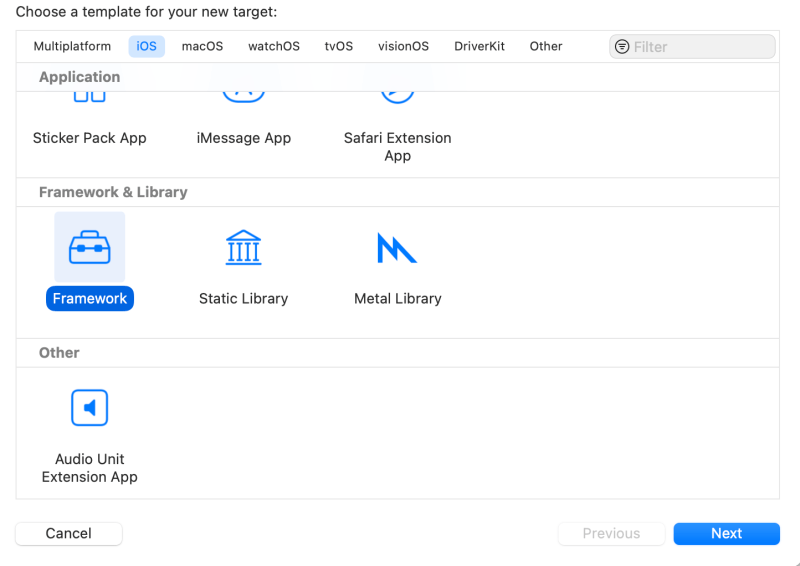
Xcode -> File -> New -> Target
You can create a Framework or Static Library
Static Library
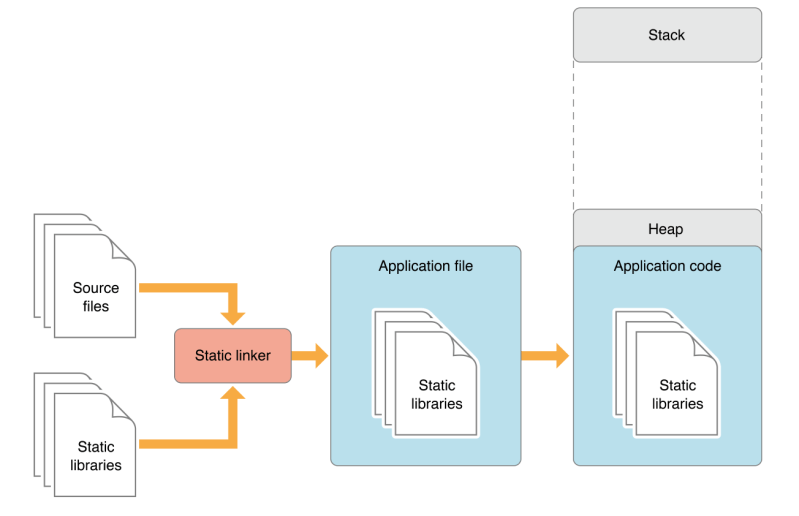
Most of an app’s functionality is implemented in libraries of executable code. When an app is linked with a library using a static linker, the code that the app uses is copied to the generated executable file. A static linker collects compiled source code, known as object code, and library code into one executable file that is loaded into memory in its entirety at runtime. The kind of library that becomes part of an app’s executable file is known as a static library. Static libraries are collections or archives of object files.
Note: Static libraries are also known as static archive libraries and static linked shared libraries.
When an app is launched, the app’s code—which includes the code of the static libraries it was linked with—is loaded into the app’s address space. Linking many static libraries into an app produces large app executable files. Figure 1 shows the memory usage of an app that uses functionality implemented in static libraries. Applications with large executables suffer from slow launch times and large memory footprints. Also, when a static library is updated, its client apps don’t benefit from the improvements made to it. To gain access to the improved functionality, the app’s developer must link the app’s object files with the new version of the library. And the apps users would have to replace their copy of the app with the latest version. Therefore, keeping an app up to date with the latest functionality provided by static libraries requires disruptive work by both developers and end users.
Apple
When you create a module using SPM, It is a static library.
Dynamic Library
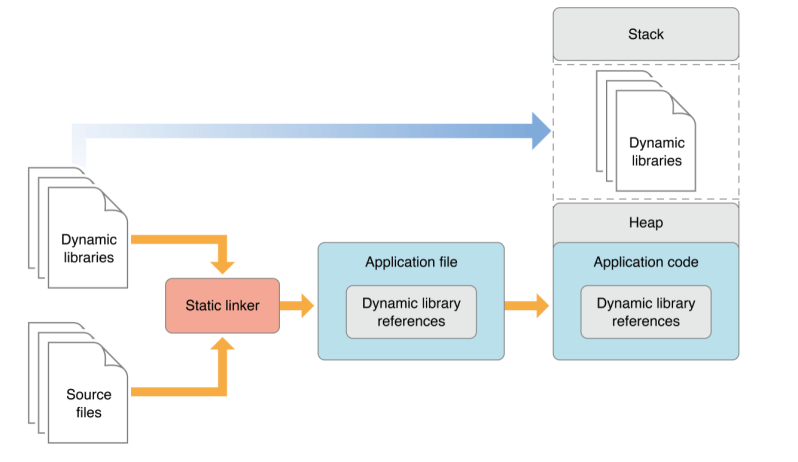
A better approach is for an app to load code into its address space when it’s actually needed, either at launch time or at runtime. The type of library that provides this flexibility is called dynamic library. Dynamic libraries are not statically linked into client apps; they don’t become part of the executable file. Instead, dynamic libraries can be loaded (and linked) into an app either when the app is launched or as it runs.
Using dynamic libraries, programs can benefit from improvements to the libraries they use automatically because their link to the libraries is dynamic, not static. That is, the functionality of the client apps can be improved and extended without requiring app developers to recompile the apps. Apps written for OS X benefit from this feature because all system libraries in OS X are dynamic libraries. This is how apps that use Carbon or Cocoa technologies benefit from improvements to OS X.
Another benefit dynamic libraries offer is that they can be initialized when they are loaded and can perform clean-up tasks when the client app terminates normally. Static libraries don’t have this feature. For details, see Module Initializers and Finalizers.
Apple
Reduce dependencies on external frameworks and dynamic libraries
Before any of your code runs, the system must find and load your app’s executable and any libraries on which it depends.
The dynamic loader (
dyld) loads the app’s executable file, and examines the Mach load commands in the executable to find frameworks and dynamic libraries that the app needs. It then loads each of the frameworks into memory, and resolves dynamic symbols in the executable to point to the appropriate addresses in the dynamic libraries.Each additional third-party framework that your app loads adds to the launch time. Although
https://developer.apple.com/documentation/xcode/reducing-your-app-s-launch-timedyldcaches a lot of this work in a launch closure when the user installs the app, the size of the launch closure and the amount of work done after loading it still depend on the number and sizes of the libraries loaded. You can reduce your app’s launch time by limiting the number of 3rd party frameworks you embed. Frameworks that you import or add to your app’s Linked Frameworks and Libraries setting in the Target editor in Xcode count toward this number. Built-in frameworks, like CoreFoundation, have a much lower impact on launch, because they use shared memory with other processes that use the same framework.
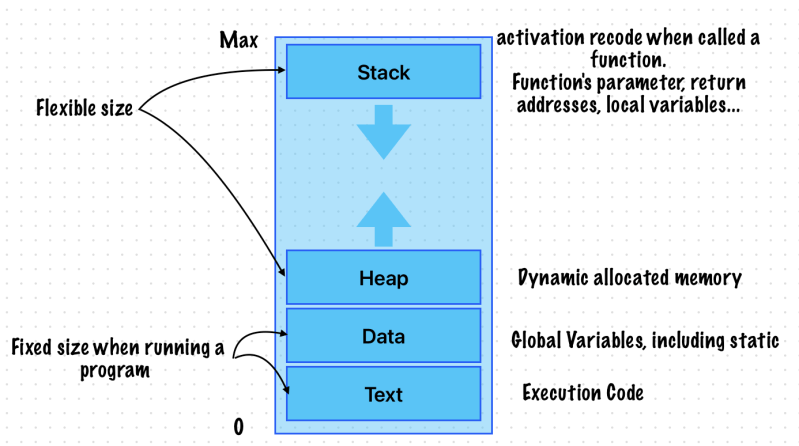
Memory Layout
Types of Variable
https://developer.apple.com/library/archive/documentation/Cocoa/Conceptual/Blocks/Articles/bxVariables.html#//apple_ref/doc/uid/TP40007502-CH6-SW1
 Shawn
Shawn 
Leave a comment