✍️ Note
Some codes and contents are sourced from Apple’s official documentation. This post is for personal notes where I summarize the original contents to grasp the key concepts
Life cycle
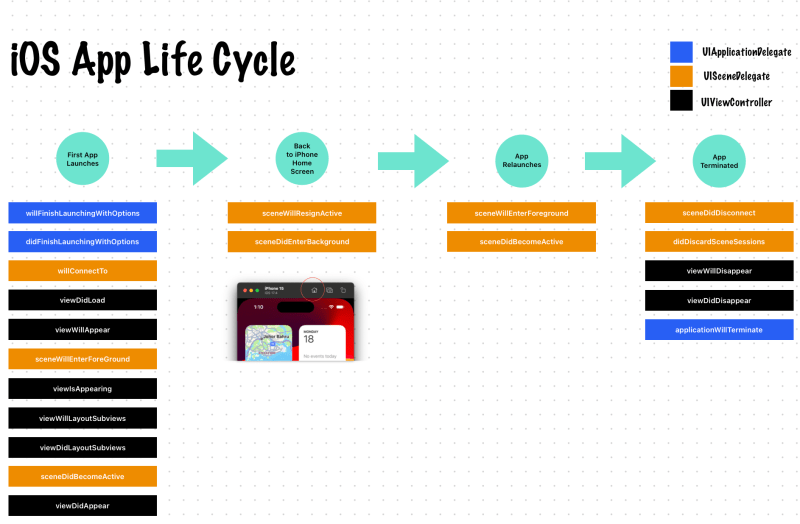
I checked what functions are called when first launches, enter background, foreground and terminated.

figure shows the state transitions for scenes. When the user or system requests a new scene for your app, UIKit creates it and puts it in the unattached state. User-requested scenes move quickly to the foreground, where they appear onscreen. A system-requested scene typically moves to the background so that it can process an event. For example, the system might launch the scene in the background to process a location event. When the user dismisses your app’s UI, UIKit moves the associated scene to the background state and eventually to the suspended state. UIKit can disconnect a background or suspended scene at any time to reclaim its resources, returning that scene to the unattached state.
https://developer.apple.com/documentation/uikit/app_and_environment/managing_your_app_s_life_cycle
- When UIKit connects a scene to your app, configure your scene’s initial UI and load the data your scene needs.
- When transitioning to the foreground-active state, configure your UI and prepare to interact with the user. See Preparing your UI to run in the foreground.
- Upon leaving the foreground-active state, save data and quiet your app’s behavior. See Preparing your UI to run in the background.
- Upon entering the background state, finish crucial tasks, free up as much memory as possible, and prepare for your app snapshot. See Preparing your UI to run in the background.
- At scene disconnection, clean up any shared resources associated with the scene.
- In addition to scene-related events, you must also respond to the launch of your app using your
UIApplicationDelegateobject. For information about what to do at app launch, see Responding to the launch of your app.
UIApplicationMain
Creates the application object and the application delegate and sets up the event cycle.
This function instantiates the application object from the principal class and instantiates the delegate (if any) from the given class and sets the delegate for the application. It also sets up the main event loop, including the application’s run loop, and begins processing events. If the application’s
Info.plistfile specifies a main nib file to be loaded, by including theNSMainNibFilekey and a valid nib file name for the value, this function loads that nib file.Despite the declared return type, this function never returns.
https://developer.apple.com/documentation/uikit/1622933-uiapplicationmain
UI restoration process
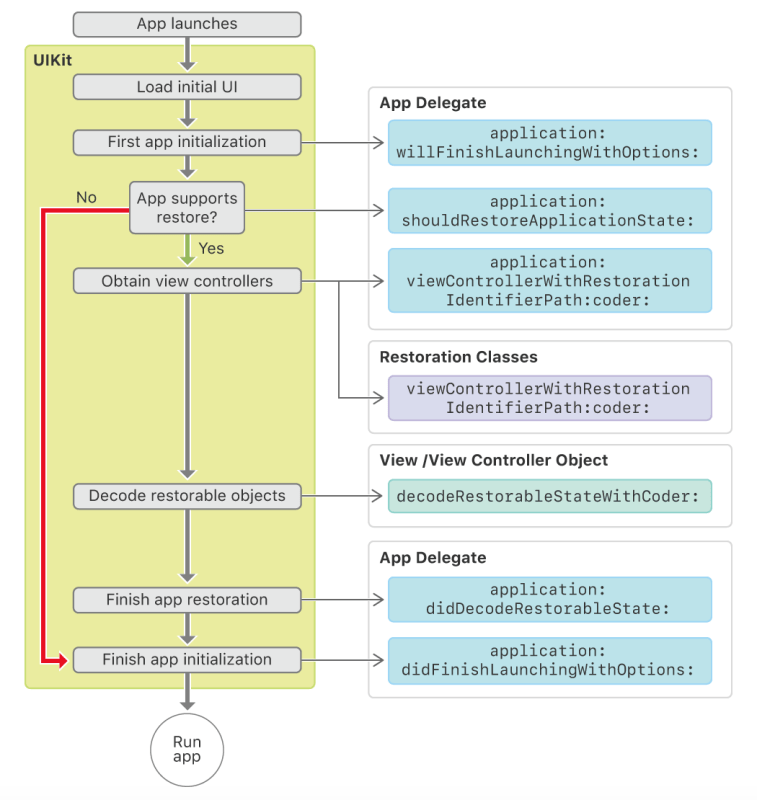
Restoration occurs during the middle of your app’s initialization, and it proceeds only when a state restoration archive is available and your app delegate’s
https://developer.apple.com/documentation/uikit/view_controllers/preserving_your_app_s_ui_across_launches/about_the_ui_restoration_processapplication(_:shouldRestoreApplicationState:)method returnstrue.
 Shawn
Shawn 
Leave a comment