
✍️ Note
Some codes and contents are sourced from Apple’s official documentation, educative.io and mozilla. This post is for personal notes where I summarize the original contents to grasp the key concepts (🎨 some images I draw it)
URLSession
The
URLSessionclass and related classes provide an API for downloading data from and uploading data to endpoints indicated by URLs. Your app can also use this API to perform background downloads when your app isn’t running or, in iOS, while your app is suspended.Your app creates one or more
URLSessioninstances, each of which coordinates a group of related data-transfer tasks. For example, if you’re creating a web browser, your app might create one session per tab or window, or one session for interactive use and another for background downloads. Within each session, your app adds a series of tasks, each of which represents a request for a specific URL (following HTTP redirects, if necessary).Type of URL Sessions
URLSessionhas a singletonsharedsession (which doesn’t have a configuration object) for basic requests. It’s not as customizable as sessions you create, but it serves as a good starting point if you have very limited requirements. You access this session by calling the shared class method. For other kinds of sessions, you create aURLSessionwith one of three kinds of configurations:
- A default session behaves much like the shared session, but lets you configure it. You can also assign a delegate to the default session to obtain data incrementally.
- Ephemeral sessions are similar to shared sessions, but don’t write caches, cookies, or credentials to disk.
- Background sessions let you perform uploads and downloads of content in the background while your app isn’t running.
Types of URL session tasks
- Data tasks send and receive data using
NSDataobjects. Data tasks are intended for short, often interactive requests to a server.- Upload tasks are similar to data tasks, but they also send data (often in the form of a file), and support background uploads while the app isn’t running.
- Download tasks retrieve data in the form of a file, and support background downloads and uploads while the app isn’t running.
- WebSocket tasks exchange messages over TCP and TLS, using the WebSocket protocol defined in RFC 6455.
- Authentication fails.
- Data arrives from the server.
- Data becomes available for caching.
The session object keeps a strong reference to the delegate until your app exits or explicitly invalidates the session. If you don’t invalidate the session, your app leaks memory until the app terminates.
URLSessionprovides status and progress properties. Query these properties if you need to make programmatic decisions based on the current state of the task (with the caveat that its state can change at any time).Protocol supports
he
URLSessionclass natively supports thedata,file,ftp,http, andhttpsURL schemes, with transparent support for proxy servers and SOCKS gateways, as configured in the user’s system preferences.
URLSessionsupports the HTTP/1.1, HTTP/2, and HTTP/3 protocols. HTTP/2 support, as described by RFC 7540, requires a server that supports Application-Layer Protocol Negotiation (ALPN).You can also add support for your own custom networking protocols and URL schemes (for your app’s private use) by subclassing
URLProtocol.iOS 9.0 and macOS 10.11 and later use App Transport Security (ATS) for all HTTP connections made with
URLSession. ATS requires that HTTP connections use HTTPS (RFC 2818).For more information, see
https://developer.apple.com/documentation/foundation/urlsessionNSAppTransportSecurity.
Network 101
If you want to learn more about network related topics, I recommend visit Mozilla MDN Web Docs
http structure
https://developer.mozilla.org/en-US/docs/Web/HTTP
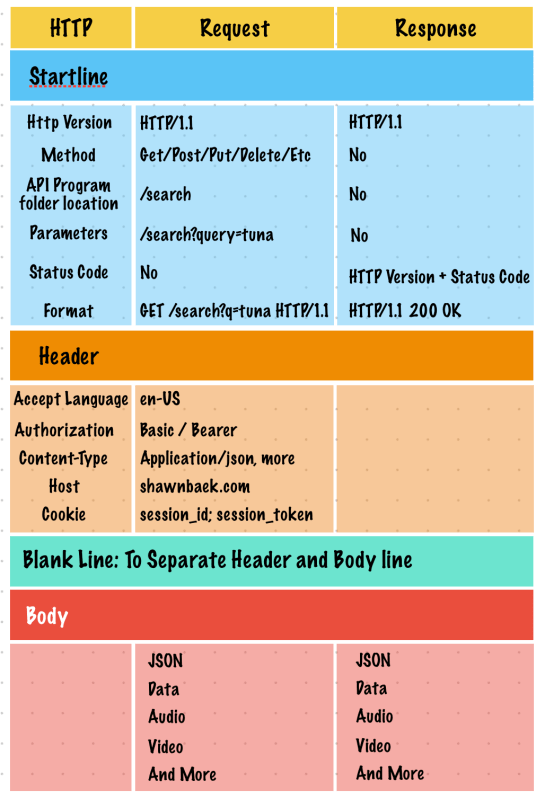
TCP/IP Model

Short communication
HTTP Request
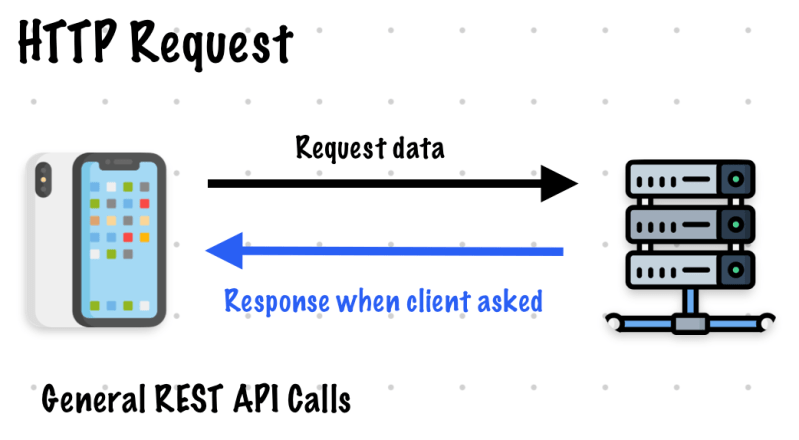
Polling

Long communication
Long polling
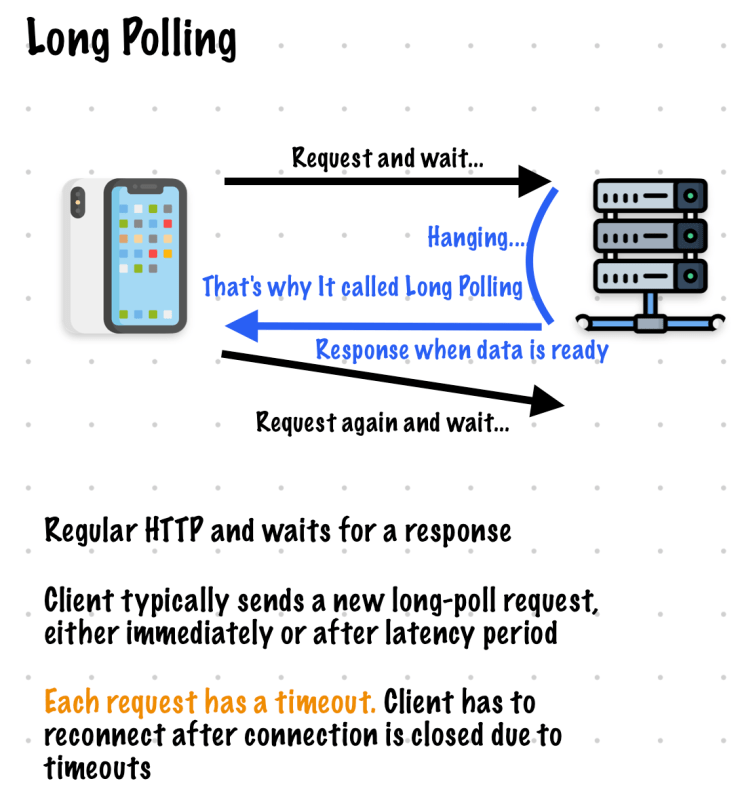
WebSocket
since iOS 13, You can use webSocketTask (https://developer.apple.com/documentation/foundation/urlsession/3181171-websockettask)
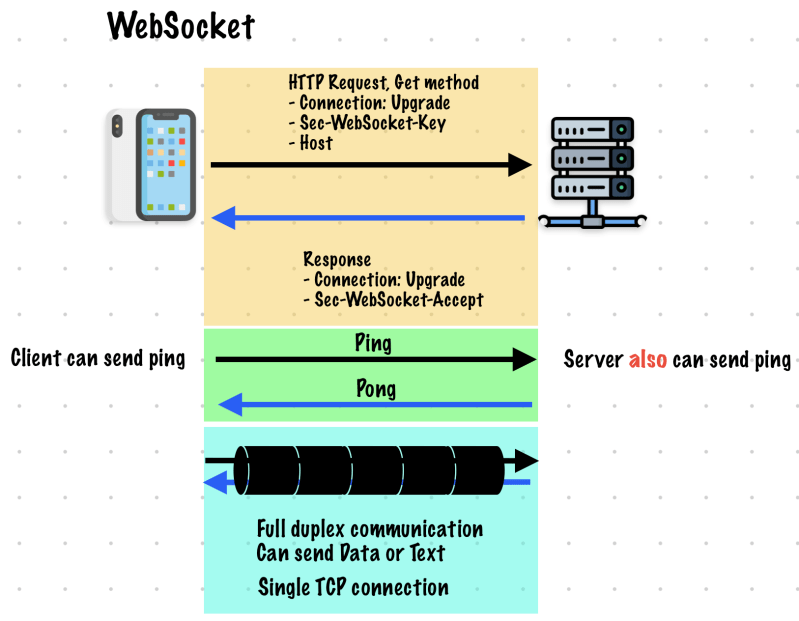
If you want to know details I suggest visit mozilla website
SSEs: Server Sent Events

In my working experience, I haven’t use SSEs.
Summary
There are various ways to communicate with a server. In my experience, these methods can often be combined with others, such as APNS (Apple Push Notification Service).

 Shawn
Shawn 
Leave a reply to Socket Programming using Vapor and URLSessionWebSocketTask – Shawn Cancel reply