✍️ Note
Some codes and contents are sourced from Apple, WWDC and BigMountStudio. This post is for personal notes where I summarize the original contents to grasp the key concepts (🎨 some images I draw it)
Overview
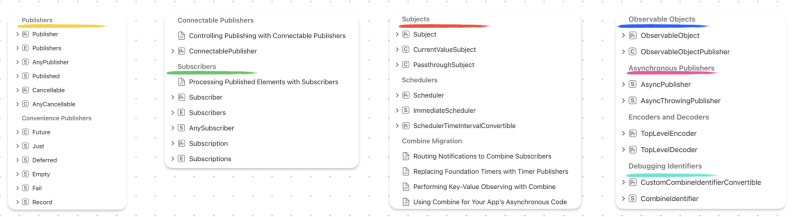
The Combine framework provides a declarative approach for how your app processes events. Rather than potentially implementing multiple delegate callbacks or completion handler closures, you can create a single processing chain for a given event source. Each part of the chain is a Combine operator that performs a distinct action on the elements received from the previous step.

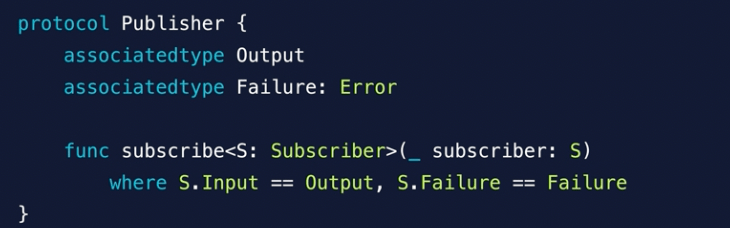
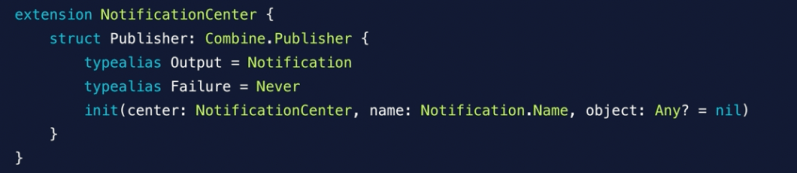
Publisher is struct
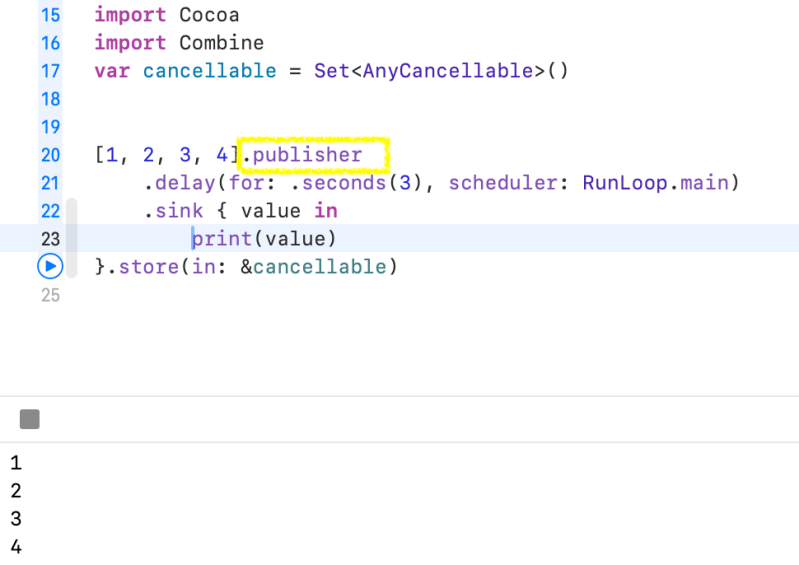
Array can publish values.
I used delay, between publisher and subscriber. It controlling the timing like debounce and throttle. Above the example, It prints 1, 2, 3, 4 after 3 seconds.
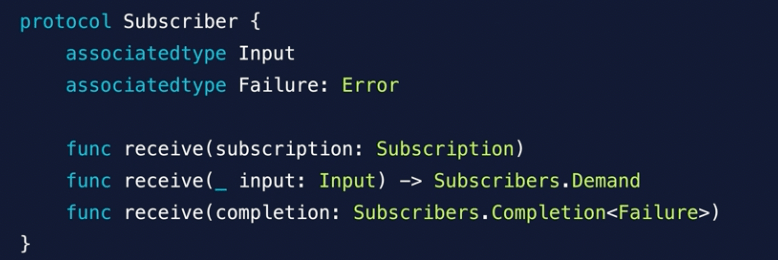
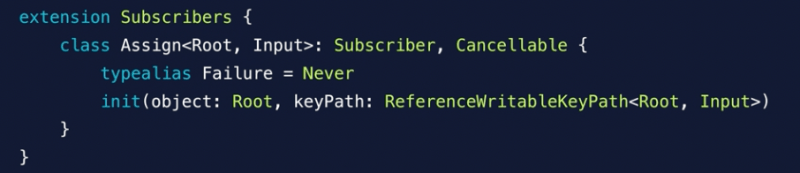
Subscriber
It has two main feature.
- receive
- assign
Operators
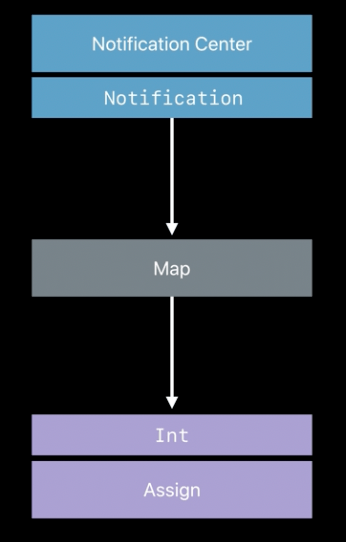
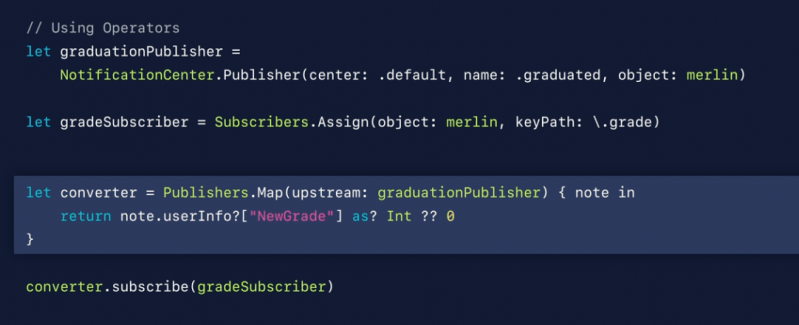
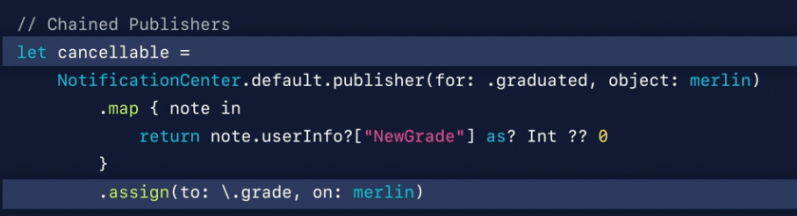
It adopts publisher and send results to subscriber
- Upstream: Publisher – Subscribes to Publisher
- Downstream: Subscriber – Sends results to a Subscriber
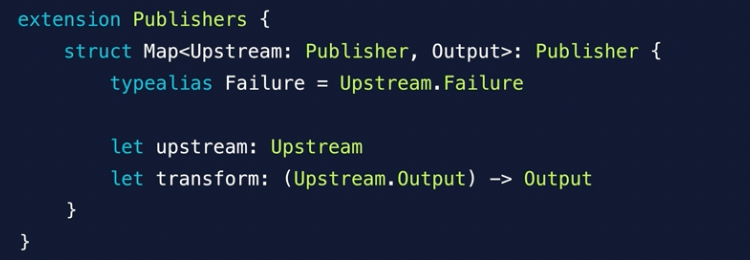

Publisher’s map function. It’s upstream is self
Subjects
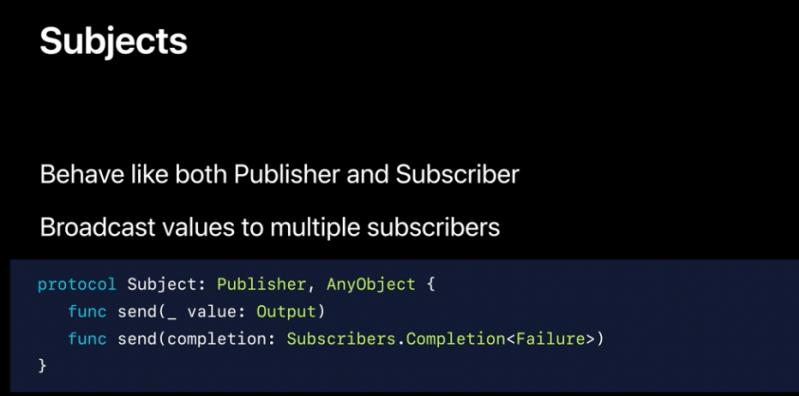
A publisher that exposes a method for outside callers to publish elements.
A subject is a publisher that you can use to ”inject” values into a stream, by calling its
send(_:)method. This can be useful for adapting existing imperative code to the Combine model.
- CurrentValueSubject
- PassthroughSubject
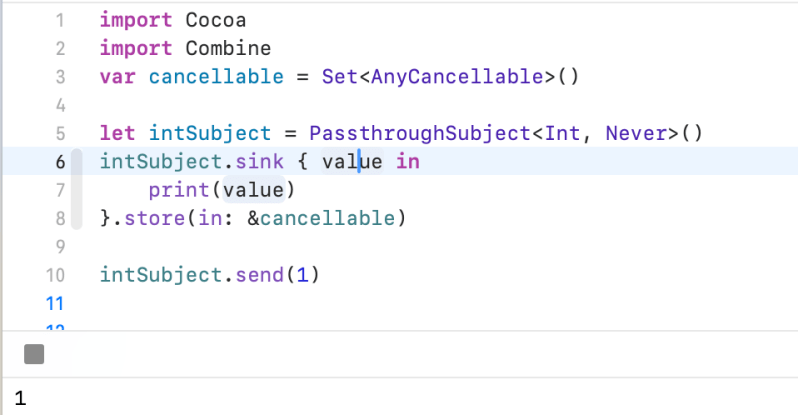
PassthroughSubject
A subject that broadcasts elements to downstream subscribers.
Unlike
CurrentValueSubject, aPassthroughSubjectdoesn’t have an initial value or a buffer of the most recently-published element. APassthroughSubjectdrops values if there are no subscribers, or its current demand is zero.
CurrentValueSubject
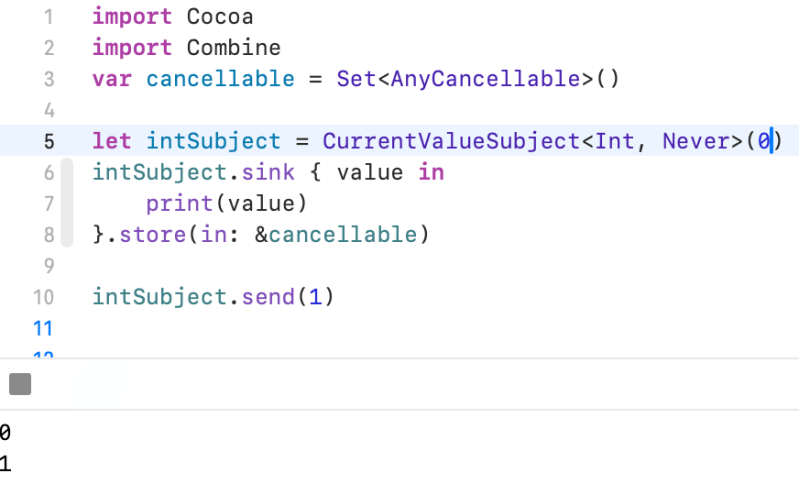
A subject that wraps a single value and publishes a new element whenever the value changes.
Unlike
PassthroughSubject,CurrentValueSubjectmaintains a buffer of the most recently published element.Calling
send(_:)on aCurrentValueSubjectalso updates the current value, making it equivalent to updating thevaluedirectly.
Map
Transforms all elements from the upstream publisher with a provided closure.
func map<T>(_ transform: @escaping (Self.
Output) -> T) ->Publishers.Map<Self, T>Parameters
transformA closure that takes one element as its parameter and returns a new element.
Return Value
A publisher that uses the provided closure to map elements from the upstream publisher to new elements that it then publishes.
FlatMap
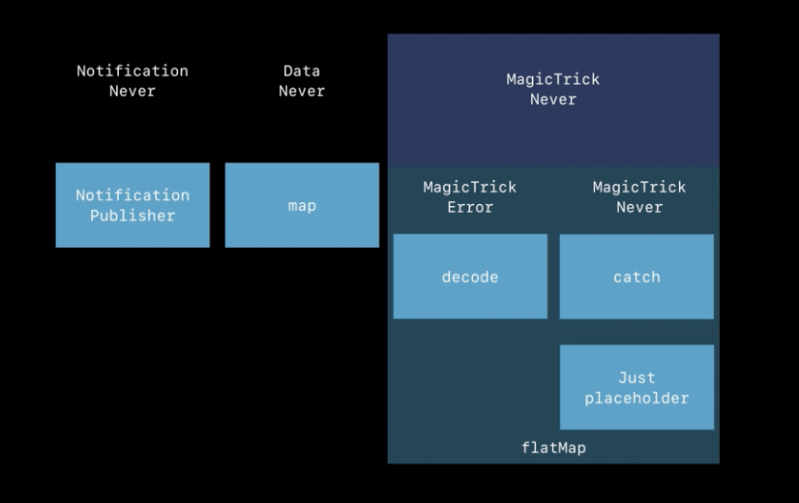
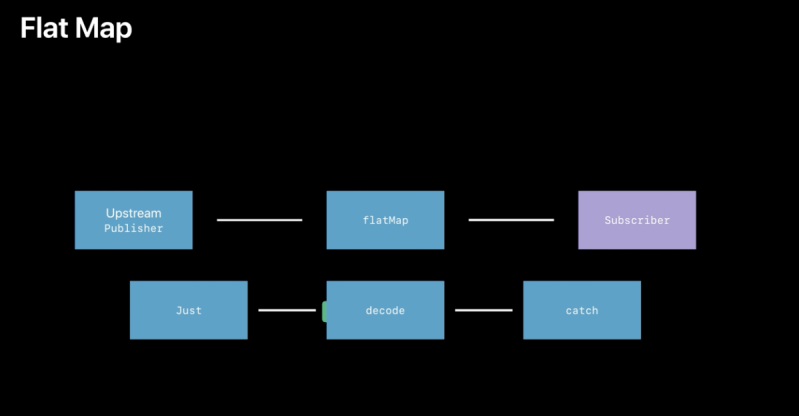
Transforms all elements from an upstream publisher into a new publisher up to a maximum number of publishers you specify.
func flatMap<T, P>( maxPublishers:
Subscribers.Demand= .unlimited, _ transform: @escaping (Self.Output) -> P ) ->Publishers.FlatMap<P, Self> where T == P.Output, P :Publisher, Self.Failure== P.FailureParameters
maxPublishersSpecifies the maximum number of concurrent publisher subscriptions, or
unlimitedif unspecified.transformA closure that takes an element as a parameter and returns a publisher that produces elements of that type.
Return Value
A publisher that transforms elements from an upstream publisher into a publisher of that element’s type.
Combine‘s
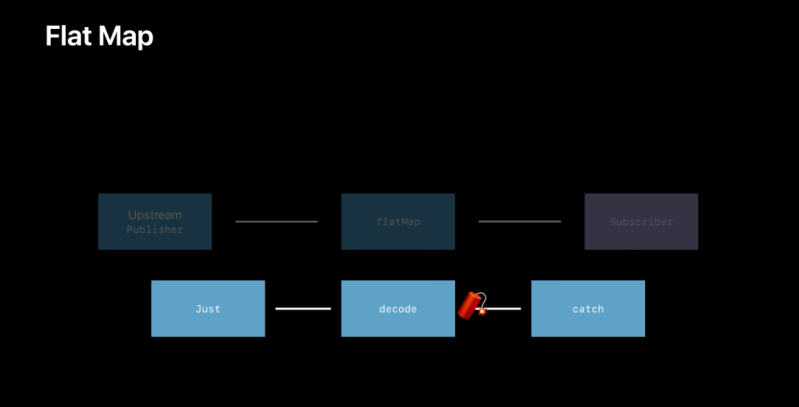
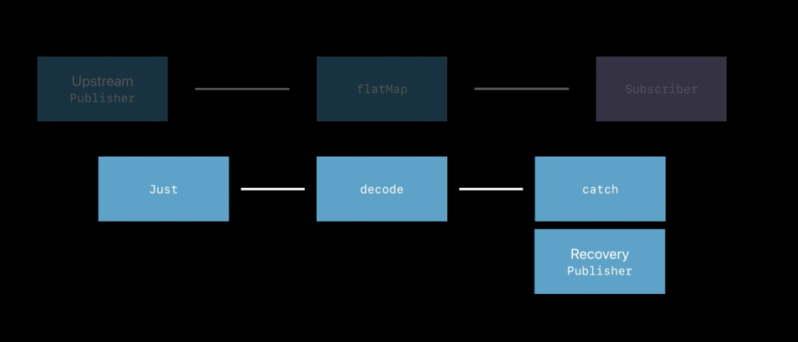
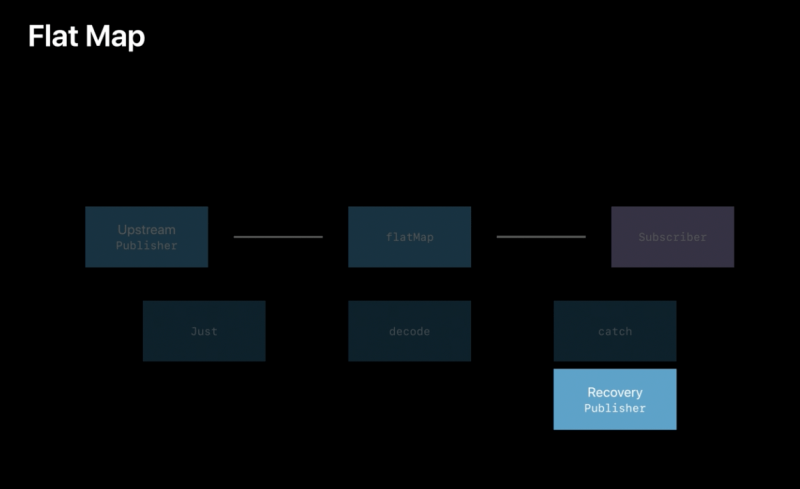
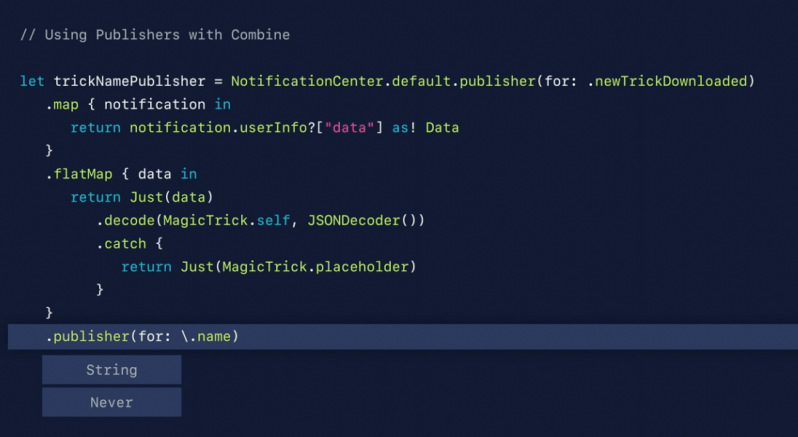
flatMap(maxPublishers:_:)operator performs a similar function to theflatMap(_:)operator in the Swift standard library, but turns the elements from one kind of publisher into a new publisher that is sent to subscribers. UseflatMap(maxPublishers:_:)when you want to create a new series of events for downstream subscribers based on the received value. The closure creates the newPublisherbased on the received value. The newPublishercan emit more than one event, and successful completion of the newPublisherdoes not complete the overall stream. Failure of the newPublishercauses the overall stream to fail.
In the example below, a PassthroughSubject publishes WeatherStation elements. The flatMap(maxPublishers:_:) receives each element, creates a URL from it, and produces a new URLSession.DataTaskPublisher, which will publish the data loaded from that URL.
public struct WeatherStation {
    public let stationID: String
}


var weatherPublisher = PassthroughSubject<WeatherStation, URLError>()


cancellable = weatherPublisher.flatMap { station -> URLSession.DataTaskPublisher in
    let url = URL(string:"https://weatherapi.example.com/stations/\(station.stationID)/observations/latest")!
    return URLSession.shared.dataTaskPublisher(for: url)
}
.sink(
    receiveCompletion: { completion in
        // Handle publisher completion (normal or error).
    },
    receiveValue: {
        // Process the received data.
    }
 )


weatherPublisher.send(WeatherStation(stationID: "KSFO")) // San Francisco, CA
weatherPublisher.send(WeatherStation(stationID: "EGLC")) // London, UK
weatherPublisher.send(WeatherStation(stationID: "ZBBB")) // Beijing, CN
Future – Publisher
A publisher that eventually produces a single value and then finishes or fails.
Use a future to perform some work and then asynchronously publish a single element. You initialize the future with a closure that takes a
Future.Promise; the closure calls the promise with aResultthat indicates either success or failure. In the success case, the future’s downstream subscriber receives the element prior to the publishing stream finishing normally. If the result is an error, publishing terminates with that error.
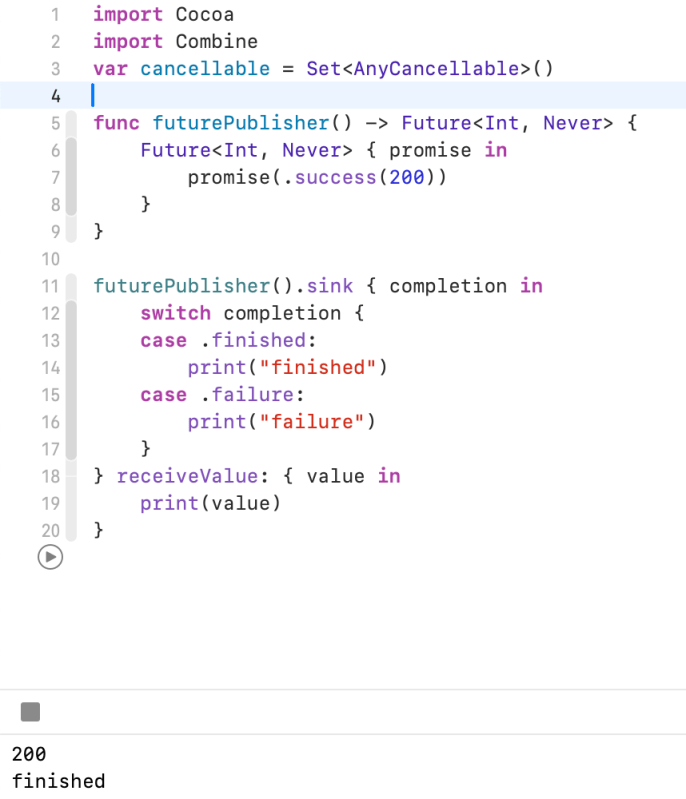
Above the example, when you call a function It create a Future publisher. As you can see Future has finished after send a value (200)
Apple’s example
func generateAsyncRandomNumberFromFuture() -> Future <Int, Never> {
    return Future() { promise in
        DispatchQueue.main.asyncAfter(deadline: .now() + 2) {
            let number = Int.random(in: 1...10)
            promise(Result.success(number))
        }
    }
}

cancellable = generateAsyncRandomNumberFromFuture()
    .sink { number in print("Got random number \(number).") }

//async-await syntax
let number = await generateAsyncRandomNumberFromFuture().value
print("Got random number \(number).")

//Alternative to Futures
func generateAsyncRandomNumberFromContinuation() async -> Int {
    return await withCheckedContinuation { continuation in
        DispatchQueue.main.asyncAfter(deadline: .now() + 2) {
            let number = Int.random(in: 1...10)
            continuation.resume(returning: number)
        }
    }
}

let asyncRandom = await generateAsyncRandomNumberFromContinuation()
Demand – Publisher
A publisher that awaits subscription before running the supplied closure to create a publisher for the new subscriber.
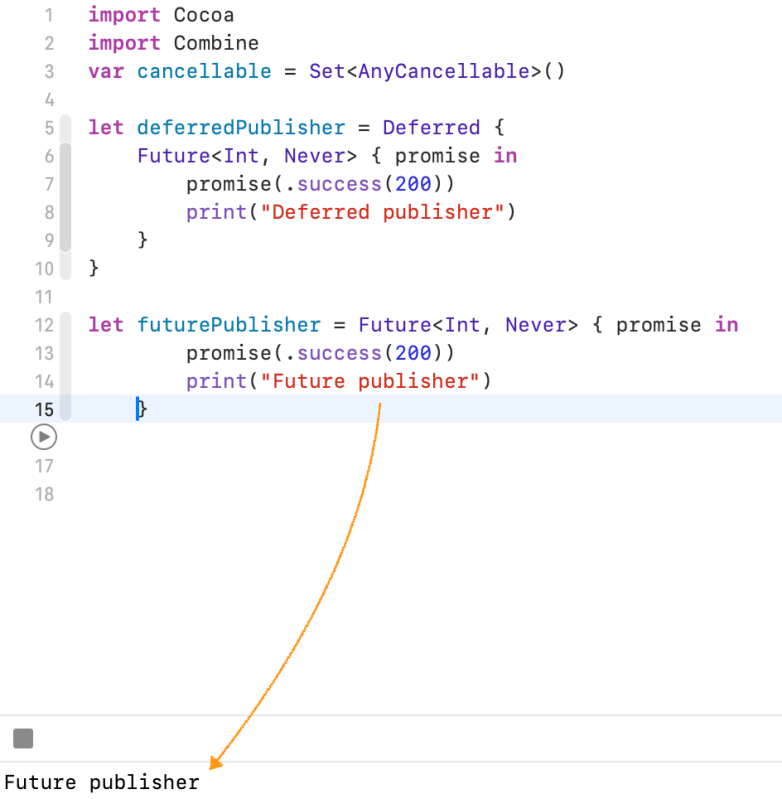
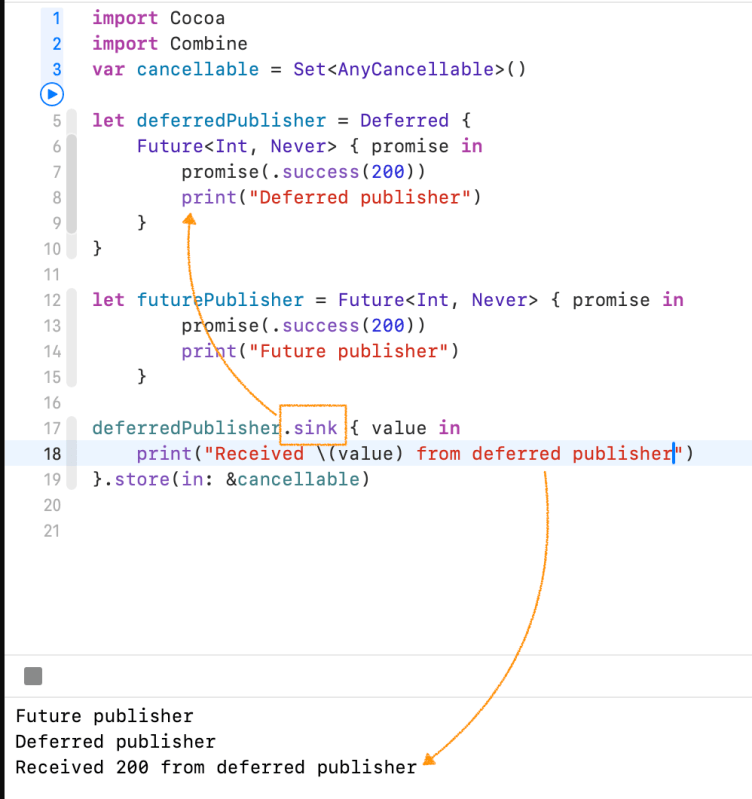
Unlike Future Publisher, It deferred publisher will not execute immediately when It is created.
It will execute every time a subscriber is attached.You can use it for many of Apple’s Kits where you need to get information from a device, or ask the user for permissions to access something, like photos, or other private or sensitive information
Throttle – Publisher method
Publishes either the most-recent or first element published by the upstream publisher in the specified time interval.
intervalThe interval at which to find and emit either the most recent or the first element, expressed in the time system of the scheduler.
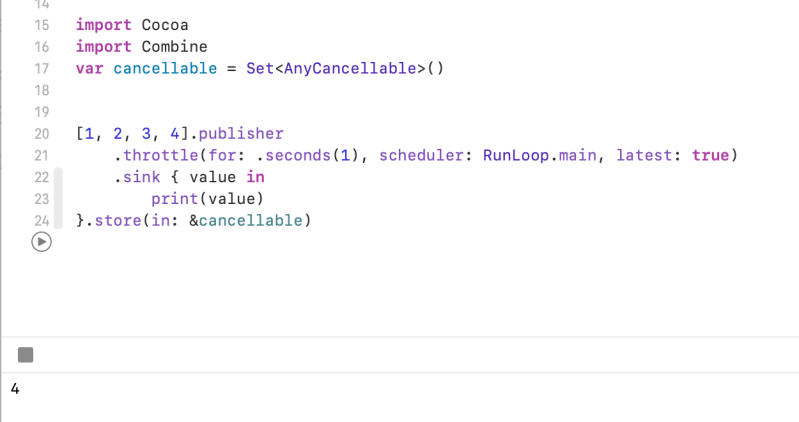
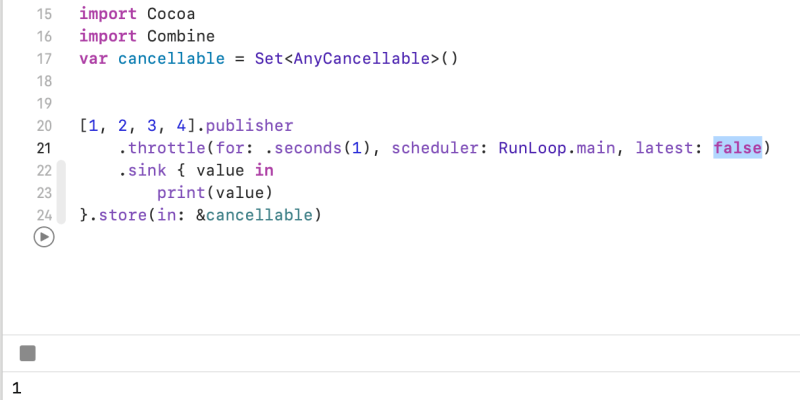
When you set latest true, It returns the latest value. Otherwise It returns a first value.
Share
Shares the output of an upstream publisher with multiple subscribers.
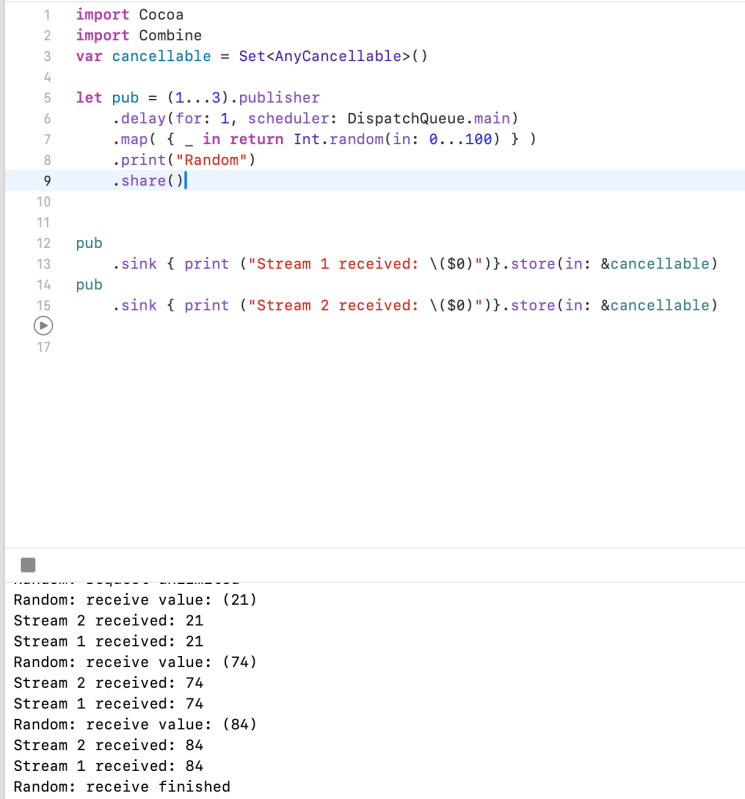
Publishers.Shareis effectively a combination of thePublishers.MulticastandPassthroughSubjectpublishers, with an implicitautoconnect().The following example uses a sequence publisher as a counter to publish three random numbers, generated by a
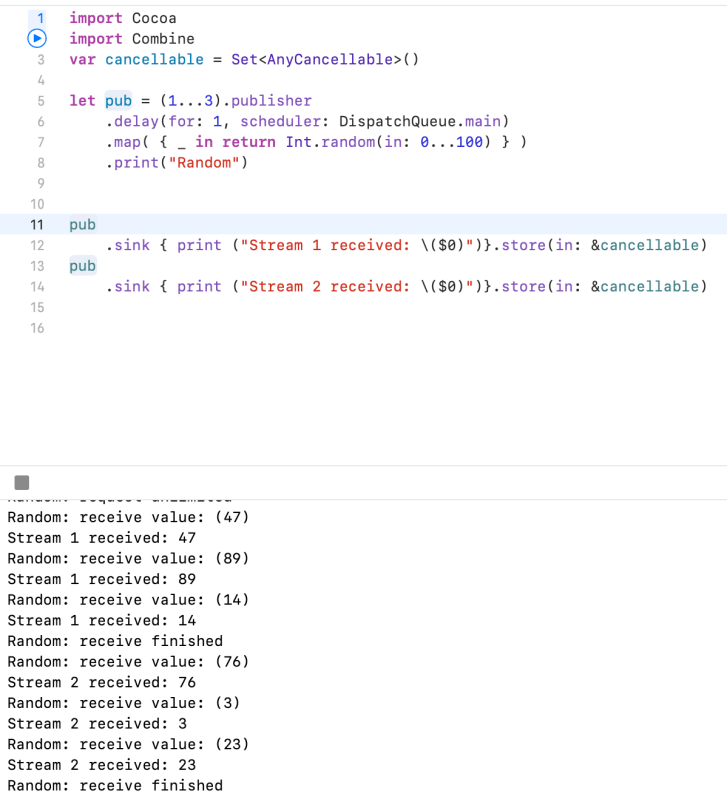
map(_:)operator. It uses ashare()operator to share the same random number to each of two subscribers. This example uses adelay(for:tolerance:scheduler:options:)operator only to prevent the first subscriber from exhausting the sequence publisher immediately; an asynchronous publisher wouldn’t need this.Without the
share()operator, stream 1 receives three random values, followed by stream 2 receiving three different random values.Also note that
Publishers.Shareis a class rather than a structure like most other publishers. This means you can use this operator to create a publisher instance that uses reference semantics.
Example 1. Without Share – received values are different
Example 2. With share() – received values are the same
Connect / AutoConnect – Use for ConnectablePublisher
Sometimes, you want to configure a publisher before it starts producing elements, such as when a publisher has properties that affect its behavior. But commonly used subscribers like
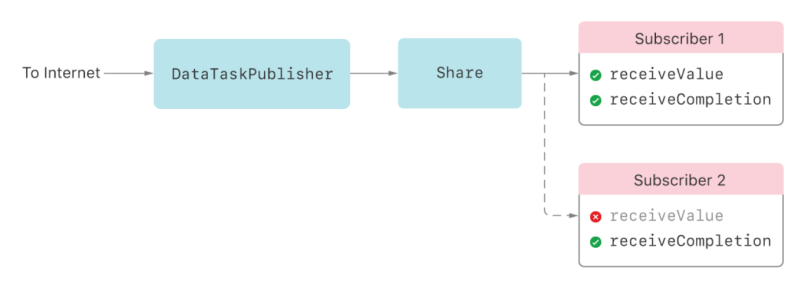
sink(receiveValue:)demand unlimited elements immediately, which might prevent you from setting up the publisher the way you like. A publisher that produces values before you’re ready for them can also be a problem when the publisher has two or more subscribers. This multi-subscriber scenario creates a race condition: the publisher can send elements to the first subscriber before the second even exists.Consider the scenario in the following figure. You create a
URLSession.DataTaskPublisherand attach a sink subscriber to it (Subscriber 1) which causes the data task to start fetching the URL’s data. At some later point, you attach a second subscriber (Subscriber 2). If the data task completes its download before the second subscriber attaches, the second subscriber misses the data and only sees the completion.
Hold Publishing by Using a Connectable Publisher
To prevent a publisher from sending elements before you’re ready, Combine provides the
ConnectablePublisherprotocol. A connectable publisher produces no elements until you call itsconnect()method. Even if it’s ready to produce elements and has unsatisfied demand, a connectable publisher doesn’t deliver any elements to subscribers until you explicitly callconnect().The following figure shows the
URLSession.DataTaskPublisherscenario from above, but with aConnectablePublisherahead of the subscribers. By waiting to callconnect()until both subscribers attach, the data task doesn’t start downloading until then. This eliminates the race condition and guarantees both subscribers can receive the data.
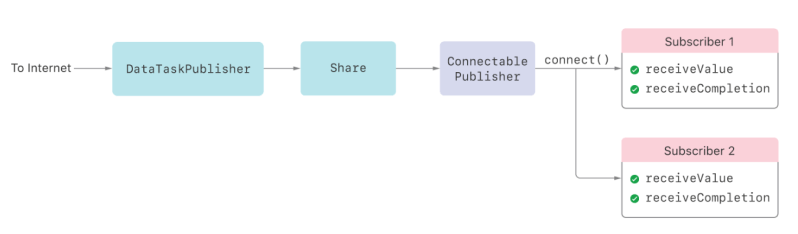
To use a
ConnectablePublisherin your own Combine code, use themakeConnectable()operator to wrap an existing publisher with aPublishers.MakeConnectableinstance. The following code shows howmakeConnectable()fixes the data task publisher race condition described above. Typically, attaching a sink — identified here by theAnyCancellableit returns,cancellable1— would cause the data task to start immediately. In this scenario, the second sink, identified ascancellable2, doesn’t attach until one second later, and the data task publisher might complete before the second sink attaches. Instead, explicitly using aConnectablePublishercauses the data task to start only after the app callsconnect(), which it does after a two-second delay.
let url = URL(string: "https://example.com/")!
let connectable = URLSession.shared
    .dataTaskPublisher(for: url)
    .map() { $0.data }
    .catch() { _ in Just(Data() )}
    .share()
    .makeConnectable()


cancellable1 = connectable
    .sink(receiveCompletion: { print("Received completion 1: \($0).") },
          receiveValue: { print("Received data 1: \($0.count) bytes.") })


DispatchQueue.main.asyncAfter(deadline: .now() + 1) {
    self.cancellable2 = connectable
        .sink(receiveCompletion: { print("Received completion 2: \($0).") },
              receiveValue: { print("Received data 2: \($0.count) bytes.") })
}


DispatchQueue.main.asyncAfter(deadline: .now() + 2) {
    self.connection = connectable.connect()
}
Use the Autoconnect Operator If You Don’t Need to Explicitly Connect
Some Combine publishers already implement
ConnectablePublisher, such asPublishers.MulticastandTimer.TimerPublisher. Using these publishers can cause the opposite problem: having to explicitlyconnect()could be burdensome if you don’t need to configure the publisher or attach multiple subscribers.For cases like these,
ConnectablePublisherprovides theautoconnect()operator. This operator immediately callsconnect()when aSubscriberattaches to the publisher with thesubscribe(_:)method.The following example uses
autoconnect(), so a subscriber immediately receives elements from a once-a-secondTimer.TimerPublisher. Withoutautoconnect(), the example would need to explicitly start the timer publisher by callingconnect()at some point.
let cancellable = Timer.publish(every: 1, on: .main, in: .default)
    .autoconnect()
    .sink() { date in
        print ("Date now: \(date)")
     }
 Shawn
Shawn 
Leave a comment