싱가포르는 연봉 정보가 오픈되어 있다. 왜냐면 기업이 외국인을 채용하려면 일단 싱가포르 정부 사이트에 채용 공고를 올려야 한다. 즉, 로컬(싱가포르인 혹은 영주권자) 채용을 우선하고 일정기간 내에 채용하지 못했을 경우 링크드인 같은 곳에 외국인들을 채용할 수 있는 공고를 올릴 수 있기 때문이다.
사이트 접속해서 검색해보면 알겠지만 신입, 시니어 등의 연봉 테이블이 회사별로 올라와있다. 구글 페이스북 이런 회사들도 채용하고자 하는 포지션과 월급 정보(최소 월급~최대 월급)를 다 올린다. 여기에 올라온 정보는 꽤 정확하다. 외국인 채용을 했을때 해당 채용공고 ID기준으로 비자 발급까지 진행한다고 들었다.
단, 공개된 정보는 Base Salary 계약 월급이다. 사이닝이라든가 스톡옵션 정보는 포함되어 있지 않다.
Our UI creation rule was creating a UI programmatically. But recently, we changed it.
Now our iOS team can create UI depending on their preferred approaches.
The reason is that there are really good things if you use Storyboard
Less Code
Compile Time
Preview
Layout warnings
Among them, the main reason for making a decision is Compile time.
Compile Time: Swift vs Storyboard
Imagine if you need to change the spacing in UIStackView.
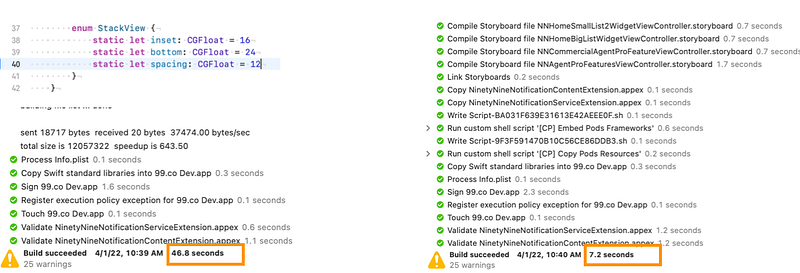
The left one is programmatic UI. If you change just one line of code then the swift compiler detects source file changes and will compile it. It may take more time if the source file dependent on other source files.
The right one is used Storyboard. If you change the spacing in StackView on Storyboard then ibtool compile a storyboard into the multiple nibs(stands for NextStep Interface Build file) at compile time.
Results: Storyboard compile-time 6.5x faster than Swift
Swift: 46.8 seconds
Storyboard: 7.2 seconds
As you can see from the results, compile-time when using the storyboard is much faster than swift file changes.
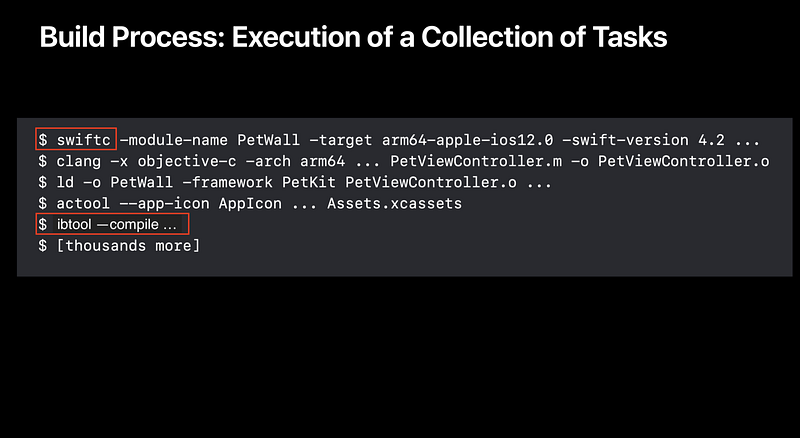
WWDC2018, Behind the Scenes of the Xcode Build Process
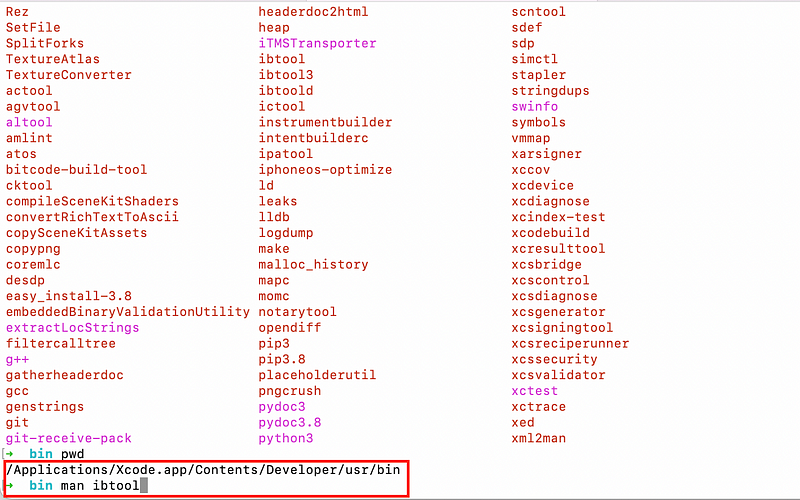
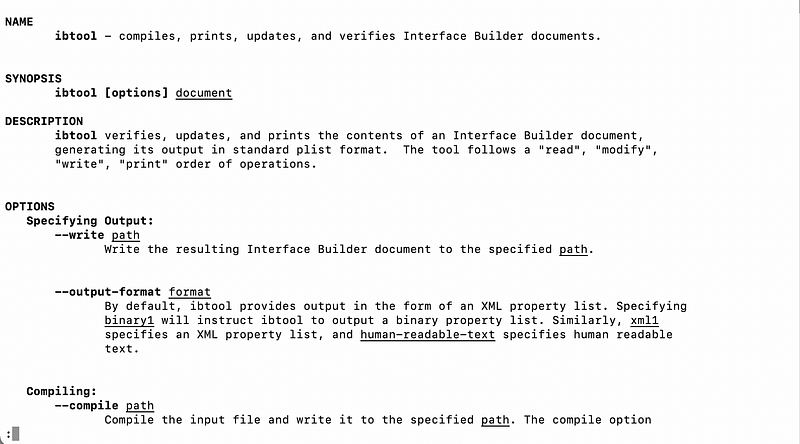
If you want to know ibtool’s compile options then check man ibtool in /Applications/Xcode.app/Contents/Developer/usr/bin.
/Applications/Xcode.app/Contents/Developer/usr/bin/You can check the Interface Builder document.
Although there were pros we’ve had some concerns about using Storyboard like below
PR Review
Conflicts Storyboard/Xib files
To address these concerns, we need to know about the xib(stands for XML Interface Builder) format.
xib format
Storyboard/Xib is a XML format. It means that Human Readable format. I sometimes heard that from iOS Engineers Storyboard/Xib files are hard to review. It’s true compared to reviewing swift code.
But once familiar with that format You may feel It is easy to review it. Because It looks like HTML format.
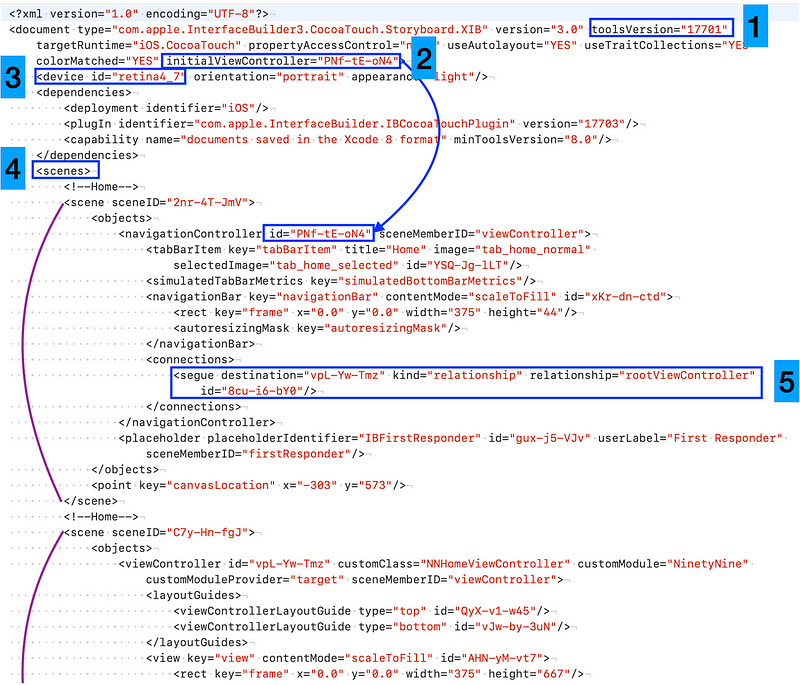
The storyboard is an XML document.
The numbers above the image mean like below
toolVersion
It means Interface builder tool’s version. It may be changed when you update Xcode. I highly recommend all team members use the latest Xcode version to avoid merge conflicts.
initialViewController
It indicates the initial view controller’s object id in Storyboard. So If you called an instantiateInitialViewController() then It returns that viewController.
device
You can use it to preview the layout on Storyboard. Anyone can change it but after checking the layout then I recommend resetting it as your team’s default device (e.g. iPhone X) to avoid merge conflicts.
scenes
A storyboard can have multiple scenes. A Scene has a ViewController.
segue
segue is a connection between ViewControllers. It has an id and a destination’s id. If the destination’s id has changed then we need to review it carefully. If there is no ViewController that has the destination’s id then It might be caused a crash at runtime.
PR review
I’ll show two examples.
Minor changes
Major changes (e.g. Layout, objectId, segue, etc)
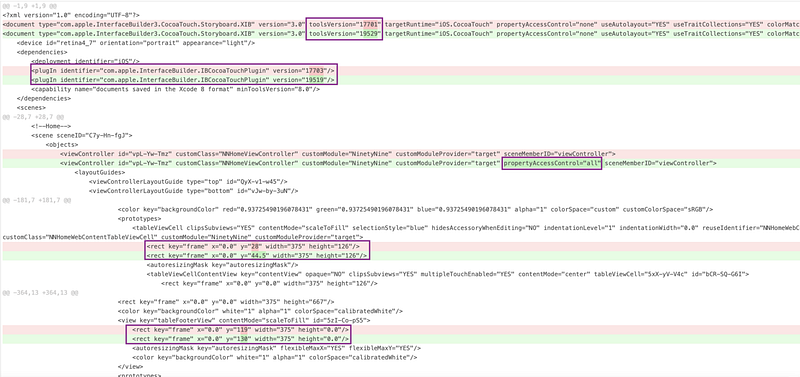
Minor Changes
These changes normally don’t affect your UI. So You can easily review and approve it. It should be fine.
toolsVersion / plugin version can be changed automatically when you use a different Xcode version and edited the Interface Builder.
rect can be changed when you change the device or move a subview. These small changes should be fine because It uses autolayout.
propertyAccessControl(Locking View) is controlled by the developer. I’ll explain it next section.
Major Changes
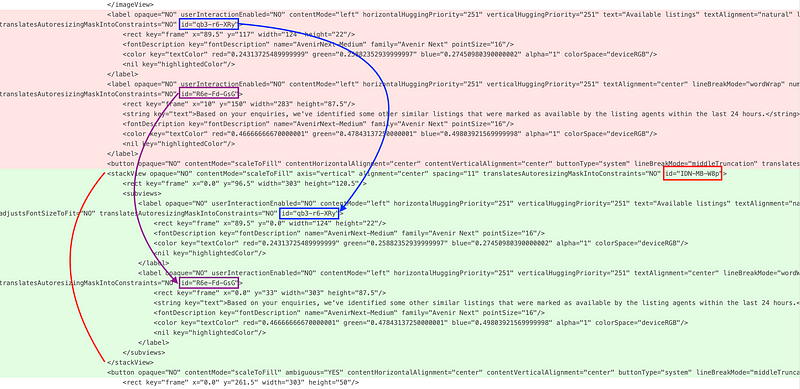
Major Changes will affect layout issues. I’ll show you some examples below.
Embedded in UIStackView
If you embedded labels in UIStackView then you have to double-check label’s id is in stackView or not.
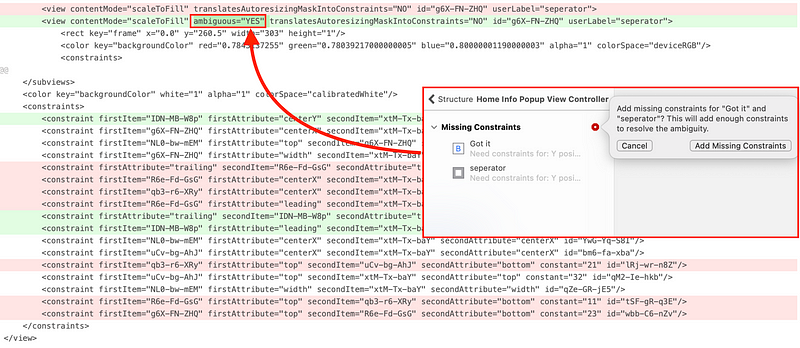
Layout Constraint Issue
An ambiguous=”YES” indicates us there is Layout Issue! So It should be fixed.
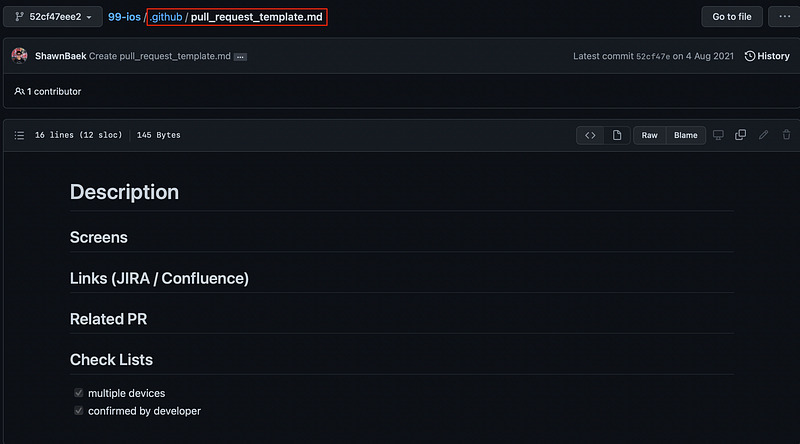
Pull Request Template
I highly recommend adding a screenshot of the layout in PR. To encourage your teammate to add a screenshot, set a Pull Request Template.
File changes cause merge conflicts. You can avoid it by dealing with file changes carefully.
By following this rule, merge conflicts are avoided as much as possible.
use the latest Xcode.
don’t commit the changes if you are not working on that View
locking Views in Storyboard and XIB Files you are working on
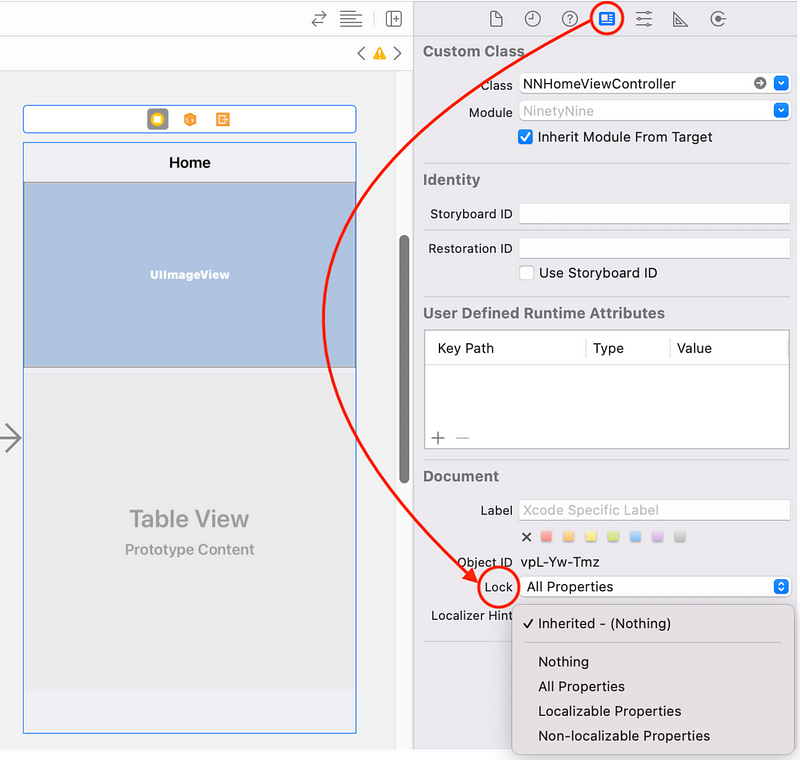
If your team is working on the same Storyboard, I highly recommend locking views to prevent unwanted changes.
Show the Identity Inspector -> Lock
You can set a lock on any UI Components(Whole Storyboard, UIViewController, UIView, Segue, any UI-related objects like a Constraint) you will be working on. As I mentioned above, propertyAccessControl will be added to the storyboard/xib file when you set a lock.
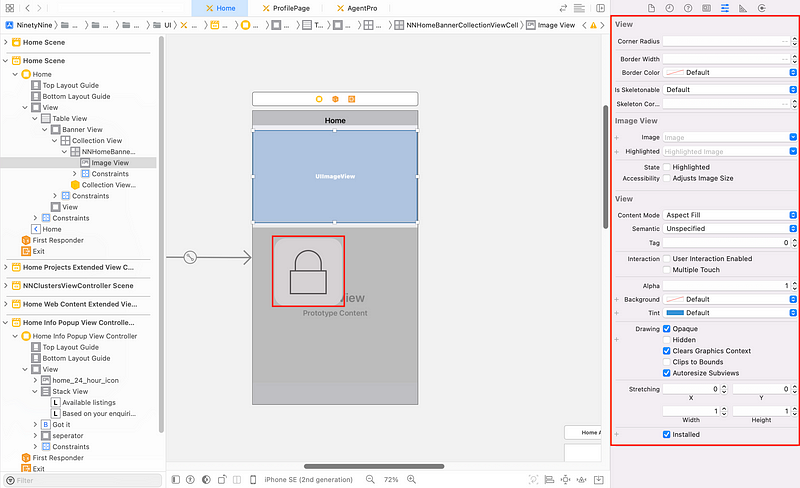
UIViewController is locked
Lock Image will be shown when you try to change on Locking View.
Conclusion
There are cons and pros to using Storyboard/Xib. Productivity is also different depending on the iOS developer’s preferred UI creation approach. But We made a decision to use both. Because we can save compile-time and found a good solution to resolve concerns for using it.










































 Shawn
Shawn 
You must be logged in to post a comment.