Blog

  • iMovie로 지도위에 여행경로 애니메이션 영상 만들기

    iMovie로 지도위에 여행경로 애니메이션 영상 만들기

    iMovie를 이용하면 정말 간단하게 여행경로 영상을 만들 수 있습니다.

    Background 선택하기


    imovie
    아이무비 편집

    iMovie에서 Backgrounds를 선택한 다음 원하는 지도를 선택하고 타임라인에 추가합니다.

    여행경로 설정하기


    Preview 화면에서 지구모양 버튼을 선택하면 여행경로를 선택할 수 있는 메뉴가 나옵니다. 저는 인천공항에서 베를린으로 이동하는 경로를 설정했습니다.

    iMovie로 이동경로 편집
    아이무비 이동경로 편집

    여행경로 확인


    여행경로
    완성된 여행경로 영상

    간단하게 여행경로 영상을 iMovie로 만들었습니다. 1분도 안걸리는 것 같네요 😃

  • How to remove text insets on UITextView?

    How to remove text insets on UITextView?

    Default UITextView has text insets, unlike the UILabel.

    Default UITextView has text insets, unlike the UILabel.

    How to remove the insets on UITextView like an UILabel?

    UITextView

    UITextView

    On the storyboard, select the UITextView and remove the Scrolling Enabled.

    @IBOutlet weak var textView: UITextView!
    override func viewDidLoad() {
        super.viewDidLoad()
        textView.textContainer.lineFragmentPadding = 0
        textView.textContainerInset = .zero
    }

    removeInset.png

    UITextView which is removed text insets will look like an UILabel.

    Thanks for reviewing my post

    Divjjot Singh ( 신승훈 )

  • 뉴욕 첼시마켓 Chelsea Market

    뉴욕 첼시마켓 Chelsea Market

    뉴욕에서 수산물을 값 싸게 먹고 싶을 때 생각 나는 곳이다. 그곳은 바로 첼시마켓!

    뉴욕 구글
    첼시마켓은 Google 바로 건너편에 있다.

    첼시마켓 둘러보기


    한국의 가락시장 같은 곳이다. 해산물 뿐만 아니라 과일, 스테이크 전문점 등등 여러 종류의 레스토랑이 있다. 개인적으로는 랍스터가 생각날 때 찾아가는 곳인데 먹느라 정신이 없었는지 랍스터 사진이 없다. 😅

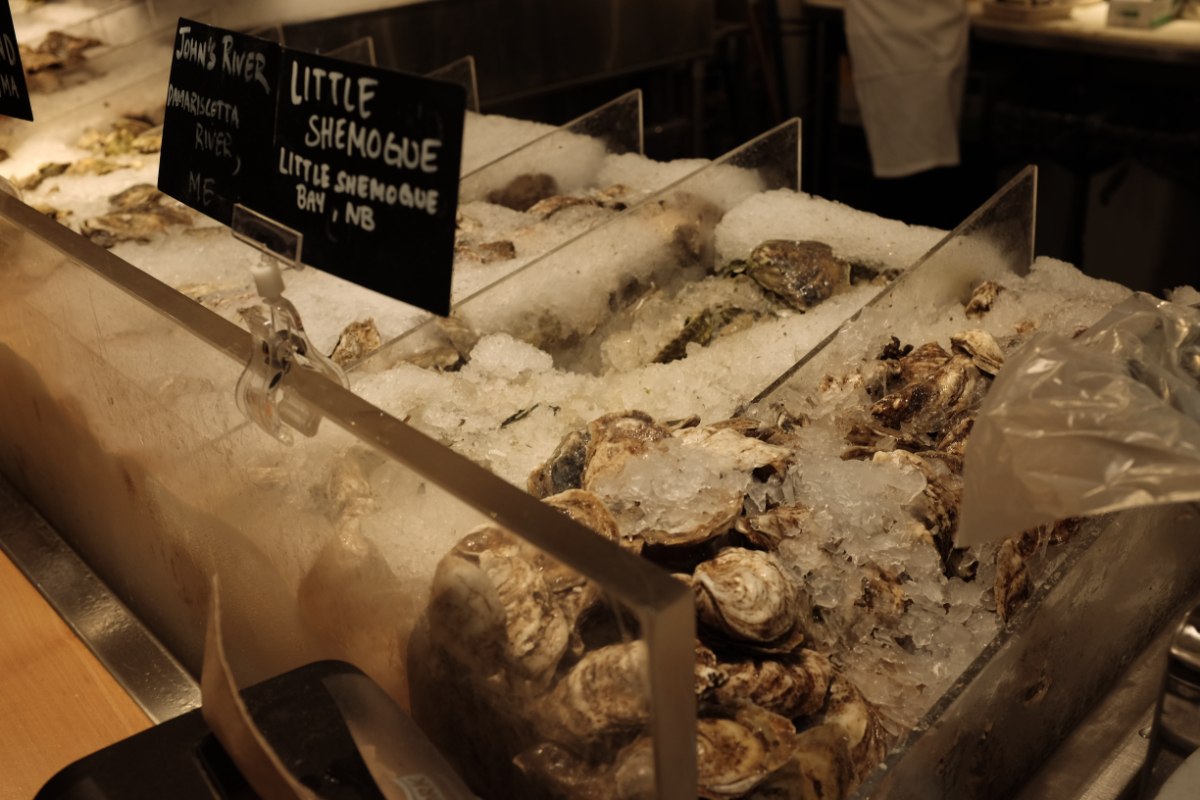
    굴 요리
    10가지 넘는 굴을 선택해서 맛 볼 수 있다
    첼시마켓
    애플망고
    첼시마켓
    정육점
    첼시마켓
    한국의 정육점이랑 비슷하다. 가격은 더 저렴한 편.
    핫도그
    정육점에서 판매하는 핫도그

    첼시마켓 위치


    첼시마켓 주변에는 휘트니 미술관(Whitney Museum), 하이라인 파크(High Line Park) 등이 있다. 이 근처로 여행계획이 있으시다면 첼시마켓에 들려서 랍스터와 굴을 드셔보는 것을 추천드립니다.

  • 뉴욕 베이글 Ess A Bagle

    뉴욕 베이글 Ess A Bagle

    센트럴 파크 근처 베이글 맛집을 소개합니다. 바로 Ess-a-Bagle 입니다. 에스 베이글이라고 불러야 되나요?

    에스 어 베이글

    센트럴 파크에서 피크닉을 하기 위해 이른 아침 베이글 맛집을 찾아갔어요. 오전 8시쯤 도착했는데 이미 많은 사람들이 기다리는 중.

    매장 내부


    매장 내부에 들어가면 티셔츠와 머그컵 같은 기념품이 보이고 베이글과 커피를 주문해서 가볍게 먹을 수 있는 테이블이 있습니다. 저는 포장주문을 하고 센트럴 파크 공원에서 먹었어요.

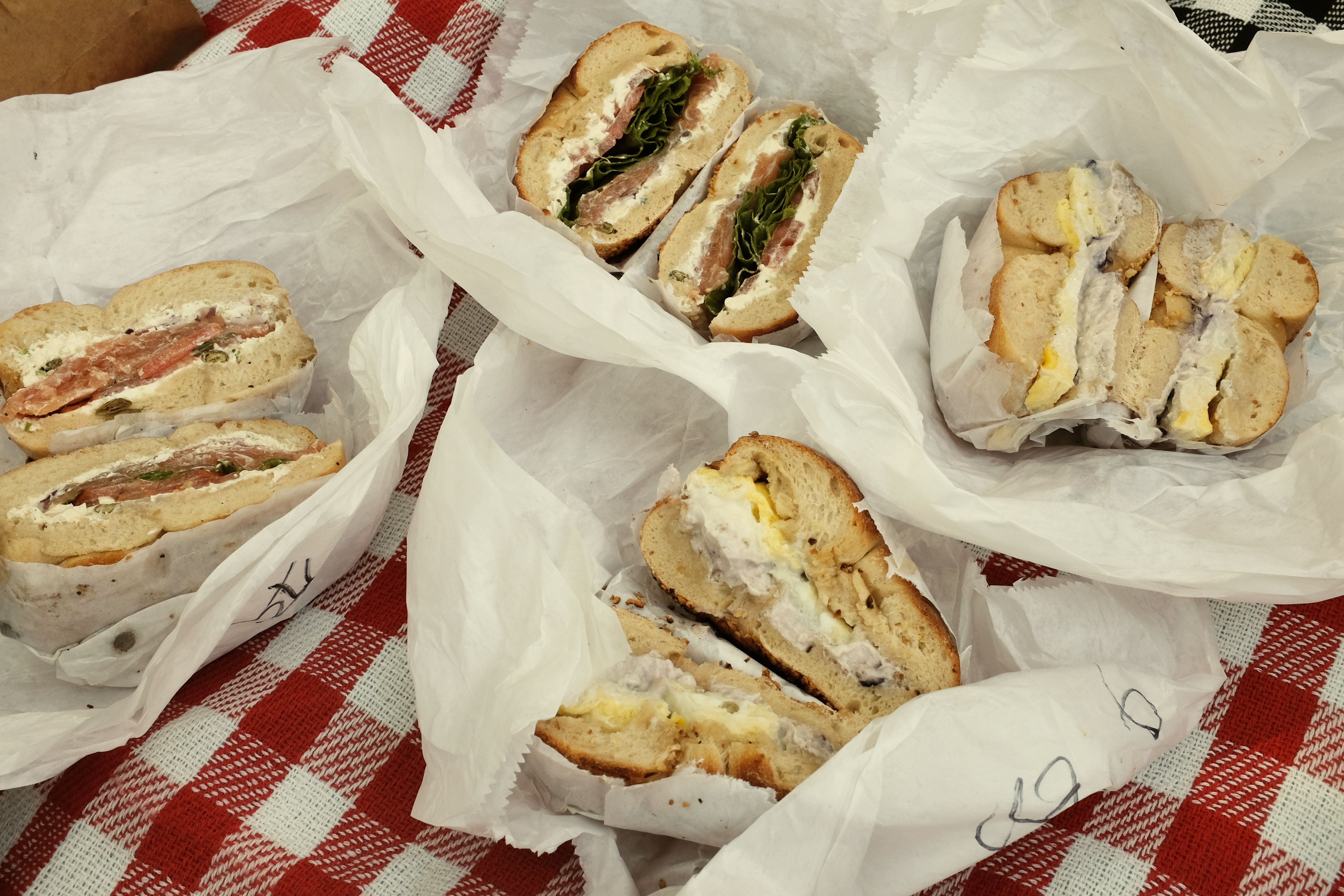
    베이글
    다양한 재료와 소스를 선택하고 나만의 베이글을 주문
    시나몬 베이글
    빵 종류도 다양합니다

    센트럴 파크


    센트럴파크
    피크닉

    베이글을 포장하고 센트럴 파크까지 걸어 갔는데 소요시간은 약 15분 정도 였던 것 같습니다. 커피와 함께 먹으니 아주 꿀 맛이었어요.

    Ess-a-Bagle 위치


    지도에 보이는 것 처럼 센트럴 파크와 가까운 편이라 센트럴 파크 여행 계획이 있으시다면 Ess-a-Bagle 꼭 들려보세요.

  • Introduction to Table

    Introduction to Table

    Last month I made the Table library. I inspired by javascript console.table.


    What is the Table?

    The Table is a helper function to print the tabulation data bypassing the Any data! [e.g., 1d array, 2d array, and dictionary]. I’m sure if you practice coding interviews, it helps you a lot. You don’t need to struggle for checking results using a build-in print function! 


    Examples

    The Table can print the tabulation data. It also supports the iPad playground.

    print(
        table: ["Good", "Very Good", "Happy", "Cool!"], 
        header: ["Wed", "Thu", "Fri", "Sat"]
    )
    
    //Result
    +----+---------+-----+-----+
    |Wed |Thu      |Fri  |Sat  |
    +----+---------+-----+-----+
    |Good|Very Good|Happy|Cool!|
    +----+---------+-----+-----+
    
    print(
        table: [
            "1": 1, 
            2: "Hellow?", 
            1.2: 0, 
            "I'm Table": [1, 2, 3, 2, 1]], 
        header: [
            "key", "value"
        ]
    )
    
    //Result
    +---------+---------------+
    |key      |value          |
    +---------+---------------+
    |2        |Hellow?        |
    +---------+---------------+
    |I'm Table|[1, 2, 3, 2, 1]|
    +---------+---------------+
    |1.2      |0              |
    +---------+---------------+
    |1        |1              |
    +---------+---------------+
    
    print(table: [
        [1, 2, 3], 
        [4, 5, 6], 
        [7, 8, 9, 10]
    ])
    
    //Result
    +-+-+-+--+
    |1|2|3|  |
    +-+-+-+--+
    |4|5|6|  |
    +-+-+-+--+
    |7|8|9|10|
    +-+-+-+--+
    

    iPad.PNG


    Inside the Table Library

    The declaration of function is similar to standard Swift print function.

    //Standard print
    func print(
        _ items: Any..., 
        separator: String = " ", 
        terminator: String = "\n"
    )
    
    //Table print
    @discardableResult func print(
        table data: Any,
        header: [String]? = nil,
        distribution: TableSpacing = .fillProportionally,
        terminator: String = ""
    ) -> String
    

    The difference is that it is not a variadic function. It take the one data type and then print the tabulation of given data.


    How to check the given data type?

    It use the Mirror to check the given data type. It is useful to check the type of any data.

    A representation of the substructure and display style of an instance of any type.

    https://developer.apple.com/documentation/swift/mirror
    let mirrorObj = Mirror(reflecting: data)
    
    //Check one dimensional array
    if mirrorObj == [Any].self {
    }
    //Check two dimensional array
    else if mirrorObj == [[Any]].self {
    }
    //Check Dictionary
    else if mirrorObj == [AnyHashable: Any].self {
    }


    Check the Item Width

    To display the tabulation of data, It needed item width in data elements. The table cell’s width is set by the longest item width.

    private func tableInfo<Item: LosslessStringConvertible>(
    data: [Item]) -> (
        numberOfItem: Int,
        maxWidth: Int,
        widthInfo: [Int: Int]
        ) {
        let stringData = data.map { String($0) }
        let maxWidth = stringData.sorted { 
            $0.count > $1.count 
        }.first!.count
        var maxWidthDict: [Int: Int] = [:]
        for (index, item) in stringData.enumerated() {
            maxWidthDict[index] = item.count
        }
        return (
            numberOfItem: stringData.count, 
            maxWidth: maxWidth, 
            widthInfo: maxWidthDict
        )
    }
    

    The tableInfo function return the informations of data. I use the LosslessStringConvertible protocols to get the item width by checking the characters of string.

    For example, the integer value 1050 can be represented in its entirety as the string “1050”.

    https://developer.apple.com/documentation/swift/losslessstringconvertible

    This function didn’t considering the Unicode block so far. If you set the CJK(Chinese, Japanese, and Korean) characters then table layout will be broken. I’m going to solve it by using Unocode-Box-Drawing next time.


    Unit Test

    Apple tests the print function using TextOutputStream.

    //Declaration of print function by Apple
    func print<Target>(
        _ items: Any..., 
        separator: String = " ", 
        terminator: String = "\n", 
        to output: inout Target
    ) where Target : TextOutputStream
    

    The TextOutputStream is a protocol. The String type already conforms to TextOutputStream. So If you pass the reference of String at to in print function, The output of print will be written into String.

    //https://github.com/apple/swift/blob/master/test/stdlib/Print.swift
    PrintTests.test("StdoutUTF8") {
      expectPrinted("µ", "\u{00B5}")
    }
    
    PrintTests.test("Varargs") {
      var s0 = ""
      print("", 1, 2, 3, 4, "", separator: "|", to: &s0)
      expectEqual("|1|2|3|4|\n", s0)
    
      var s1 = ""
      print(1, 2, 3, separator: "\n", terminator: "===", to: &s1)
      expectEqual("1\n2\n3===", s1)
    
      var s2 = ""
      print(4, 5, 6, separator: "\n", to: &s2)
      expectEqual("4\n5\n6\n", s2)
    
      var s3 = ""
      print("", 1, 2, 3, 4, "", separator: "|", to: &s3)
      expectEqual("|1|2|3|4|\n", s3)
    }
    

    I wrote the unit tests code by checking the result of function.

    func test_1DArray_Of_String_with_header() {
      let output = print(
      table: ["Good", "Very Good", "Happy", "Cool!"],
      header: ["Wed", "Thu", "Fri", "Sat"]
      )
      let expected = """
      +----+---------+-----+-----+
      |Wed |Thu      |Fri  |Sat  |
      +----+---------+-----+-----+
      |Good|Very Good|Happy|Cool!|
      +----+---------+-----+-----+
    
      """
      XCTAssertEqual(output, expected)
    }
    
    func test_2DArray_Of_Int_With_Different_Columns() {
        let output = print(
          table: [
            [1, 2, 3], 
            [4, 5, 6], 
            [7, 8, 9, 10]
          ]
        )
      let expected = """
      +-+-+-+--+
      |1|2|3|  |
      +-+-+-+--+
      |4|5|6|  |
      +-+-+-+--+
      |7|8|9|10|
      +-+-+-+--+
    
      """
      XCTAssertEqual(output, expected)
    }
    

    Swift Over Coffee S2E4: Erica vs the World

    Paul Hudson(HackingWithSwift.com) introduces the Table library on the Swift Over Coffee PodCast Episode S2E4.

    In this episode: WWDC goes WFH, Swift gets some inspiration from JavaScript, and we review your awesome Breathe app submissions.


    What’s the next step?

    I’m going to support more types!

    • tuple

    • decodable / encodable

    • custom data type

    • emoji / unicode

  • 나이아가라 폭포 KOA 캠핑장

    나이아가라 폭포 KOA 캠핑장

    나이아가라 폭포 근처에 있는 KOA 캠핑장을 다녀왔습니다. 개인적으로 캠핑은 설치하고 정리해야 할 것들이 많아서 호텔이나 에어비앤비를 선호합니다만 KOA 캠핑장은 모든 것이 준비되어 있어요! 그리고 캠핑족을 위한 다양한 숙박형태도 갖추고 있죠. (텐트, 캠핑카, 독채 등등)

    저는 오두막 같이 생긴 독채를 예약했습니다. 이곳은 호텔처럼 침대와 거실 그리고 화장실을 갖추고 있어서 아주 편리했습니다.

    KOA 캠핑장
    KOA 캠핑장 입구
    미국 캠핑장
    NIAGARA FALL KOA

    KOA 캠핑장의 놀거리들


    캐나다 캠핑장
    80년대 미국 영화에서 본 듯한 수영장 풍경
    KOA Camping
    KOA Camping
    엄청 넓은 덤블링
    코아 캠핑장
    4인용 자전거
    코아 캠핑장
    놀이터
    골프장
    미니 골프장
    미국 캠핑
    이제 본격적으로 캠핑 느낌나는 장소로 이동~!
    캐나다 캠핑카
    캐나다 캠핑카 스케일 엄청나죠?

    오두막 형태의 숙소


    오두막
    제가 머무른 숙소입니다.

    별채공간이고 다른 별채와 공간이 적당히 떨어져 있습니다.

    공간 구성을 간략하게 설명드릴게요

    • 큰 방은 퀸 사이즈 침대 1개
    • 작은 방은 2층 침대 2개
    • 거실 및 부엌이 연결된 형태이고 쇼파와 TV가 있어요
    • 화장실은 1개
    • 주차공간 아주 넉넉
    캐나다 캠핑
    시골동네 같은 느낌
    KOA Camping
    계수대 미국 캠핑장
    공용 개수대가 깔끔

    나이아가라 폭포와의 거리는?


    나이아가라 폭포
    저녁먹고 노을보러 찾아간 나이아가라 폭포

    KOA 캠핑장은 체인점이라 미국과 캐나다 곳곳에 있는데 나이아가라 지점은 차로 약 10분 – 15분 거리 정도 됩니다. 미리 예약하고 가셔야 되고 예약은 KOA 캠핑 클릭하세요 😀

    캠핑 좋아하시는 분들에게 추천 합니다. 다음 포스팅은 나이아가라 주변 관광코스를 소개할게요~!

  • What’s new on scrollView?

    What’s new on scrollView?

    In Xcode 11, the scroll view has two new things, which are the Content Layout Guide and Frame Layout Guide.

    It’s a very convenient way to set content size for scrollView.

    Let’s check how to use it on the storyboard.

    scrollView.png

    What is the Content Layout Guide?

    It is the size of the content. For example, if your scrollView is enabled vertical scrolling only, then set the subviews constraints relative to the Content Layout Guide.

    viewConstraintStep1.png

    viewConstraintStep2.png

    What is the Frame Layout Guide?

    It is a fixed size of the content. For example, if scrollView is enabled vertical only, then just set the Frame Layout Guide’s width constraint and leave your height constraint.

    viewConstraintStep3.png

    How to resolve the constraint warnings?

    The above steps is an essential for scrollView with its subView. However Storyboard may still complain.

    constraintProblem.png

    To solve the constraint issue, change the intrinsic size of the scroll views subView.

    constraintSolve.png

    Add stackView

    For scrolling the contents, I added stackView with listViews.

    scrolling.gif

    Thanks for reviewing my post

    Shai Mishali

    Navati is having tea

    Bart Pang

  • Data Structures and Algorithms for Coding Interviews – Essential Summary

    Data Structures and Algorithms for Coding Interviews – Essential Summary

    The coding interview is hard because We have to remember the basic data structures and algorithms. For me, I received masters degree of computer science seven years ago. Most of the tech companies require the coding interview when you apply for a job. So I decided to summarize the data structure and algorithm.

    Here is the list, and I’ll write the basic concept and will be solving problems using Swift

    Complexity

    • Time Complexity

    • Space Complexity

    Data Structures

    • Stack

    • Queue

    • Circular Queue

    • Linked List

    • Doubly Linked List

      1. Reverse Linked List

    • Hash Table

    • Tree

    • Binary Tree

      1. BFS

      2. DFS

        1. Pre-Order

          1. In-Order

          2. Post-Order

      3. Binary Search Tree [Ordered Binary Tree]

    • Dictionary

    • Set

    • Graph

    • Directed

      1. Undirected

      2. Graph using an Adjacency Matrix

      3. Graph using an Adjacency List and Set

      4. Depth First

      5. Breath First

      6. Topological Sort

      7. Weighted Graph

      8. Negative Weighted Graph

    Algorithms

    • Stack

      • Match parenthesis in an expression

      • find the minimum element in a expression

      • stack in constant time

    • Sorting

      • Selection Sort

      • Insertion Sort

      • Bubble Sort

      • Shell Sort

      • Merge Sort

      • Quick Sort

    • Search

      • Linear Search [Brute Force]

      • Binary Search [Sorted List]

    • Binary Tree

      • Find the minimum value in a Binary Search Tree

      • Find the maximum depth of a Binary Tree

      • Mirror a Binary Tree

      • Count the number of structurally unique binary tree possible

      • print all nodes within a range in a binary search tree

      • check if a binary tree is a binary search tree

      • check if a path from toot to leaf node sums up to a certain value

      • print all paths from the root to the leaf nodes

      • find the least common ancestor for 2 nodes

    • Heap [Priority Queue]

      • The Binary Heap

        1. Minimum Heap

        2. Maximum Heap

        3. Balanced Binary Search Tree

        4. An array or A list

        5. Insert and remove from a Heap

        6. Heapify

        7. Heap Sort

        8. Merge K sorted lists into one sorted array

        9. maximum element in a minimum heap and K largest elements in a stream

        10. Find the median In a stream of elements

    • Graph

      • Shortest path algorithm

      • Shortest path in a weighted graph

      • Dijkstra’s Algorithm [Greedy Algorithm]

      • Bellman Ford Algorithm [Shortest path in negative weighted graph] [Greedy Algorithm]

      • Dealing with negative cycles in the weighted graph [Bellman Ford Algorithm]

      • Prim’s Algorithm for a Minimal Spanning Tree [Undirected Graph] [Greedy Algorithm]

      • Kruskal’s Algorithm for a Minimal Spanning Tree for Forest [Priority Queue] [Connected / Unconnected]

      • Find the shortest path In a weight graph

      • Design A course schedule considering pre request for courses

    General Programming Problem

    • Basic Operation

    • Bit Manipulation

      • Set and Get n-th Bit

      • Print bits in Integer

      • Count the number of 1 bits

      • Reverse the bits in an Integer

    • Recursion

      • Find All subsets of A given set

      • Check whether 2 binary tree are the same

      • Paint Fill

      • Build A car given tasks and dependencies

      • Find all anagrams of a given word

      • Find a path a rat can travel through a maze

      • place 8 queens on a chess board

    • Palindrome

    • Find Distance

    • Run Length Encoding and Decoding

    • Game of Life

    • Break A Document Into Chunks

    • Add Two Numbers Represented by their Digits

    • Sudoku Validator

    • Incrementing A Number


    Thanks for reviewing my post

    Divjjot Singh ( 신승훈 )

  • How to render xib on Storyboard?

    How to render xib on Storyboard?

    When you create the custom view with xib and then set the custom view on Storyboard but if It has not appeared. How can you solve the rendering issue?

    I stuck in similar issues on Xcode 11.

    xcode 11 said -> Failed to render and update auto layout the agent threw an exception

    Here is my solution and I hope it helps you!

    customView.png

    import UIKit
    
    @IBDesignable
    class XibView: UIView {
        let className = String(describing: XibView.self)
        required init?(coder aDecoder: NSCoder) {
            super.init(coder: aDecoder)
            setupNib()
        }
    
        override init(frame: CGRect) {
            super.init(frame: frame)
            setupNib()
        }
    
        private func setupNib() {
            guard let nib = loadNib() else { return }   
            nib.translatesAutoresizingMaskIntoConstraints = false
            addSubview(nib)
            NSLayoutConstraint.activate([
                nib.leadingAnchor.constraint(equalTo: self.leadingAnchor),
                nib.trailingAnchor.constraint(equalTo: self.trailingAnchor),
                nib.topAnchor.constraint(equalTo: self.topAnchor),
                nib.bottomAnchor.constraint(equalTo: self.bottomAnchor)
            ])
        }
    
        func loadNib() -> UIView? {
            let bundle = Bundle(for: Self.self)
            return bundle.loadNibNamed(String(describing: Self.self), owner: self, options: nil)?.first as? UIView
        }
    }

    image-asset.png

  • How to enable syntax highlighting for Swift on Squarespace

    How to enable syntax highlighting for Swift on Squarespace

    Let’s enabling syntax highlighting for Swift

    The Squarespace supports syntax highlighting for HTML, CSS, and Javascript.

    But It does not support other programming languages.

    To enable it, We can choose the syntax highlighting plugins.

    I recommend PrismJS

    Download PrismJS css and javascript

    prismjs_compressionLevel.png

    Select PrismJS option before downloading it.

    • Compression level to Minified version

    • Language for Swift

    • Plugins (e.g., line numbers)

    prismjs_download.png

    Download the JS and CSS. That’s it.

    Copy and Paste it into the Squarespace

    EditingBlog.png

    Go to the setting Pages > Select your blog page (e.g., Posts)

    CodeInjection.png

    Go to Advanced tap and Copy and Paste the CSS and Javascript code into the Post Blog Item Code injection

    <style>
    <!-- Paste Your PrismJS CSS -->
    </style>
    <script>
    /*
    Paste your PrismJS Javascript
    */
    </script>

    Now We can syntax highlighting for Swift using Markdown

    markdown.png.jpeg

    let greeting = "Welcome to Shawn Baek's blog!"
    print(greeting)