In this post, I’ll explain the life cycle of UIViewController.
What happens when you create the UIViewController?
-
loadView (only once called during the entire life cycles)
-
viewDidLoad (only once called during the entire life cycles)
-
viewWillAppear
- viewIsAppearing
-
viewWillLayoutSubviews
-
viewDidLayoutSubviews
-
viewDidAppear
And what happens when you dismiss or destroy the UIViewController?
-
viewWillDisappear
-
viewDidDisappear
There are many steps of UIViewControllers. Let’s take a look loadView method.
loadView
Every view controller which subclassing the UIViewController has the view. It is the root view of the view controller. The default value is nil, and loadView is called when a view is a nil.
There are three ways to initialize the UIViewControllers.
-
Use Nib
-
Use Storyboard
-
Use Code
You take care of loadView methods. If your view controller uses the Nib or Storyboard, then you should not override this method.
Why?
As I mentioned, You can initialize the UIViewController in different ways. If you use the Nib or Storyboard, the view will be set when loaded from Nib or Storyboard objects.
Nib
The init(nibName:bundle:) will set the view by loading the nib file.
Storyboard
The initiateViewController(withIdentifier:) will set the view. (UIStoryboard object create the view controller and return it to your code)
Code
You should override the loadView method to set the root view of the view controller. You can also put subviews into the root view on this method. Don’t call a super.loadView in the override loadView method.
override func loadView() {
     let rootView = UIView()
     rootView.backgroundColor = .blue
     view = rootView

     //You can also add some more subviews into the view
 }
ViewDidLoad
It is called when the view controller’s view hierarchy is loaded into the memory.
If you are using Storyboard or Nib, You can add, remove subviews on ViewDidLoad methods.
Use this method to add or remove views, modify layout constraints, and load data for your views.
viewWillAppear
This method is called before configuring any animations and adding to the view hierarchy to display. You can set the style of view or set or change the orientation of the status bar. Call a super.viewWillAppear is required.
viewWillLayoutSubviews
When the view controller’s view is changed in its layout or bounds, then the system will call a viewWillLayoutSubviews. Compare to viewDidAppear; It will be automatically called when the view’s frame or bound changed, which means it can be called several times. On the other hand, viewDidAppear called once when the view controller’s view shows on the screen.
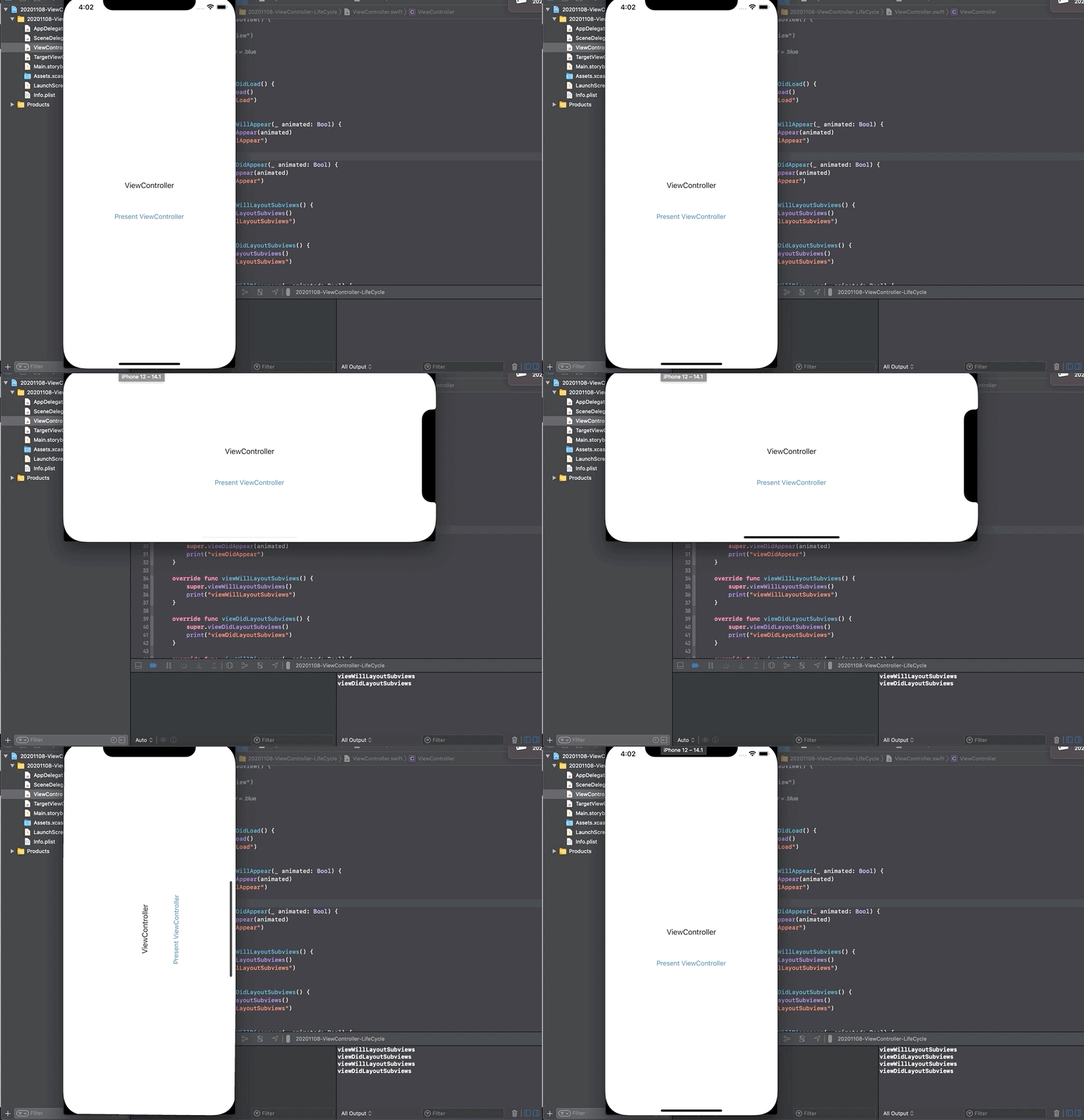
Your view controller can override this method to make changes before the view lays out its subviews. The default implementation of this method does nothing.
viewDidLayoutSubviews
This method is called when after layout subViews. It means that the view is updated and lays out their bounds and frames. You can override this method if you need some implementation when after updated views. And You don’t need to call a super.viewDidLayoutSubviews because the default implementation does nothing.
When the bounds change for a view controller’s view, the view adjusts the positions of its subviews and then the system calls this method. However, this method being called does not indicate that the individual layouts of the view’s subviews have been adjusted. Each subview is responsible for adjusting its own layout.
updateViewConstraints
If you use autolayout, You can override this method to update the view’s constraints. This method will be called when you call a view.setNeedsUpdateConstraints().
What happens when you call a setNeedsUpdateConstraint?
-
viewWillLayoutSubviews
-
updateViewConstraints
-
viewDidLayoutSubviews
Here are examples
@IBOutlet weak var buttonTopConstraint: NSLayoutConstraint!

override func updateViewConstraints() {
    //Implement your code in here
    buttonTopConstraint.constant = 100
    //You should call a super.updateViewConstraints at final step
    super.updateViewConstraints()
}
Hmm, I watched the WWDC 15 video about this. I’m not sure should I need to override this function or not. Apple also recommends setting constraints in a place when you need to change it. (e.g., When tapped the button then update the constraint, set a constraint in an IBAction method) If you are facing a performance problem to update the constraints, then you can override updateViewConstraints.
Override this method to optimize changes to your constraints.
It is almost always cleaner and easier to update a constraint immediately after the affecting change has occurred. For example, if you want to change a constraint in response to a button tap, make that change directly in the button’s action method.
You should only override this method when changing constraints in place is too slow, or when a view is producing a number of redundant changes.
Your implementation must be as efficient as possible. Do not deactivate all your constraints, then reactivate the ones you need. Instead, your app must have some way of tracking your constraints, and validating them during each update pass. Only change items that need to be changed. During each update pass, you must ensure that you have the appropriate constraints for the app’s current state.
viewDidAppear
It is called when after all of the views in view controller are onScreen. Call a super.viewDidAppear is required.
viewWillDisappear
It is called the view being removed from the view hierarchy. You can use this function to resign the responder or revert the orientation or style of view set on viewWillAppear or viewDidAppear. Call a super.viewWillDisappear is required.
viewDidDisapper
It is called the view was removed from the view hierarchy. Use this function if you need some tasks when dismissing the view controller. Call a super.viewDidDisappear is required.
References
Apple Document, View Controllers
 Shawn
Shawn 