Security topics are common interview question. I summarized what is Certificate, Provisioning, Code Signing, App Transport Security and CryptoKit.
Overview
Use the Security framework to protect information, establish trust, and control access to software. Broadly, security services support these goals:
- Establish a user’s identity (authentication) and then selectively grant access to resources (authorization).
- Secure data, both on disk and in motion across a network connection.
- Ensure the validity of code to be executed for a particular purpose.
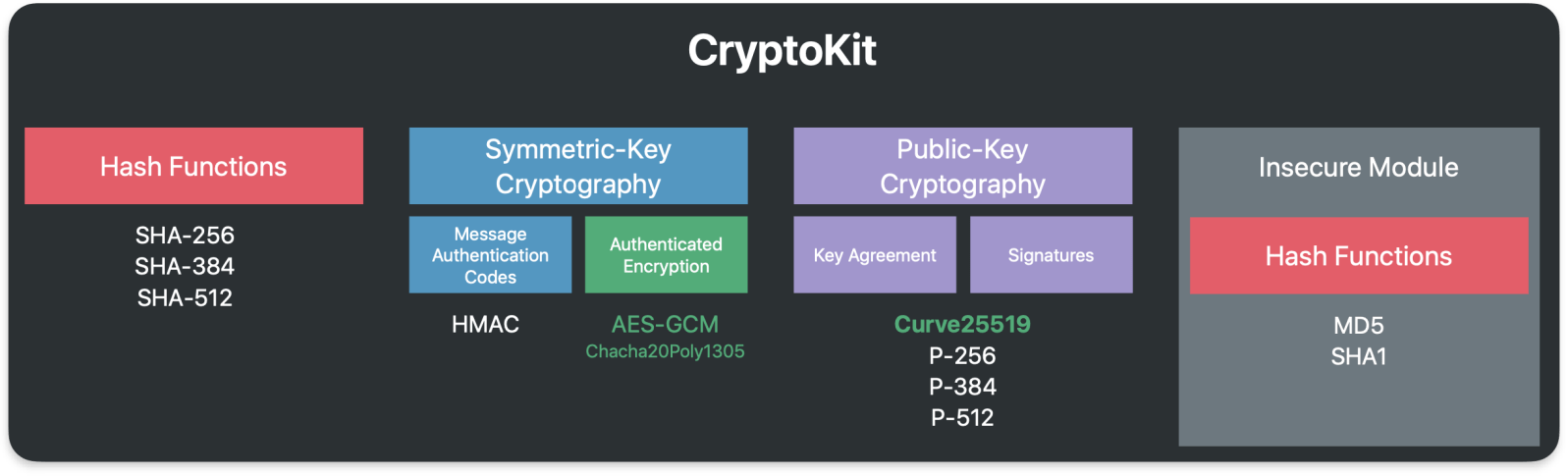
As shown in the image below, you can also use lower level cryptographic resources to create new secure services. Cryptography is difficult and the cost of bugs typically so high that it’s rarely a good idea to implement your own cryptography solution. Rely on the Security framework when you need cryptography in your app.

Certificate
Digital certificates can be used to securely identify a client or server, and to encrypt the communication between them using the public and private key pair.
A certificate contains a public key, information about the client (or server), and is signed (verified) by a CA.
A certificate and its associated private key are known as an identity. Certificates can be freely distributed, but identities must be kept secure. The freely distributed certificate, and especially its public key, are used for encryption that can be decrypted only by the matching private key. The private key part of an identity is stored as a PKCS #12 identity certificate (.p12) file and encrypted with another key that’s protected by a passphrase. An identity can be used for authentication (such as 802.1X EAP-TLS), signing, or encryption (such as S/MIME).
The certificate and identity formats Apple devices support are:
- Certificate: .cer, .crt, .der, X.509 certificates with RSA keys
- Identity: .pfx, .p12
https://support.apple.com/zh-sg/guide/deployment/depb5eff8914/web

Public Key Certificate Flow

Certificate Trust
If a certificate has been issued from a CA whose root isn’t in the list of trusted root certificates, iOS, iPadOS, macOS, or visionOS won’t trust the certificate. This is often the case with enterprise-issuing CAs. To establish trust, use the method described in certificate deployment. This sets the trust anchor at the certificate being deployed. For multitiered public key infrastructures, it may be necessary to establish trust not only with the root certificate, but also with any intermediates in the chain. Often, enterprise trust is configured in a single configuration profile that can be updated with your MDM solution as needed without affecting other services on the device.
Root certificates on iPhone, iPad, and Apple Vision Pro
Root certificates installed manually on an unsupervised iPhone, iPad, or Apple Vision Pro through a profile display the following warning, “Installing the certificate “name of certificate” adds it to the list of trusted certificates on your iPhone or iPad. This certificate won’t be trusted for websites until you enable it in Certificate Trust Settings.”
The user can then trust the certificate on the device by going to Settings > General > About > Certificate Trust Settings.
Note: Root certificates installed by an MDM solution or on supervised devices disable the option to change the trust settings.
https://www.apple.com/certificateauthority/
https://support.apple.com/zh-sg/guide/deployment/depb5eff8914/web
PKI (Public Key Infrastructure)
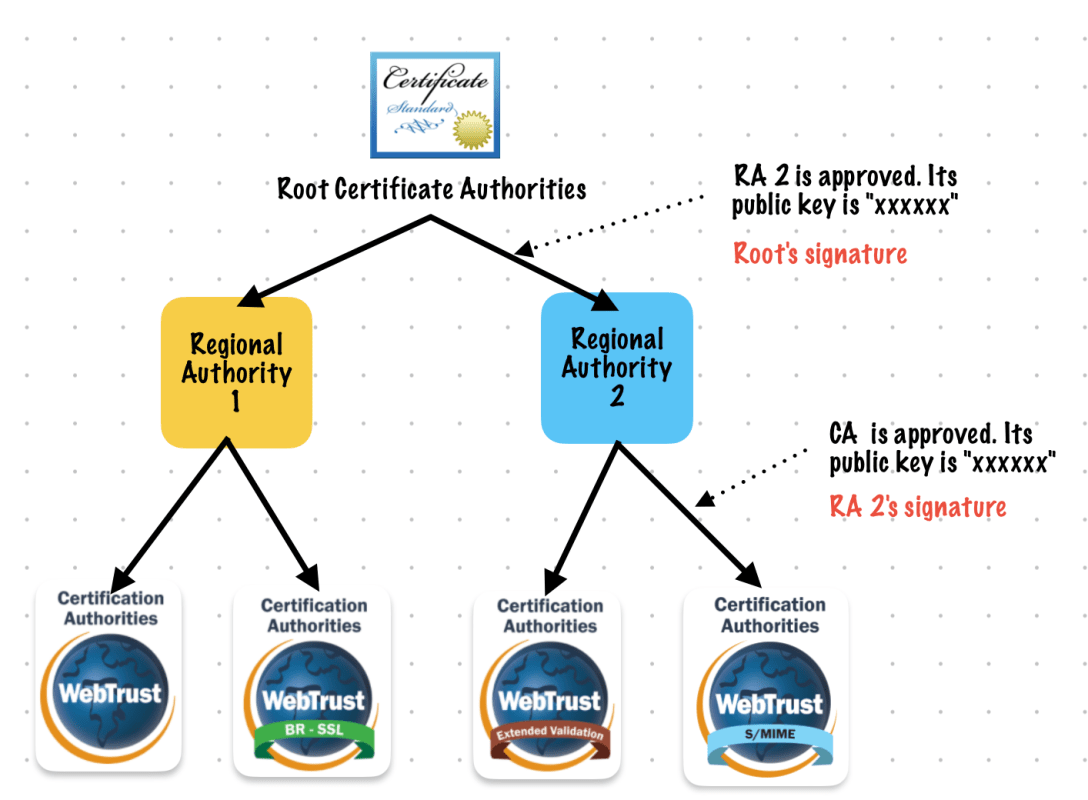
Certificate Chain
Provisioning
development provisioning profile
A development provisioning profile allows your app to launch on devices and use certain app services during development. For an individual, a development provisioning profile allows apps signed by you to run on your registered devices. For an organization, a development provisioning profile allows apps developed by a team to be signed by any member of the team and installed on their devices.
The development provisioning profile contains:
- A wildcard App ID that matches all your team’s apps or an explicit App ID that matches a single app
- Specified devices associated with the team
- Specified development certificates associated with the team
distribution provisioning profile
A distribution provisioning profile is a provisioning profile that authorizes your app to use certain app services and ensures that you are a known developer distributing or uploading your app. A distribution provisioning profile contains a single App ID that matches one or more of your apps and a distribution certificate. You configure the App ID indirectly through Xcode to use certain app services. Xcode enables and configures app services by setting entitlements and performing other configuration steps. Some entitlements are enabled for an App ID (stored in your developer account) and others are set in the Xcode project. When you export or upload your app, Xcode signs the app bundle with the distribution certificate referenced in the distribution provisioning profile.
https://developer.apple.com/help/account/manage-profiles/edit-download-or-delete-profiles/
Code Signing
Code signing is a macOS security technology that you use to certify that an app was created by you. Once an app is signed, the system can detect any change to the app—whether the change is introduced accidentally or by malicious code.
You participate in code signing as a developer when you obtain a signing identity and apply your signature to apps that you ship. A certificate authority (often Apple) vouches for your signing identity.
Note: In most cases, you can rely on Xcode’s automatic code signing, which requires only that you specify a code signing identity in the build settings for your project. This document is for readers who must go beyond automatic code signing—perhaps to troubleshoot an unusual problem, or to incorporate the
codesign(1)tool into a build system.Benefits of Code Signing
After installing a new version of a code-signed app, a user is not bothered with alerts asking again for permission to access the keychain or similar resources. As long as the new version uses the same digital signature, macOS can treat the new app exactly as it treated the previous one.
Other macOS security features, such as App Sandbox and parental controls, also depend on code signing. Specifically, code signing allows the operating system to:
- Ensure that a piece of code has not been altered since it was signed. The system can detect even the smallest change, whether it was intentional (by a malicious attacker, for example) or accidental (as when a file gets corrupted). When a code signature is intact, the system can be sure the code is as the signer intended.
- Identify code as coming from a specific source (a developer or signer). The code signature includes cryptographic information that unambiguously points to a particular author.
- Determine whether code is trustworthy for a specific purpose. Among other things, a developer can use a code signature to state that an updated version of an app should be considered by the system to be the same app as the previous version.
Limitations of Code Signing
Code signing is one component of a complete security solution, working in concert with other technologies and techniques. It does not address every possible security issue. For example, code signing does not:
- Guarantee that a piece of code is free of security vulnerabilities.
- Guarantee that an app will not load unsafe or altered code—such as untrusted plug-ins—during execution.
- Provide digital rights management (DRM) or copy protection technology. Code signing does not in any way hide or obscure the content of the signed code.
See Also
Read Security Overview to understand the place of code signing in the macOS security picture.
For descriptions of the command-line tools for performing code signing, see the codesign and csreq man pages.

App Transport Security
On Apple platforms, a networking security feature called App Transport Security (ATS) improves privacy and data integrity for all apps and app extensions. It does this by requiring that network connections made by your app are secured by the Transport Layer Security (TLS) protocol using reliable certificates and ciphers. ATS blocks connections that don’t meet minimum security requirements.
https://developer.apple.com/documentation/security/preventing-insecure-network-connections
SSL(Secure Socket Layer)/TLS handshake

Apple CryptoKit
Use Apple CryptoKit to perform common cryptographic operations:
- Compute and compare cryptographically secure digests.
- Use public-key cryptography to create and evaluate digital signatures, and to perform key exchange. In addition to working with keys stored in memory, you can also use private keys stored in and managed by the Secure Enclave.
- Generate symmetric keys, and use them in operations like message authentication and encryption.
Prefer CryptoKit over lower-level interfaces. CryptoKit frees your app from managing raw pointers, and automatically handles tasks that make your app more secure, like overwriting sensitive data during memory deallocation.
Symmetric Key
- DES (Data Decryption Standard)
- AES (Advanced Encryption Standard)
Public Key
- RSA
 Shawn
Shawn 
Leave a comment